Find domain users allowed to reset other user’s password
A question haunted me for a while and I wanted to have an answer to : "How can I determine if an arbitrary user has the right to reset someone else password ?".
Initial research
Firstly, I tracked the kinds of rights available for an Active Directory object. I checked it for a user.
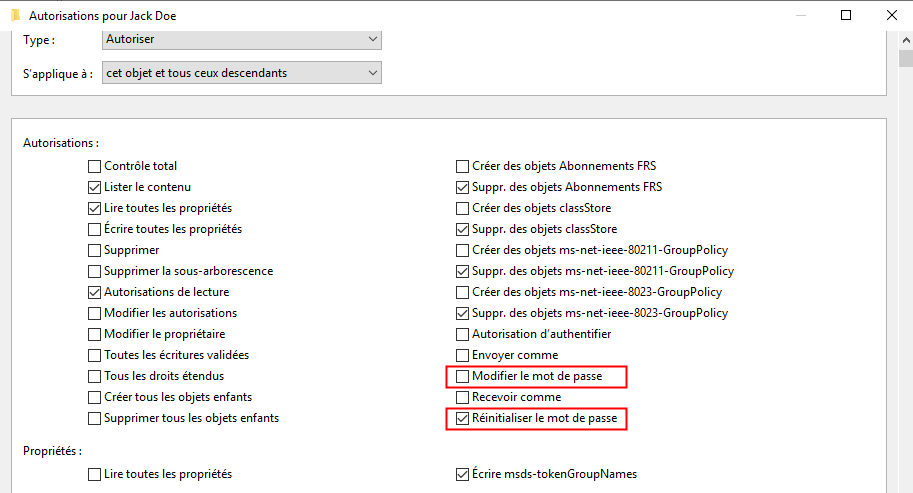
I decided to focus on the ’Reset Password’ right.
Why the "Reset Password" right and not ’Change Password’ ?
With the Change Password right, it is possible to change a user’s password but the current password will be needed. With the ’Reset Password’ right, it is possible to reset the password without knowing the current one.
Another interesting right that would allow a user to reset someone else password is the Generic All right.
After few research, the GUID related to the right Reset Password was found to be : 00299570-246d-11d0-a768-00aa006e0529. The GUID related to the Generic All right was found to be : 00000000-0000-0000-0000-000000000000.
Query ACL objects
In order to query domain object for related ACL, the domain needs to be mounted as a drive. In fact, users are objects that acts like a file and have ACL.
The AD was mounted like so :
# Mount the AD as drive in order to get ACL on its objects
Write-Output "[+] Mount AD drive"
New-PSDrive -Name AD -PSProvider ActiveDirectory -Root "//RootDSE/" -Server $Server | Out-Null
ACL can then be queried like so :
Get-Acl "AD:\CN=TEST,OU=Users,DC=Lab,DC=LOCAL"Query users and groups membership
User objects and related information can be retrieved like so :
Get-ADUser -Server $Server -Identity $UserGroup where the user belongs to also need to be retrieved. It can be done like so :
(Get-ADUser -Server $Server -Identity $User -Properties MemberOf).MemberOfOften groups belong to another group and so on. So it is interesting to recursively get all the groups where a group belongs to.
function Get-ADAllUserGroupMembership {
    <#
    .SYNOPSIS
    Recursively retrieve all the groups where a specified group belongs to.

    .EXAMPLE
    PS> Get-ADAllUserGroupMembership -Server 10.10.10.10 -GroupName custom_admin

    .PARAMETER Server
    Domain Controller where to run commands.

    .PARAMETER GroupName
    Group where the function will dig.

    #>

    [CmdletBinding()]
    param(
        [parameter(mandatory=$True)]
        [ValidateNotNullOrEmpty()]
        [string]$Server,
        [parameter(mandatory=$True)]
        [ValidateNotNullOrEmpty()]
        [string]$GroupName
    )

    $GroupMembership = @()

    $GroupObject = Get-ADGroup -Server $Server -Identity $GroupName -Properties MemberOf,objectSid

    [array]$GroupMembership += $GroupObject

    $GroupMemberObject = ($GroupObject).MemberOf

    if($GroupMemberObject.count -eq 0) {
        return $GroupMembership
    }

    foreach ($grp in $GroupMemberObject) {
        [array]$GroupMembership += Get-ADAllUserGroupMembership -Server $Server -GroupName $grp
    }

    return $GroupMembership | Sort-Object -Unique
}
Script
I compiled all this information to create a script that will find all the users where a specific user has the right to reset their password. I added multiple options to put multiple file as input. The script is also working on a non-domain joined machines.
function Get-ADAllUserGroupMembership {
    <#
    .SYNOPSIS
    Recursively retrieve all the groups where a specified group belongs to.

    .EXAMPLE
    PS> Get-ADAllUserGroupMembership -Server 10.10.10.10 -GroupName custom_admin

    .PARAMETER Server
    Domain Controller where to run commands.

    .PARAMETER GroupName
    Group where the function will dig.

    #>

    [CmdletBinding()]
    param(
        [parameter(mandatory=$True)]
        [ValidateNotNullOrEmpty()]
        [string]$Server,
        [parameter(mandatory=$True)]
        [ValidateNotNullOrEmpty()]
        [string]$GroupName
    )

    $GroupMembership = @()

    $GroupObject = Get-ADGroup -Server $Server -Identity $GroupName -Properties MemberOf,objectSid

    [array]$GroupMembership += $GroupObject

    $GroupMemberObject = ($GroupObject).MemberOf

    if($GroupMemberObject.count -eq 0) {
        return $GroupMembership
    }

    foreach ($grp in $GroupMemberObject) {
        [array]$GroupMembership += Get-ADAllUserGroupMembership -Server $Server -GroupName $grp
    }

    return $GroupMembership | Sort-Object -Unique
}

function Invoke-CheckResetUserPasswordRight {
    <#
    .SYNOPSIS
    Retrieve the users that the specified users are able to reset the password.

    .EXAMPLE
    PS> Invoke-CheckResetUserPasswordRight -Server 10.10.10.10 -Users User1
    PS> Invoke-CheckResetUserPasswordRight -Server 10.10.10.10 -Users User1 -Filter 'enabled -eq $true'
    PS> Invoke-CheckResetUserPasswordRight -Server 10.10.10.10 -Users User1 -Filter "Name -like '*user*'"
    PS> Invoke-CheckResetUserPasswordRight -Server 10.10.10.10 -Users User1,User2 -SearchBase "OU=Admins,DC=lab,DC=local"
    PS> Invoke-CheckResetUserPasswordRight -Server 10.10.10.10 -Users User1,User2,User3 -NoGroupCheck -OnlyResult

    .PARAMETER Server
    Domain Controller where to run commands.

    .PARAMETER Users
    List of users to check.

    .PARAMETER Filter
    Filter applied to the Get-AdUser function.

    .PARAMETER Filter
    Apply a search base to the function Get-AdUser.

    .PARAMETER OnlyResults
    Display only the samAccountName of users were specified users can reset the password.

    .PARAMETER OnlyResults
    Search only direct right to reset password and do not include groups of the user.

    #>

    [CmdletBinding()]
    [OutputType([hashtable])]
    param(
        [parameter(mandatory=$True)]
        [ValidateNotNullOrEmpty()]
        [string]$Server,
        [parameter(mandatory=$True)]
        [ValidateNotNullOrEmpty()]
        [array]$Users,
        [parameter(mandatory=$False)]
        [string]$Filter = "*",
        [parameter(mandatory=$False)]
        [ValidateNotNullOrEmpty()]
        [string]$SearchBase = "",
        [switch]$OnlyResults,
        [switch]$NoGroupCheck
    )

    try {
    Import-Module ActiveDirectory
    }
    catch {
    Write-Host "[!] Please install the ActiveDirectory module"
    return
    }

    $ResultRestPasswordRight = @()
    $objects = @()

    # Default values for ObjectType GUID - CN=User-Force-Change-Password,CN=Extended-Rights,CN=Configuration,DC=lab,DC=local
    $RestPasswordRight = "00299570-246d-11d0-a768-00aa006e0529"
    #$ChangePasswordRight = "ab721a53-1e2f-11d0-9819-00aa0040529b"
    $GenericAllRight = "00000000-0000-0000-0000-000000000000"


    # Mount the AD as drive in order to get ACL on its objects
    Write-Output "[+] Mount AD drive"
    New-PSDrive -Name AD -PSProvider ActiveDirectory -Root "//RootDSE/" -Server $Server | Out-Null

    # Get user information
    foreach ($User in $Users) {
        Echo "[+] Get User informations for $User"
        $userInfo = Get-ADUser -Server $Server -Identity $User -Properties MemberOf
        if ($userInfo -eq $null) {
            return
        }

        [array]$objects += $userInfo

        $userGroups = ($userInfo).MemberOf

        if ($NoGroupCheck.IsPresent -eq $True) {
            break
        }

        Write-Output "[+] Get groups for $User"
        ($userGroups) | ForEach-Object {
                [array]$objects += Get-ADAllUserGroupMembership -Server $Server -GroupName $_
        }

        if ($userGroups.count -ge 1) {
            Write-Output "[+] $User belongs to :"
            ($objects[1..($objects.Length-1)]) | ForEach-Object {
                Write-Output "   - [$($_.objectSid)] $($_.samAccountName)"
            }
         } else {
            Write-Output "    [+] $User does not belong to any group."
         }

        $objects = ($objects | Sort-Object -Unique)
    }

    Write-Output "[+] Get all users"
    if ($SearchBase -ne "") {
        $allUsers = Get-ADUser -Server $Server -Filter $Filter -SearchBase $SearchBase
    } else {
        $allUsers = Get-ADUser -Server $Server -Filter $Filter
    }

    Write-Output "[+] Run search on $($allUsers.count) users at $(Get-Date)"
    ($allUsers) | ForEach-Object {
        $targetUser = $_
        # Get ACL to reset password right

        try {
            $aclResetPassword = ((Get-Acl "AD:\$($targetUser.DistinguishedName)" | Select-object Access).access| Where-Object {$_.ObjectType -eq $RestPasswordRight -or $_.InheritedObjectType -eq $ResetPasswordRight -or $_.ObjectType -eq $GenericAllRight})
        }
        catch { }
        ($objects) | ForEach-Object {
            $object = $_
            $acl = $aclResetPassword | Where-Object {$_.IdentityReference -like "*$($object.SamAccountName)" -or $_.IdentityReference -eq $object.SID}
            if ($acl -ne $null) {
                $properties = @{
                    From = $object.samAccountName
                    PasswordResetRight = $true
                    User = $targetUser.samAccountName
                    UserIsEnabled = $targetUser.Enabled
                }
                $obj = New-Object -TypeName psobject -Property $properties
                $ResultRestPasswordRight += $obj
            }
        }
    }

    Write-Output "[+] Finished search on $($allUsers.count) users at $(Get-Date)"

    if ($OnlyResults -eq $True) {
        return ($ResultRestPasswordRight).User | Sort-Object -Unique
    }

    if ($ResultRestPasswordRight.Length -ge 1) {
        Write-Output "’r’n[+] CMD : Set-ADAccountPassword -Server $($Server) -identity User -Reset -NewPassword (ConvertTo-SecureString -AsPlainText 'Password' -Force)"
    }
    return $ResultRestPasswordRight
}
Examples
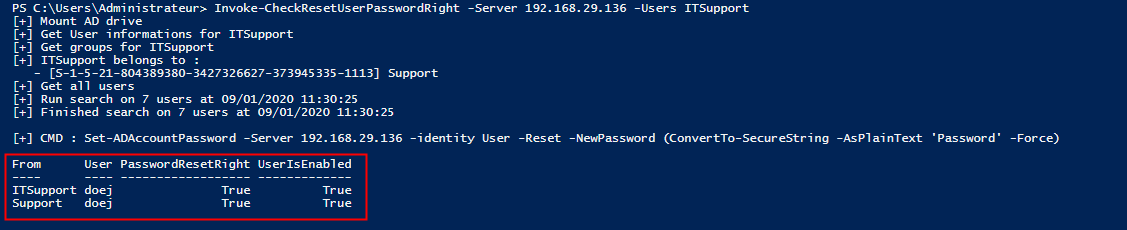
Considering an ’ITSupport’ user that has the right to reset the password of the user ’John Doe’.
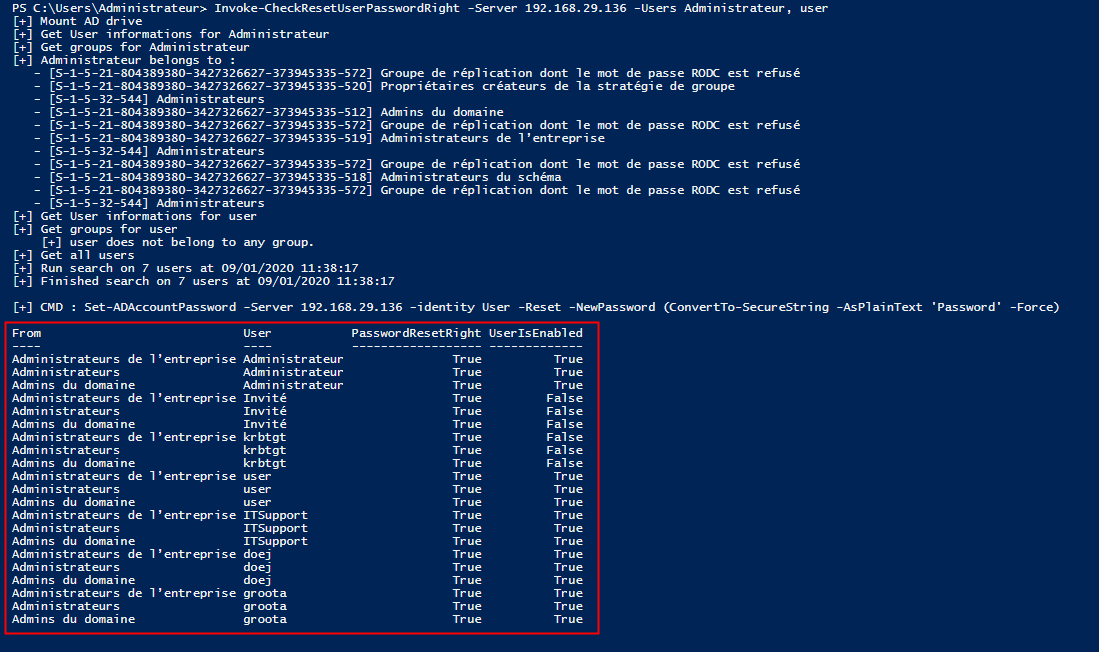
The function accepts multiple users as input. A test can be run with the user ’Administrator.
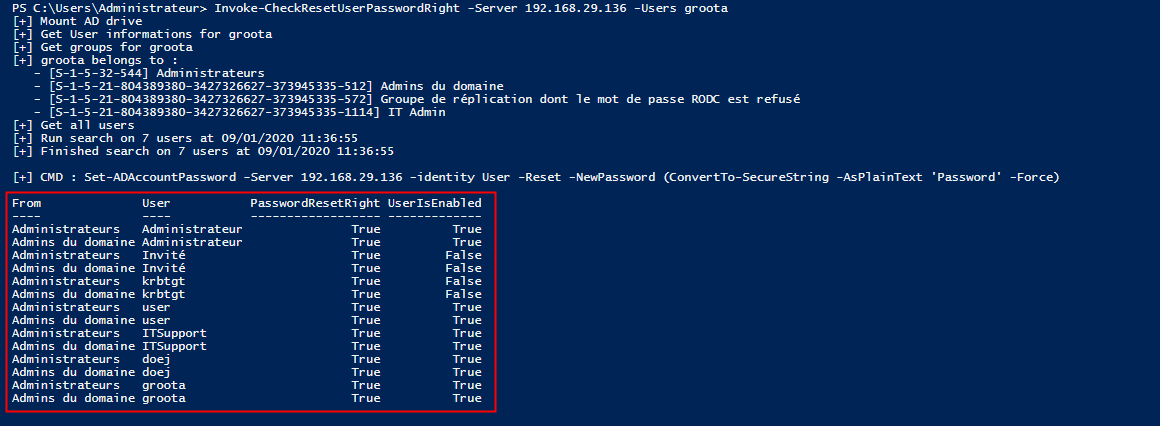
Another situation is when a user belongs to group that belongs itself to another group. Let’s take the user ’Arnold Groot’ which belongs to the group ’IT Admin’. The group ’IT Admin’ belongs to the group ’Domain Admins’.